



Seems as though shadncn Command's Type is broken on React 19. The question being is it a React 19 problem, a cmdk problem, or a radix-ui problem? Typescript wrote me an essay that I can't decipher

December 8, 2024 at 7:42 PM
Seems as though shadncn Command's Type is broken on React 19. The question being is it a React 19 problem, a cmdk problem, or a radix-ui problem? Typescript wrote me an essay that I can't decipher

Or just pass Promise<ReactNode> as children 😅
Did you know you can pass a promise to children? So you don't need to split into components just to get a loading boundary, just do
<Suspense>
{promise.then(data => <whatever data={data} />)}
</Suspense>
<Suspense>
{promise.then(data => <whatever data={data} />)}
</Suspense>
July 31, 2025 at 12:41 PM
Or just pass Promise<ReactNode> as children 😅

reactでReactNode使えばのサーバーコンポーネントをクライアントコンポーネントの入れ子関係反転させれるやんとか思ってたけど、それだとhtmlとハイドレーション用のhtmlが二重に飛ぶことに気づいてしまった……
November 28, 2025 at 9:06 AM
reactでReactNode使えばのサーバーコンポーネントをクライアントコンポーネントの入れ子関係反転させれるやんとか思ってたけど、それだとhtmlとハイドレーション用のhtmlが二重に飛ぶことに気づいてしまった……

If you want to be sure that your component only have one child, you can use the React.Children.only method on the specific ReactNode component.
It can be another safeguard for your design system components.
#techtweets #day18
It can be another safeguard for your design system components.
#techtweets #day18

April 29, 2025 at 6:14 PM
If you want to be sure that your component only have one child, you can use the React.Children.only method on the specific ReactNode component.
It can be another safeguard for your design system components.
#techtweets #day18
It can be another safeguard for your design system components.
#techtweets #day18

https://qiita.com/honey32/items/4d04e454550fb1ed922c
ReactにおけるContextの使用前に、コンポジション(ReactNode型のProps)を使う方法を紹介する記事です。
Propsのバケツリレーを解消し、コードの可読性と保守性を向上させるための実践的なテクニックが解説されています。
ReactNode型のPropsを用いたコンポジションパターンと、childrenプロパティの活用方法について具体例と共に説明しています。
ReactにおけるContextの使用前に、コンポジション(ReactNode型のProps)を使う方法を紹介する記事です。
Propsのバケツリレーを解消し、コードの可読性と保守性を向上させるための実践的なテクニックが解説されています。
ReactNode型のPropsを用いたコンポジションパターンと、childrenプロパティの活用方法について具体例と共に説明しています。

【React】Context を使う前に #2 コンポジション (ReactNode 型の Props) を使え - Qiita
Props のバケツリレー (Props Drilling) を解決するときに、安易に Context を使ったり、状態管理ライブラリ(Recoil, Jotai, Redux)に頼っていませんか?そんなことをせずとも、「CompA が CompB を使い、CompB が CompC を使い、 CompC が ...」とい…
qiita.com
February 3, 2025 at 1:15 AM
https://qiita.com/honey32/items/4d04e454550fb1ed922c
ReactにおけるContextの使用前に、コンポジション(ReactNode型のProps)を使う方法を紹介する記事です。
Propsのバケツリレーを解消し、コードの可読性と保守性を向上させるための実践的なテクニックが解説されています。
ReactNode型のPropsを用いたコンポジションパターンと、childrenプロパティの活用方法について具体例と共に説明しています。
ReactにおけるContextの使用前に、コンポジション(ReactNode型のProps)を使う方法を紹介する記事です。
Propsのバケツリレーを解消し、コードの可読性と保守性を向上させるための実践的なテクニックが解説されています。
ReactNode型のPropsを用いたコンポジションパターンと、childrenプロパティの活用方法について具体例と共に説明しています。

Set user state at the Redux level
For the most part the variables passed from a controller are cached globally.
But some data is specific to the user: user name and avatar for nav, your status for books, etc.
We load that into Redux, making it available on the first load (SSR).
For the most part the variables passed from a controller are cached globally.
But some data is specific to the user: user name and avatar for nav, your status for books, etc.
We load that into Redux, making it available on the first load (SSR).

November 14, 2024 at 4:43 PM
Set user state at the Redux level
For the most part the variables passed from a controller are cached globally.
But some data is specific to the user: user name and avatar for nav, your status for books, etc.
We load that into Redux, making it available on the first load (SSR).
For the most part the variables passed from a controller are cached globally.
But some data is specific to the user: user name and avatar for nav, your status for books, etc.
We load that into Redux, making it available on the first load (SSR).

But wait, don't plain words use fewer tokens? How about this instead of TSX 😂
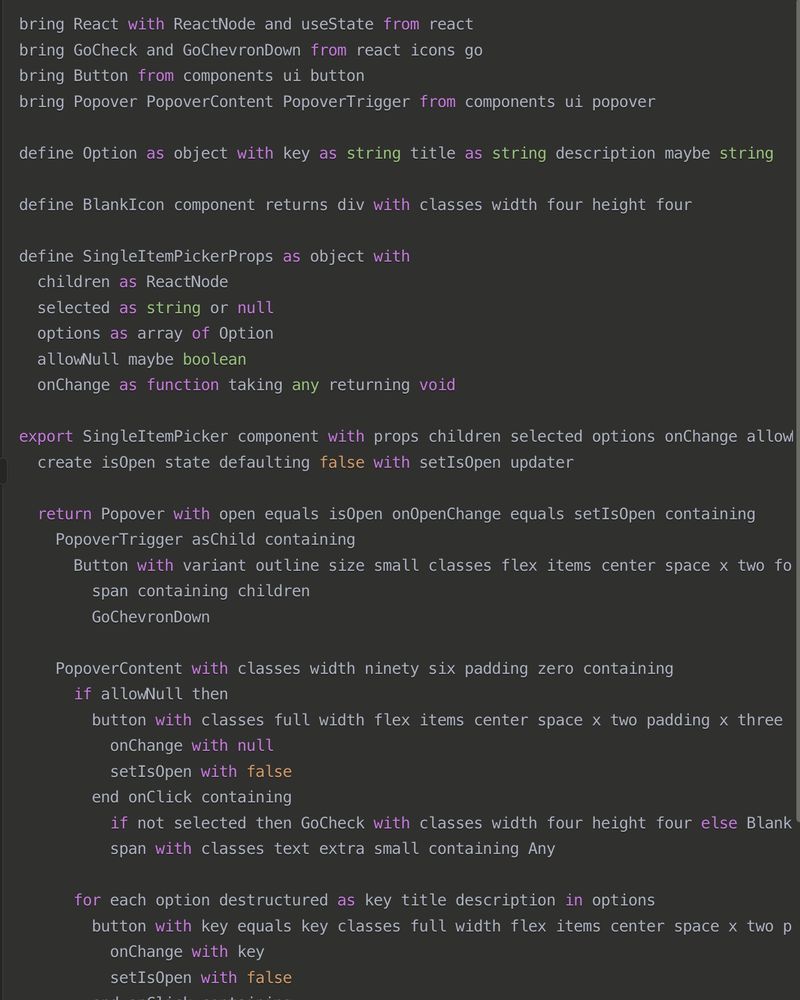
June 20, 2025 at 9:34 PM
But wait, don't plain words use fewer tokens? How about this instead of TSX 😂

<a href="https://zenn.dev/ygkn/articles/optional-react-node-prop" class="hover:underline text-blue-600 dark:text-sky-400 no-card-link" target="_blank" rel="noopener" data-link="bsky">zenn.dev/ygkn/artic...
ReactNode型のpropを正しく扱う 〜もう謎の「0」や空要素を見せないために〜
ReactNode型のpropを正しく扱う 〜もう謎の「0」や空要素を見せないために〜

ReactNode型のpropを正しく扱う 〜もう謎の「0」や空要素を見せないために〜
この記事は 株式会社ゆめみ Advent Calendar 2023 2日目の記事です。 背景 普段Reactで開発していると、非表示にできる ReactNode 型のprop(以下オプショナルな ReactNode prop)を定義することがあります。 例1: Button コンポーネント Button…
zenn.dev
December 3, 2023 at 4:46 AM
<a href="https://zenn.dev/ygkn/articles/optional-react-node-prop" class="hover:underline text-blue-600 dark:text-sky-400 no-card-link" target="_blank" rel="noopener" data-link="bsky">zenn.dev/ygkn/artic...
ReactNode型のpropを正しく扱う 〜もう謎の「0」や空要素を見せないために〜
ReactNode型のpropを正しく扱う 〜もう謎の「0」や空要素を見せないために〜

Every time I hit
`Element' is not assignable to type '() => ReactNode'.`
I think about that dude who told me TypeScript is never wrong and if I think it is it's a skill issue.
`Element' is not assignable to type '() => ReactNode'.`
I think about that dude who told me TypeScript is never wrong and if I think it is it's a skill issue.
December 10, 2024 at 4:37 PM
Every time I hit
`Element' is not assignable to type '() => ReactNode'.`
I think about that dude who told me TypeScript is never wrong and if I think it is it's a skill issue.
`Element' is not assignable to type '() => ReactNode'.`
I think about that dude who told me TypeScript is never wrong and if I think it is it's a skill issue.

【React】Context を使う前に #2 コンポジション (ReactNode 型の Props) を使え - Qiita
https://qiita.com/honey32/items/4d04e454550fb1ed922c
https://qiita.com/honey32/items/4d04e454550fb1ed922c

【React】Context を使う前に #2 コンポジション (ReactNode 型の Props) を使え - Qiita
Props のバケツリレー (Props Drilling) を解決するときに、安易に Context を使ったり、状態管理ライブラリ(Recoil, Jotai, Redux)に頼っていませんか?そんなことをせずとも、「CompA が CompB を使い、CompB が CompC を使い、 CompC が ...」とい…
qiita.com
February 2, 2025 at 1:03 PM
【React】Context を使う前に #2 コンポジション (ReactNode 型の Props) を使え - Qiita
https://qiita.com/honey32/items/4d04e454550fb1ed922c
https://qiita.com/honey32/items/4d04e454550fb1ed922c

Learn modern best practices for typing React children in TypeScript, including ReactNode, PropsWithChildren, ComponentProps, and why React.FC is no longer recommended.

How to type React children correctly in TypeScript - LogRocket Blog
Learn best practices for typing React children in TypeScript, including ReactNode, PropsWithChildren, ComponentProps, and why React.FC is no longer recommended.
blog.logrocket.com
December 21, 2025 at 2:12 PM
Learn modern best practices for typing React children in TypeScript, including ReactNode, PropsWithChildren, ComponentProps, and why React.FC is no longer recommended.

ReactNode as the type of the fist param? Interesting.
May 7, 2023 at 1:20 AM
ReactNode as the type of the fist param? Interesting.

Understanding Composition in React with ReactNode Props
Imagine you’re diving into React and facing a daunting challenge calle...
https://breaking.dog/2320c69c85ab4b5d9cdd20ec0c290604?lang=en
Imagine you’re diving into React and facing a daunting challenge calle...
https://breaking.dog/2320c69c85ab4b5d9cdd20ec0c290604?lang=en

February 2, 2025 at 1:30 PM
Understanding Composition in React with ReactNode Props
Imagine you’re diving into React and facing a daunting challenge calle...
https://breaking.dog/2320c69c85ab4b5d9cdd20ec0c290604?lang=en
Imagine you’re diving into React and facing a daunting challenge calle...
https://breaking.dog/2320c69c85ab4b5d9cdd20ec0c290604?lang=en

見てる: "ReactNode型のpropを正しく扱う 〜もう謎の「0」や空要素を見せないために〜" https://zenn.dev/ygkn/articles/optional-react-node-prop
December 3, 2023 at 2:32 AM
見てる: "ReactNode型のpropを正しく扱う 〜もう謎の「0」や空要素を見せないために〜" https://zenn.dev/ygkn/articles/optional-react-node-prop
見てる: "【React】Context を使う前に #2 コンポジション (ReactNode 型の Props) を使え #設計 - Qiita" https://qiita.com/honey32/items/4d04e454550fb1ed922c
February 6, 2025 at 4:08 PM
見てる: "【React】Context を使う前に #2 コンポジション (ReactNode 型の Props) を使え #設計 - Qiita" https://qiita.com/honey32/items/4d04e454550fb1ed922c

The React version can be significantly simpler.
export function VisuallyHidden({ className, ...props }: ComponentProps<'span'>): ReactNode {
return <span
className={styles. visuallyHidden + ' ' + className}
{...props}
/>
}
export function VisuallyHidden({ className, ...props }: ComponentProps<'span'>): ReactNode {
return <span
className={styles. visuallyHidden + ' ' + className}
{...props}
/>
}
March 13, 2025 at 12:23 PM
The React version can be significantly simpler.
export function VisuallyHidden({ className, ...props }: ComponentProps<'span'>): ReactNode {
return <span
className={styles. visuallyHidden + ' ' + className}
{...props}
/>
}
export function VisuallyHidden({ className, ...props }: ComponentProps<'span'>): ReactNode {
return <span
className={styles. visuallyHidden + ' ' + className}
{...props}
/>
}

今日のQiitaトレンド
React 19の型定義では「FC」と「ReactNodeを返す関数」が違う
React 19への移行で、`FC`型と`ReactNode`を返す関数の型定義が変更され、互換性が失われる場合がある。
`FC`は`Promise`を返せるようになったが、`ReactNode`を返す関数はそれができないため、render propsパターンなどで型エラーが発生する可能性がある。
これはTypeScriptの制約と、async関数での型指定の分かりやすさの両立のために起きた問題。
React 19の型定義では「FC」と「ReactNodeを返す関数」が違う
React 19への移行で、`FC`型と`ReactNode`を返す関数の型定義が変更され、互換性が失われる場合がある。
`FC`は`Promise
これはTypeScriptの制約と、async関数での型指定の分かりやすさの両立のために起きた問題。

React 19の型定義では「FC」と「ReactNodeを返す関数」が違う #React - Qiita
対象読者: 現在React 18以前を使っていて、React 19にそのうち上げたいと思っている方。React 19の型定義の背景を知りたい方 みなさんこんにちは。筆者は最近気づいたのですが、React 18から19に上げるときに問題になる(型エラーになる)パターンがありま...
qiita.com
February 4, 2026 at 10:39 PM
今日のQiitaトレンド
React 19の型定義では「FC」と「ReactNodeを返す関数」が違う
React 19への移行で、`FC`型と`ReactNode`を返す関数の型定義が変更され、互換性が失われる場合がある。
`FC`は`Promise`を返せるようになったが、`ReactNode`を返す関数はそれができないため、render propsパターンなどで型エラーが発生する可能性がある。
これはTypeScriptの制約と、async関数での型指定の分かりやすさの両立のために起きた問題。
React 19の型定義では「FC」と「ReactNodeを返す関数」が違う
React 19への移行で、`FC`型と`ReactNode`を返す関数の型定義が変更され、互換性が失われる場合がある。
`FC`は`Promise
これはTypeScriptの制約と、async関数での型指定の分かりやすさの両立のために起きた問題。

@react.dev I always giggle when I see this #softwaredevelopment

December 4, 2024 at 9:39 PM
@react.dev I always giggle when I see this #softwaredevelopment

Interesting, will take a look.
Any reason why `Renderable` isn't `ComponentChild | ComponentType<TProps>`? We don't use the `ReactNode` name for obvious reasons, `ComponentChild` should be the replacement tthere.
Any reason why `Renderable` isn't `ComponentChild | ComponentType<TProps>`? We don't use the `ReactNode` name for obvious reasons, `ComponentChild` should be the replacement tthere.
January 5, 2025 at 11:37 PM
Interesting, will take a look.
Any reason why `Renderable` isn't `ComponentChild | ComponentType<TProps>`? We don't use the `ReactNode` name for obvious reasons, `ComponentChild` should be the replacement tthere.
Any reason why `Renderable` isn't `ComponentChild | ComponentType<TProps>`? We don't use the `ReactNode` name for obvious reasons, `ComponentChild` should be the replacement tthere.

TIL `useState<ReactNode>()` is a bad idea.
July 30, 2024 at 8:43 PM
TIL `useState<ReactNode>()` is a bad idea.

요즘 리액트에도 쓰면 해고당하는 API가 있구나

July 25, 2025 at 4:25 PM
요즘 리액트에도 쓰면 해고당하는 API가 있구나

React experts help! Say I have a component that accepts a ReactNode as a prop (not children). Is it valid to use React.Children to get the prop component's children? Use case being setting different layout depending on that component having children or not
November 2, 2024 at 12:09 PM
React experts help! Say I have a component that accepts a ReactNode as a prop (not children). Is it valid to use React.Children to get the prop component's children? Use case being setting different layout depending on that component having children or not

It fits in a tweet.
import { Suspense, use, type ReactNode } from 'react';
/** Access a promise in React without needing to create a separate component */
function Async<T>({
data,
children,
}: {
data: Promise<T>;
children: (val: T) => ReactNode;
}) {
return children(use(data));
}
import { Suspense, use, type ReactNode } from 'react';
/** Access a promise in React without needing to create a separate component */
function Async<T>({
data,
children,
}: {
data: Promise<T>;
children: (val: T) => ReactNode;
}) {
return children(use(data));
}

I created my own that uses use() under the hood.
The lack of <Await> is ridiculous, it forces you to split your JSX into components where you otherwise wouldn’t have, just because of use().
And what do you name these components? You can’t because you didn’t plan them.
The lack of <Await> is ridiculous, it forces you to split your JSX into components where you otherwise wouldn’t have, just because of use().
And what do you name these components? You can’t because you didn’t plan them.

🌶️ take: React Router's should be a @react.dev primitive
July 30, 2025 at 4:19 PM
It fits in a tweet.
import { Suspense, use, type ReactNode } from 'react';
/** Access a promise in React without needing to create a separate component */
function Async<T>({
data,
children,
}: {
data: Promise<T>;
children: (val: T) => ReactNode;
}) {
return children(use(data));
}
import { Suspense, use, type ReactNode } from 'react';
/** Access a promise in React without needing to create a separate component */
function Async<T>({
data,
children,
}: {
data: Promise<T>;
children: (val: T) => ReactNode;
}) {
return children(use(data));
}

interface 会议信息 {
会议密码: string;
}
export interface 会议条款类型 {
会议: 会议信息;
}
export const 会议语境 = createContext(null);
export const 会议条款 = ({ children }: { children: ReactNode }) => {
return <会议语境 value={null}>{children}</会议语境>;
};
会议密码: string;
}
export interface 会议条款类型 {
会议: 会议信息;
}
export const 会议语境 = createContext(null);
export const 会议条款 = ({ children }: { children: ReactNode }) => {
return <会议语境 value={null}>{children}</会议语境>;
};
October 27, 2025 at 5:14 AM
interface 会议信息 {
会议密码: string;
}
export interface 会议条款类型 {
会议: 会议信息;
}
export const 会议语境 = createContext(null);
export const 会议条款 = ({ children }: { children: ReactNode }) => {
return <会议语境 value={null}>{children}</会议语境>;
};
会议密码: string;
}
export interface 会议条款类型 {
会议: 会议信息;
}
export const 会议语境 = createContext(null);
export const 会议条款 = ({ children }: { children: ReactNode }) => {
return <会议语境 value={null}>{children}</会议语境>;
};

A TL;DR comparison of #ReactElement, #ReactNode, & #JSX.Element:
1. ReactElement: an object representing a UI element with these properties:
type: specifies the element type (div, p, span, etc.)
props: the element's attributes and children
key: helps identify an element in an array
1. ReactElement: an object representing a UI element with these properties:
type: specifies the element type (div, p, span, etc.)
props: the element's attributes and children
key: helps identify an element in an array
December 18, 2024 at 9:13 AM
A TL;DR comparison of #ReactElement, #ReactNode, & #JSX.Element:
1. ReactElement: an object representing a UI element with these properties:
type: specifies the element type (div, p, span, etc.)
props: the element's attributes and children
key: helps identify an element in an array
1. ReactElement: an object representing a UI element with these properties:
type: specifies the element type (div, p, span, etc.)
props: the element's attributes and children
key: helps identify an element in an array