




OLantern
@olantern.bsky.social
He/Him
Programmer & Hobby Artist |
Goal: getting into Graphics Engineering |
working on https://github.com/adriankraw/pomoRPG
Programmer & Hobby Artist |
Goal: getting into Graphics Engineering |
working on https://github.com/adriankraw/pomoRPG
During the gamejam, I played around with blender to make a render look more like it was sketched. If you wanna play around with a similar setup, try out Grease Pencil by going to your
Viewport->Add->Grease Pencil->Scene Line Art
You can add modifiers to it and create outlines.
Viewport->Add->Grease Pencil->Scene Line Art
You can add modifiers to it and create outlines.


August 9, 2025 at 8:07 PM
During the gamejam, I played around with blender to make a render look more like it was sketched. If you wanna play around with a similar setup, try out Grease Pencil by going to your
Viewport->Add->Grease Pencil->Scene Line Art
You can add modifiers to it and create outlines.
Viewport->Add->Grease Pencil->Scene Line Art
You can add modifiers to it and create outlines.
Current state of my project. I'm working on an idea for a small story driven cafe manager game.

July 9, 2025 at 8:48 PM
Current state of my project. I'm working on an idea for a small story driven cafe manager game.
Current Progress of my scene. This is rendered using blender. But I will try my hardest to get something similar out of raylib, so I can use it for a Gamedev-Project I have in mind. Should be possible... hope so.... but it will probably take longer then excepted. 😅

June 12, 2025 at 9:43 PM
Current Progress of my scene. This is rendered using blender. But I will try my hardest to get something similar out of raylib, so I can use it for a Gamedev-Project I have in mind. Should be possible... hope so.... but it will probably take longer then excepted. 😅
Got some very basic PBR rendering working ✅
Shadows and indirect lighting is next
Shadows and indirect lighting is next

June 2, 2025 at 6:04 PM
Got some very basic PBR rendering working ✅
Shadows and indirect lighting is next
Shadows and indirect lighting is next
Using raylib is sooo refreshing. Beeing able to render a sphere and play around with glsl, in just a few minutes, is wonderful.
I hope to get a good enough understanding of raylib and graphics to start creating tools and games on my own.
Unity just doesn't work for me anymore (currently)
I hope to get a good enough understanding of raylib and graphics to start creating tools and games on my own.
Unity just doesn't work for me anymore (currently)

May 30, 2025 at 4:52 PM
Using raylib is sooo refreshing. Beeing able to render a sphere and play around with glsl, in just a few minutes, is wonderful.
I hope to get a good enough understanding of raylib and graphics to start creating tools and games on my own.
Unity just doesn't work for me anymore (currently)
I hope to get a good enough understanding of raylib and graphics to start creating tools and games on my own.
Unity just doesn't work for me anymore (currently)
I have been thinking about my workflow for creating Materials like this one and found a few mistakes I have been doing
* Adaptive Subdivision does not fix everything
* Learn about each Node (The Voronoi position-output IS AWESOME)
* Compositioning Nodetrees are your friends
* 16 sample are enough
* Adaptive Subdivision does not fix everything
* Learn about each Node (The Voronoi position-output IS AWESOME)
* Compositioning Nodetrees are your friends
* 16 sample are enough

January 12, 2025 at 5:47 PM
I have been thinking about my workflow for creating Materials like this one and found a few mistakes I have been doing
* Adaptive Subdivision does not fix everything
* Learn about each Node (The Voronoi position-output IS AWESOME)
* Compositioning Nodetrees are your friends
* 16 sample are enough
* Adaptive Subdivision does not fix everything
* Learn about each Node (The Voronoi position-output IS AWESOME)
* Compositioning Nodetrees are your friends
* 16 sample are enough
This is the "main"-Part of the shader. Creating a spiral and outputting it as a mask + a uv(isch)-Map

December 18, 2024 at 9:49 PM
This is the "main"-Part of the shader. Creating a spiral and outputting it as a mask + a uv(isch)-Map
Even though I wasn't able to recreate the hexcore from arcane I am still happy about the outcome.
I checked out a bunch of tutorials. Creating a spiral and placing it on a sphere was harder then I anticipated.
#Blender
I checked out a bunch of tutorials. Creating a spiral and placing it on a sphere was harder then I anticipated.
#Blender

December 18, 2024 at 9:47 PM
Even though I wasn't able to recreate the hexcore from arcane I am still happy about the outcome.
I checked out a bunch of tutorials. Creating a spiral and placing it on a sphere was harder then I anticipated.
#Blender
I checked out a bunch of tutorials. Creating a spiral and placing it on a sphere was harder then I anticipated.
#Blender
Power of Nature
This is a piece of a world I am currently building. It was the first time I used the compositor inside Blender to edit my render afterwards.
#Blender
This is a piece of a world I am currently building. It was the first time I used the compositor inside Blender to edit my render afterwards.
#Blender

November 28, 2024 at 10:06 AM
Power of Nature
This is a piece of a world I am currently building. It was the first time I used the compositor inside Blender to edit my render afterwards.
#Blender
This is a piece of a world I am currently building. It was the first time I used the compositor inside Blender to edit my render afterwards.
#Blender
Current state of my little side project. I've been playing around with environments while learning about material design. I still don't know how to create a real point of interest. I wanna lure the eye of the viewer to a specific point.
#Blender
#Blender

November 24, 2024 at 8:53 PM
Current state of my little side project. I've been playing around with environments while learning about material design. I still don't know how to create a real point of interest. I wanna lure the eye of the viewer to a specific point.
#Blender
#Blender
Currently working on an idle game you can play while work. It's probably more of an productivity app then an actual game, but yeaaa.....
Instead of clicking or pressing a button you are supposed to do something. What ever you want. Earn exp, find loot, and customise your players behaviour.
#Gamedev
Instead of clicking or pressing a button you are supposed to do something. What ever you want. Earn exp, find loot, and customise your players behaviour.
#Gamedev

November 17, 2024 at 7:44 PM
Currently working on an idle game you can play while work. It's probably more of an productivity app then an actual game, but yeaaa.....
Instead of clicking or pressing a button you are supposed to do something. What ever you want. Earn exp, find loot, and customise your players behaviour.
#Gamedev
Instead of clicking or pressing a button you are supposed to do something. What ever you want. Earn exp, find loot, and customise your players behaviour.
#Gamedev
if you want to use this information inside of a material/shader. Just add an Attribute Node, inside of you information.

November 16, 2024 at 12:30 PM
if you want to use this information inside of a material/shader. Just add an Attribute Node, inside of you information.
Just here to share a cool thing I do when scattering grass/Flowers.
You can save custom information inside of attributes when using Geometry-Nodes.
This little setup checks (dot product + greater than) whether the normal of a vector is pointing up.
#Blender
You can save custom information inside of attributes when using Geometry-Nodes.
This little setup checks (dot product + greater than) whether the normal of a vector is pointing up.
#Blender


November 16, 2024 at 12:29 PM
Just here to share a cool thing I do when scattering grass/Flowers.
You can save custom information inside of attributes when using Geometry-Nodes.
This little setup checks (dot product + greater than) whether the normal of a vector is pointing up.
#Blender
You can save custom information inside of attributes when using Geometry-Nodes.
This little setup checks (dot product + greater than) whether the normal of a vector is pointing up.
#Blender
This is cool material I've been working on for some time now.
I've added the most important parts of the material as a screenshot. Use it to your liking.
ps: Made using Blender
pps: I LOVE adaptive subdivision. Makes playing around with Displacement way easier.
I've added the most important parts of the material as a screenshot. Use it to your liking.
ps: Made using Blender
pps: I LOVE adaptive subdivision. Makes playing around with Displacement way easier.


October 27, 2024 at 11:54 AM
This is cool material I've been working on for some time now.
I've added the most important parts of the material as a screenshot. Use it to your liking.
ps: Made using Blender
pps: I LOVE adaptive subdivision. Makes playing around with Displacement way easier.
I've added the most important parts of the material as a screenshot. Use it to your liking.
ps: Made using Blender
pps: I LOVE adaptive subdivision. Makes playing around with Displacement way easier.
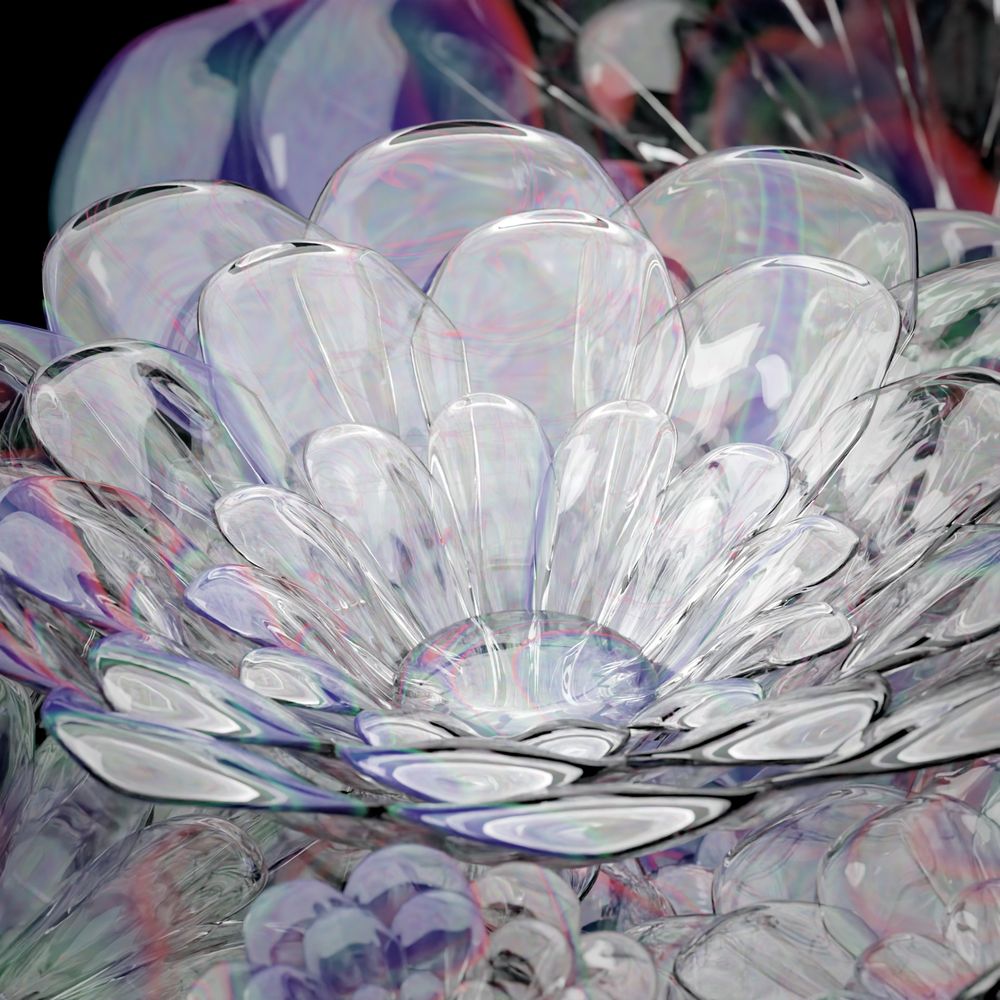
Glass Flower:
Simple and easy setup.
Made with Blender
Simple and easy setup.
Made with Blender

October 20, 2024 at 6:38 PM
Glass Flower:
Simple and easy setup.
Made with Blender
Simple and easy setup.
Made with Blender
Why is it. That I am completely fine with posting Art images online. But every time I need to write an description I'm like:
"I don't know what i'm doing"
"Whats even on the image ?"
"I don't know what i'm doing"
"Whats even on the image ?"

October 19, 2024 at 4:58 PM
Why is it. That I am completely fine with posting Art images online. But every time I need to write an description I'm like:
"I don't know what i'm doing"
"Whats even on the image ?"
"I don't know what i'm doing"
"Whats even on the image ?"

October 19, 2024 at 11:51 AM
Playing around in Blender using adaptive subdivision.

October 19, 2024 at 8:08 AM
Playing around in Blender using adaptive subdivision.


October 13, 2023 at 10:36 AM

October 12, 2023 at 9:33 AM
