



@hildaburke.bsky.social
Reposted

A call-to-action should actually make people want to take action. “Click here” isn’t a CTA—it’s a cry for help. Follow us for more tips and bullshit.
December 12, 2024 at 2:01 PM
A call-to-action should actually make people want to take action. “Click here” isn’t a CTA—it’s a cry for help. Follow us for more tips and bullshit.
She keeps asking me WHY last tax preparer did certain things on the form...I'm like idk lady, you're the one with the computer!!
March 27, 2025 at 10:07 PM
She keeps asking me WHY last tax preparer did certain things on the form...I'm like idk lady, you're the one with the computer!!
There's another tax preparer right next to us and he's so loud I cannot hear anything from her. However the loud guys name is Michael and I could repeat verbatim the tax info of the client he's talking to.
March 27, 2025 at 10:00 PM
There's another tax preparer right next to us and he's so loud I cannot hear anything from her. However the loud guys name is Michael and I could repeat verbatim the tax info of the client he's talking to.
She keeps printing out pages upon pages even though I'm asking her not to...it's for my reference she says I say no thanks, she does it anyway
March 27, 2025 at 9:32 PM
She keeps printing out pages upon pages even though I'm asking her not to...it's for my reference she says I say no thanks, she does it anyway
Getting my taxes done at a major tax chain. The woman helping me is speaking one.word.per.every.five.seconds...just took an edible to get through this.
March 27, 2025 at 9:28 PM
Getting my taxes done at a major tax chain. The woman helping me is speaking one.word.per.every.five.seconds...just took an edible to get through this.
Reposted
Fun fact: Videos under 30 seconds perform best on social media. Unless you’re Martin Scorsese, in which case, go off.
March 12, 2025 at 1:01 PM
Fun fact: Videos under 30 seconds perform best on social media. Unless you’re Martin Scorsese, in which case, go off.
Reposted

Can we just fast-forward to 2028?

January 1, 2025 at 1:58 AM
Can we just fast-forward to 2028?
Reposted

GoodsUniteUs.com is a great quick glance at organizations that made political donations to parties or political persons and PACs. However some organizations lock their information
For more detailed comprehensive information use OpenSecrets.org
Supporting companies is best done using our wallets
For more detailed comprehensive information use OpenSecrets.org
Supporting companies is best done using our wallets


January 1, 2025 at 4:42 AM
GoodsUniteUs.com is a great quick glance at organizations that made political donations to parties or political persons and PACs. However some organizations lock their information
For more detailed comprehensive information use OpenSecrets.org
Supporting companies is best done using our wallets
For more detailed comprehensive information use OpenSecrets.org
Supporting companies is best done using our wallets
Reposted

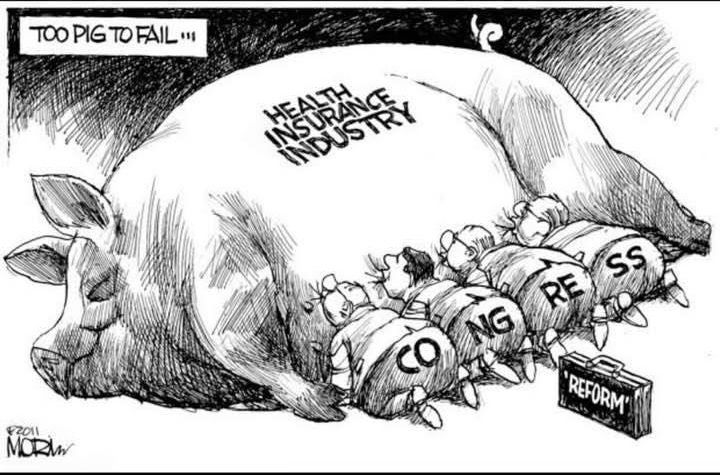
Today's lesson discusses the American health care system for those in countries where their system provides care for free or reasonable fees. 👇

December 7, 2024 at 10:36 AM
Today's lesson discusses the American health care system for those in countries where their system provides care for free or reasonable fees. 👇
Reposted


Reposted

one of the iron laws of music is if a banjo comes out and it's played by somebody who hasn't ever known financial burden you're about to hear some absolute bullshit
December 7, 2024 at 3:46 PM
one of the iron laws of music is if a banjo comes out and it's played by somebody who hasn't ever known financial burden you're about to hear some absolute bullshit
Reposted
There needs to be change.
December 7, 2024 at 5:05 PM
There needs to be change.