




𝙼𝚊𝚢𝚊𝚑𝚂𝚖𝚒𝚕𝚎𝚜ᵀᴹ
@mayahsprime.bsky.social
𝐀 𝐟𝐢𝐫𝐦 𝐛𝐞𝐥𝐢𝐞𝐯𝐞𝐫 || 𝐀 𝐥𝐢𝐛𝐞𝐫𝐚𝐥 || 𝐀 𝐥𝐨𝐯𝐞𝐫...
𝐈 𝐛𝐞𝐥𝐢𝐞𝐯𝐞 𝐢𝐧 𝐦𝐞...
𝐈 𝐝𝐨𝐧’𝐭 𝐬𝐮𝐜𝐜𝐮𝐦𝐛 𝐭𝐨 𝐩𝐞𝐞
𝐈 𝐛𝐞𝐥𝐢𝐞𝐯𝐞 𝐢𝐧 𝐦𝐞...
𝐈 𝐝𝐨𝐧’𝐭 𝐬𝐮𝐜𝐜𝐮𝐦𝐛 𝐭𝐨 𝐩𝐞𝐞
Reposted by 𝙼𝚊𝚢𝚊𝚑𝚂𝚖𝚒𝚕𝚎𝚜ᵀᴹ

Another good update 👍
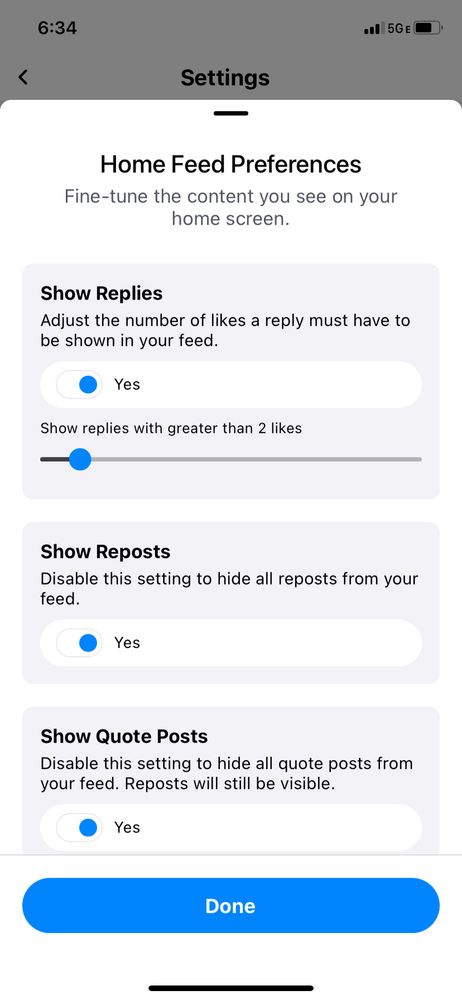
small but useful update in 1.33
in the settings page you can now tune what shows up in your following feed
in the settings page you can now tune what shows up in your following feed

June 17, 2023 at 2:19 AM
Another good update 👍