



crow | クロウ
@clownery-tr.bsky.social
I translate #akuaya stuff, sometimes. Partial repost w/credit OK. Translation is not 100% accurate.
DM for request & corrections.
𝗔𝗞𝗨𝗔𝗬𝗔 𝗧𝗿𝗮𝗻𝘀𝗹𝗮𝘁𝗶𝗼𝗻 𝗠𝗮𝘀𝘁𝗲𝗿𝗹𝗶𝘀𝘁
🔗 bit.ly/AKUAYA_TL
DM for request & corrections.
𝗔𝗞𝗨𝗔𝗬𝗔 𝗧𝗿𝗮𝗻𝘀𝗹𝗮𝘁𝗶𝗼𝗻 𝗠𝗮𝘀𝘁𝗲𝗿𝗹𝗶𝘀𝘁
🔗 bit.ly/AKUAYA_TL

Find me on Akuaya Garden!
「クロウ」
Best way to contact me is actually by commenting on my akuaya garden post... I'm there daily.
「クロウ」
Best way to contact me is actually by commenting on my akuaya garden post... I'm there daily.

March 29, 2025 at 6:52 PM
Find me on Akuaya Garden!
「クロウ」
Best way to contact me is actually by commenting on my akuaya garden post... I'm there daily.
「クロウ」
Best way to contact me is actually by commenting on my akuaya garden post... I'm there daily.
I am speed.
Not fast enough for #1 but really just how fast is #1 ...
Not fast enough for #1 but really just how fast is #1 ...

February 26, 2025 at 3:04 PM
I am speed.
Not fast enough for #1 but really just how fast is #1 ...
Not fast enough for #1 but really just how fast is #1 ...
You
1. Go to menu, and click on invite friends
2. Copy the link
3. Send the link to your friend(s)!
Your friend:
1. Click on the link
2. Follow the registration process
TIPS: you can just use inboxes.com to create temporary emails and register 5 accounts to maximise the reward!
1. Go to menu, and click on invite friends
2. Copy the link
3. Send the link to your friend(s)!
Your friend:
1. Click on the link
2. Follow the registration process
TIPS: you can just use inboxes.com to create temporary emails and register 5 accounts to maximise the reward!

February 8, 2025 at 9:47 AM
You
1. Go to menu, and click on invite friends
2. Copy the link
3. Send the link to your friend(s)!
Your friend:
1. Click on the link
2. Follow the registration process
TIPS: you can just use inboxes.com to create temporary emails and register 5 accounts to maximise the reward!
1. Go to menu, and click on invite friends
2. Copy the link
3. Send the link to your friend(s)!
Your friend:
1. Click on the link
2. Follow the registration process
TIPS: you can just use inboxes.com to create temporary emails and register 5 accounts to maximise the reward!
#AkuayaGarden
GET Akuaya Garden Digital Card by inviting at least 1 friend during campaign period!
Campaign Period:
Feb 7, 18.00 JST ~ Feb 20, 17.59 JST
Extra Reward:
1st friend: 200 coins
2nd: 400 coins
3rd: 400 coins
4th: 600 coins
5th: 600 coins
Check comments for how to guide and tips!
GET Akuaya Garden Digital Card by inviting at least 1 friend during campaign period!
Campaign Period:
Feb 7, 18.00 JST ~ Feb 20, 17.59 JST
Extra Reward:
1st friend: 200 coins
2nd: 400 coins
3rd: 400 coins
4th: 600 coins
5th: 600 coins
Check comments for how to guide and tips!

February 8, 2025 at 9:47 AM
#AkuayaGarden
GET Akuaya Garden Digital Card by inviting at least 1 friend during campaign period!
Campaign Period:
Feb 7, 18.00 JST ~ Feb 20, 17.59 JST
Extra Reward:
1st friend: 200 coins
2nd: 400 coins
3rd: 400 coins
4th: 600 coins
5th: 600 coins
Check comments for how to guide and tips!
GET Akuaya Garden Digital Card by inviting at least 1 friend during campaign period!
Campaign Period:
Feb 7, 18.00 JST ~ Feb 20, 17.59 JST
Extra Reward:
1st friend: 200 coins
2nd: 400 coins
3rd: 400 coins
4th: 600 coins
5th: 600 coins
Check comments for how to guide and tips!

Colchicum digital cards are up!

February 6, 2025 at 10:39 AM
Colchicum digital cards are up!
AKUAYA Garden Event Calendar (February 2025)
1.31 (Fri)
Valentine Hashtag Mission ~2.20 (Thu)
Valentine Goods Gacha ~2.28 (Fri)
[Main Story Archive release every Wednesday)
2.5 (Wed)
Main Story Ch.2
2.6 (Thu)
Digital Card (Valentine) ~2.20 (Thu)
2.10 (Mon)
Claude's Birthday
(cont.)
1.31 (Fri)
Valentine Hashtag Mission ~2.20 (Thu)
Valentine Goods Gacha ~2.28 (Fri)
[Main Story Archive release every Wednesday)
2.5 (Wed)
Main Story Ch.2
2.6 (Thu)
Digital Card (Valentine) ~2.20 (Thu)
2.10 (Mon)
Claude's Birthday
(cont.)

February 3, 2025 at 9:24 AM
AKUAYA Garden Event Calendar (February 2025)
1.31 (Fri)
Valentine Hashtag Mission ~2.20 (Thu)
Valentine Goods Gacha ~2.28 (Fri)
[Main Story Archive release every Wednesday)
2.5 (Wed)
Main Story Ch.2
2.6 (Thu)
Digital Card (Valentine) ~2.20 (Thu)
2.10 (Mon)
Claude's Birthday
(cont.)
1.31 (Fri)
Valentine Hashtag Mission ~2.20 (Thu)
Valentine Goods Gacha ~2.28 (Fri)
[Main Story Archive release every Wednesday)
2.5 (Wed)
Main Story Ch.2
2.6 (Thu)
Digital Card (Valentine) ~2.20 (Thu)
2.10 (Mon)
Claude's Birthday
(cont.)
Message card for Beta version is also available in shop. New card everyday at 10am JST, January 18-20.
If you get the card, you can read a one line message from the description section of your collection.
If you get the card, you can read a one line message from the description section of your collection.

January 18, 2025 at 7:56 PM
Message card for Beta version is also available in shop. New card everyday at 10am JST, January 18-20.
If you get the card, you can read a one line message from the description section of your collection.
If you get the card, you can read a one line message from the description section of your collection.
Kai's Birthday Story chapter 2 & 3 are available from your card's page.

January 18, 2025 at 7:54 PM
Kai's Birthday Story chapter 2 & 3 are available from your card's page.
3.1 Go back to mission, and claim your reward!
3.2 Check your 'My Page' to see to reward!
3.3 Each card has a unique number, information of the owner (your username) and date acquired.
3.2 Check your 'My Page' to see to reward!
3.3 Each card has a unique number, information of the owner (your username) and date acquired.


January 14, 2025 at 3:24 PM
3.1 Go back to mission, and claim your reward!
3.2 Check your 'My Page' to see to reward!
3.3 Each card has a unique number, information of the owner (your username) and date acquired.
3.2 Check your 'My Page' to see to reward!
3.3 Each card has a unique number, information of the owner (your username) and date acquired.
2.1 Click on the make a post button.
2.2 Pick Kai's birthday hashtag (at the very top).
2.3 Write a title and message for Kai. Adding image is optional. Click on post on top right after you are done.
If unsure what to post, I have a template to copy paste in next comment.
2.2 Pick Kai's birthday hashtag (at the very top).
2.3 Write a title and message for Kai. Adding image is optional. Click on post on top right after you are done.
If unsure what to post, I have a template to copy paste in next comment.


January 14, 2025 at 3:24 PM
2.1 Click on the make a post button.
2.2 Pick Kai's birthday hashtag (at the very top).
2.3 Write a title and message for Kai. Adding image is optional. Click on post on top right after you are done.
If unsure what to post, I have a template to copy paste in next comment.
2.2 Pick Kai's birthday hashtag (at the very top).
2.3 Write a title and message for Kai. Adding image is optional. Click on post on top right after you are done.
If unsure what to post, I have a template to copy paste in next comment.
How to complete Kai's Birthday Mission
1. You can find the mission on the mission tab.
1. You can find the mission on the mission tab.

January 14, 2025 at 3:24 PM
How to complete Kai's Birthday Mission
1. You can find the mission on the mission tab.
1. You can find the mission on the mission tab.
2. Kai's Birthday Story
> Chapter 1 released for free in story tab.
> Chapter 2+ will be released at a later date. You need to complete mission to unlock.
3. Birthday goods (physical) available at the store tab.
> Kai's Birthday Set for ¥ 5,500
> Chapter 1 released for free in story tab.
> Chapter 2+ will be released at a later date. You need to complete mission to unlock.
3. Birthday goods (physical) available at the store tab.
> Kai's Birthday Set for ¥ 5,500


January 14, 2025 at 3:24 PM
2. Kai's Birthday Story
> Chapter 1 released for free in story tab.
> Chapter 2+ will be released at a later date. You need to complete mission to unlock.
3. Birthday goods (physical) available at the store tab.
> Kai's Birthday Set for ¥ 5,500
> Chapter 1 released for free in story tab.
> Chapter 2+ will be released at a later date. You need to complete mission to unlock.
3. Birthday goods (physical) available at the store tab.
> Kai's Birthday Set for ¥ 5,500

January 14, 2025 at 3:24 PM
10. Others
Basically, just explore and click around. Other important pages would be:
• Store: Both digital store (web coins, not available yet) and physical (Japanese Yen)
• Story: Story is in video format. Sometimes you need to complete mission and do various things to get it unlocked.
Basically, just explore and click around. Other important pages would be:
• Store: Both digital store (web coins, not available yet) and physical (Japanese Yen)
• Story: Story is in video format. Sometimes you need to complete mission and do various things to get it unlocked.

January 14, 2025 at 2:42 PM
10. Others
Basically, just explore and click around. Other important pages would be:
• Store: Both digital store (web coins, not available yet) and physical (Japanese Yen)
• Story: Story is in video format. Sometimes you need to complete mission and do various things to get it unlocked.
Basically, just explore and click around. Other important pages would be:
• Store: Both digital store (web coins, not available yet) and physical (Japanese Yen)
• Story: Story is in video format. Sometimes you need to complete mission and do various things to get it unlocked.
9. My Page
Basically where you see your profile. Where you can see badges you earned, all items you owned, how many coins you have, posts you made, posts you liked, etc.
Basically where you see your profile. Where you can see badges you earned, all items you owned, how many coins you have, posts you made, posts you liked, etc.

January 14, 2025 at 2:34 PM
9. My Page
Basically where you see your profile. Where you can see badges you earned, all items you owned, how many coins you have, posts you made, posts you liked, etc.
Basically where you see your profile. Where you can see badges you earned, all items you owned, how many coins you have, posts you made, posts you liked, etc.
8. How to do your missions?
Head to 'timeline' on the side bar. The interface should be familiar, very similar to social medias.
Translation in image to help!
Head to 'timeline' on the side bar. The interface should be familiar, very similar to social medias.
Translation in image to help!

January 14, 2025 at 2:11 PM
8. How to do your missions?
Head to 'timeline' on the side bar. The interface should be familiar, very similar to social medias.
Translation in image to help!
Head to 'timeline' on the side bar. The interface should be familiar, very similar to social medias.
Translation in image to help!
7. Beginners Mission
> Like a post for the first time
> Comment on a post for the first time
> Follow someone for the first time
> Write a post for the first time
> Turn on notification
> Like a post for the first time
> Comment on a post for the first time
> Follow someone for the first time
> Write a post for the first time
> Turn on notification
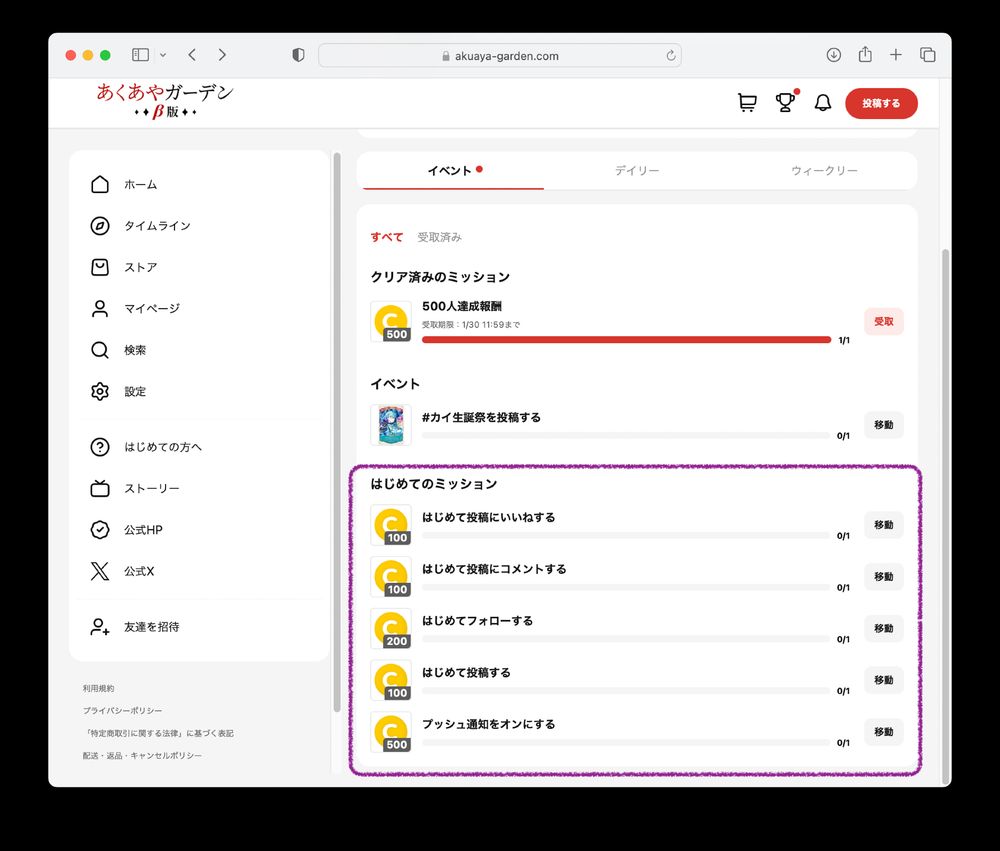
January 14, 2025 at 2:08 PM
7. Beginners Mission
> Like a post for the first time
> Comment on a post for the first time
> Follow someone for the first time
> Write a post for the first time
> Turn on notification
> Like a post for the first time
> Comment on a post for the first time
> Follow someone for the first time
> Write a post for the first time
> Turn on notification
6. Complete missions to get coins. You can use coins to purchase digital things in the store (not available yet).
There are three tabs of missions.
Event, Daily, and Weekly.
6.2 Daily
> Login
> Like one post
6.3 Weekly
> Comment 1 time
> Like 5 posts
> Write 1 post
There are three tabs of missions.
Event, Daily, and Weekly.
6.2 Daily
> Login
> Like one post
6.3 Weekly
> Comment 1 time
> Like 5 posts
> Write 1 post


January 14, 2025 at 2:05 PM
6. Complete missions to get coins. You can use coins to purchase digital things in the store (not available yet).
There are three tabs of missions.
Event, Daily, and Weekly.
6.2 Daily
> Login
> Like one post
6.3 Weekly
> Comment 1 time
> Like 5 posts
> Write 1 post
There are three tabs of missions.
Event, Daily, and Weekly.
6.2 Daily
> Login
> Like one post
6.3 Weekly
> Comment 1 time
> Like 5 posts
> Write 1 post
5. Welcome in! Now that you have an account, we shall discuss missions!
Go to the purple boxed area, to 'VIEW ALL MISSION'.
This pop-up will appear all the time you log-in. Click the very small check box at the bottom to 'stop it from appearing today'.
Go to the purple boxed area, to 'VIEW ALL MISSION'.
This pop-up will appear all the time you log-in. Click the very small check box at the bottom to 'stop it from appearing today'.

January 14, 2025 at 1:56 PM
5. Welcome in! Now that you have an account, we shall discuss missions!
Go to the purple boxed area, to 'VIEW ALL MISSION'.
This pop-up will appear all the time you log-in. Click the very small check box at the bottom to 'stop it from appearing today'.
Go to the purple boxed area, to 'VIEW ALL MISSION'.
This pop-up will appear all the time you log-in. Click the very small check box at the bottom to 'stop it from appearing today'.
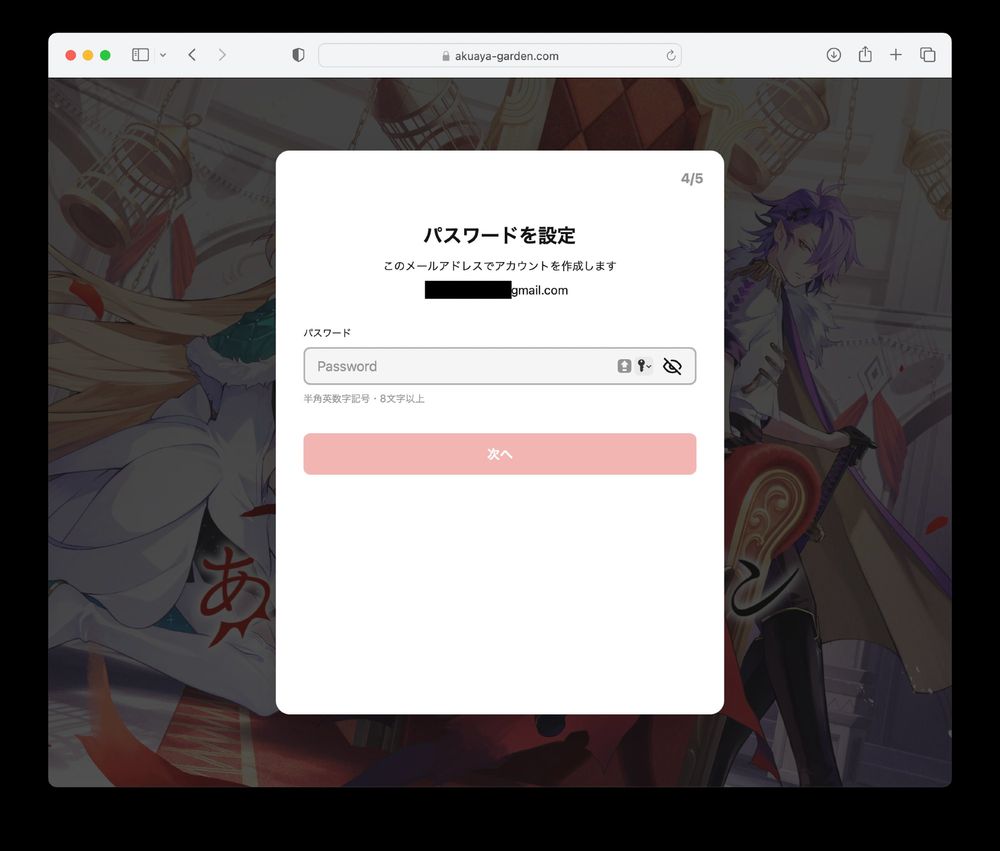
4.1 Create your password, then press red button.
4.2 Add your:
1. Profile picture (optional)
2. Username (also your display name)
3. Bio
4. Birthday
Then press the red button.
4.2 Add your:
1. Profile picture (optional)
2. Username (also your display name)
3. Bio
4. Birthday
Then press the red button.

January 14, 2025 at 1:47 PM
4.1 Create your password, then press red button.
4.2 Add your:
1. Profile picture (optional)
2. Username (also your display name)
3. Bio
4. Birthday
Then press the red button.
4.2 Add your:
1. Profile picture (optional)
2. Username (also your display name)
3. Bio
4. Birthday
Then press the red button.
3.1 Check your e-mail for the OTP code. Make sure to check the spam folder! (mine was there).
3.2 Enter your OTP, the press the red button. If you need to resend the email, press the blue box.
3.2 Enter your OTP, the press the red button. If you need to resend the email, press the blue box.


January 14, 2025 at 1:44 PM
3.1 Check your e-mail for the OTP code. Make sure to check the spam folder! (mine was there).
3.2 Enter your OTP, the press the red button. If you need to resend the email, press the blue box.
3.2 Enter your OTP, the press the red button. If you need to resend the email, press the blue box.
2.1 Press the huge red button
2.2 Enter your email address, then the huge red button.
2.3 Agree to BOTH, then red button. Trick is do not click the checkboxes, click on the text area to toggle the tick.
2.2 Enter your email address, then the huge red button.
2.3 Agree to BOTH, then red button. Trick is do not click the checkboxes, click on the text area to toggle the tick.


January 14, 2025 at 1:40 PM
2.1 Press the huge red button
2.2 Enter your email address, then the huge red button.
2.3 Agree to BOTH, then red button. Trick is do not click the checkboxes, click on the text area to toggle the tick.
2.2 Enter your email address, then the huge red button.
2.3 Agree to BOTH, then red button. Trick is do not click the checkboxes, click on the text area to toggle the tick.
1. Create New Account or Login

January 14, 2025 at 1:34 PM
1. Create New Account or Login