



Carlos Guerra
@cguerra.bsky.social
Tech Advisor on digital security and circumvention | Venezuelan
Just want these to exist outside my phone, amazing concert!
July 13, 2025 at 4:37 PM
Just want these to exist outside my phone, amazing concert!
However, if using exiftool is difficult (or just annoying), there are other ways. For instance, in macOS, you can right-click the file, go to "Quick Actions", and select "Convert Image" to create a new version of the file; just uncheck the option "Preserve Metadata" and you should be good to go :)


June 29, 2025 at 3:25 PM
However, if using exiftool is difficult (or just annoying), there are other ways. For instance, in macOS, you can right-click the file, go to "Quick Actions", and select "Convert Image" to create a new version of the file; just uncheck the option "Preserve Metadata" and you should be good to go :)
Ok, so back to the original file: if you are comfortable enough to run tools on the command line, exiftool, the one we used to check the existing metadata, can also remove it in a new version of the image. In this case by running "exiftool -all= not_made_by_me.png"


June 29, 2025 at 3:25 PM
Ok, so back to the original file: if you are comfortable enough to run tools on the command line, exiftool, the one we used to check the existing metadata, can also remove it in a new version of the image. In this case by running "exiftool -all= not_made_by_me.png"
PAUSE! Before we get too stressed, let's say something actually good and helpful: if we send the picture over Signal or WhatsApp, this data will be deleted (mostly because the platform creates its own version of the picture, hopefully optimized). This example is for the same image on Signal

June 29, 2025 at 3:25 PM
PAUSE! Before we get too stressed, let's say something actually good and helpful: if we send the picture over Signal or WhatsApp, this data will be deleted (mostly because the platform creates its own version of the picture, hopefully optimized). This example is for the same image on Signal
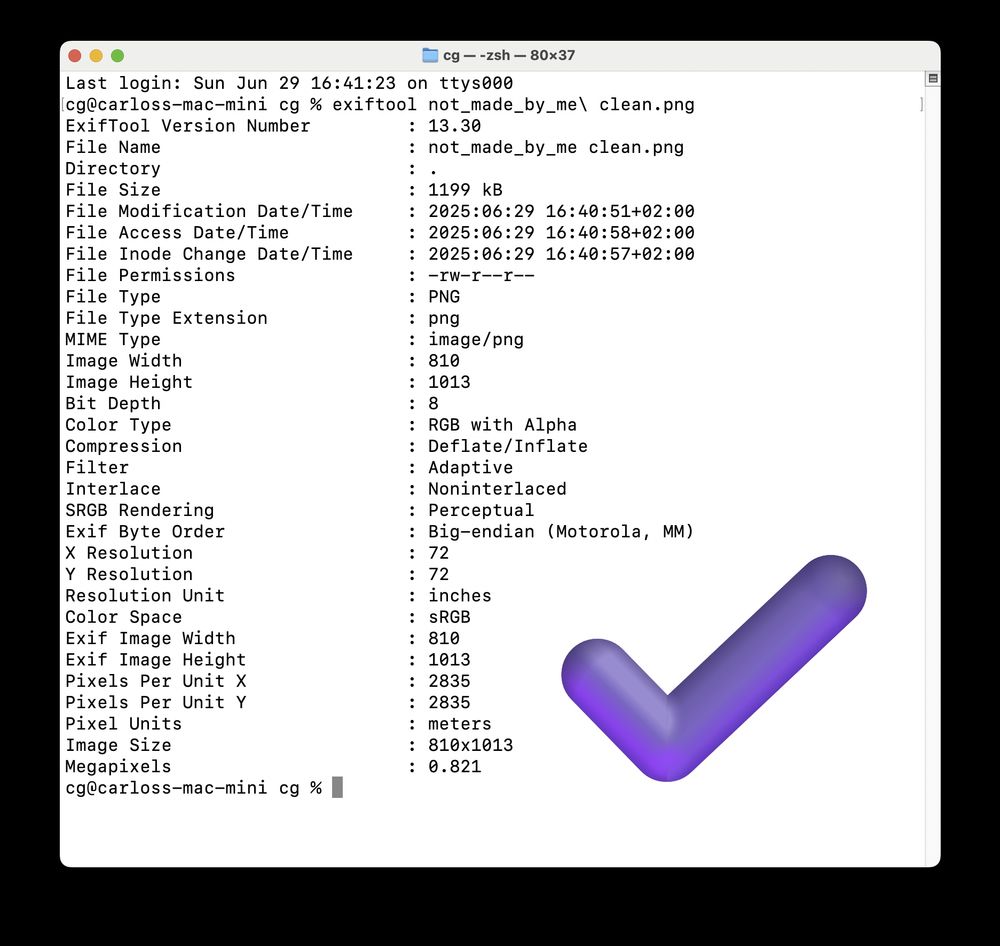
Now, if we use a tool for extracting the metadata in a more professional way (exiftool for the curious), we get this on the file (spoiler: 😐 You can see my name, that I used Canva to create the image with documents and user id, and some other weird fields that I couldn't find much about 🤔)

June 29, 2025 at 3:25 PM
Now, if we use a tool for extracting the metadata in a more professional way (exiftool for the curious), we get this on the file (spoiler: 😐 You can see my name, that I used Canva to create the image with documents and user id, and some other weird fields that I couldn't find much about 🤔)
Let's take this image above (not_made_by_me.png), usual guidance says to right-click and then select Properties/Get Info to check the available metadata. Here is what it looks like for Windows, Mac, and Linux (Ubuntu in this case):


June 29, 2025 at 3:25 PM
Let's take this image above (not_made_by_me.png), usual guidance says to right-click and then select Properties/Get Info to check the available metadata. Here is what it looks like for Windows, Mac, and Linux (Ubuntu in this case):
Let's talk metadata: Today, a friend of mine in a risky environment asked me how to make sure an image they designed is not traceable back to them, since it's been a while since the last time I checked "deeply", it was time for a refresh!!

June 29, 2025 at 3:25 PM
Let's talk metadata: Today, a friend of mine in a risky environment asked me how to make sure an image they designed is not traceable back to them, since it's been a while since the last time I checked "deeply", it was time for a refresh!!
However, if using exiftool is difficult (or just annoying), there are other ways. For instance, in macOS, you can right-click the file, go to "Quick Actions", and select "Convert Image" to create a new version of the file; just uncheck the option "Preserve Metadata" and you should be good to go :)
June 29, 2025 at 3:11 PM
However, if using exiftool is difficult (or just annoying), there are other ways. For instance, in macOS, you can right-click the file, go to "Quick Actions", and select "Convert Image" to create a new version of the file; just uncheck the option "Preserve Metadata" and you should be good to go :)
Ok, so back to the original file: if you are comfortable enough to run tools on the command line, exiftool, the one we used to check the existing metadata, can also remove it in a new version of the image. In this case by running "exiftool -all= not_made_by_me.png"
June 29, 2025 at 3:11 PM
Ok, so back to the original file: if you are comfortable enough to run tools on the command line, exiftool, the one we used to check the existing metadata, can also remove it in a new version of the image. In this case by running "exiftool -all= not_made_by_me.png"
PAUSE! Before we get too stressed, let's say something actually good and helpful: if we send the picture over Signal or WhatsApp, this data will be deleted (mostly because the platform creates its own version of the picture, hopefully optimized). This example is for the same image on Signal
June 29, 2025 at 3:11 PM
PAUSE! Before we get too stressed, let's say something actually good and helpful: if we send the picture over Signal or WhatsApp, this data will be deleted (mostly because the platform creates its own version of the picture, hopefully optimized). This example is for the same image on Signal
Now, if we use a tool for extracting the metadata in a more professional way (exiftool for the curious), we get this on the file (spoiler: 😐 You can see my name, that I used Canva to create the image with documents and user id, and some other weird fields that I couldn't find much about 🤔)
June 29, 2025 at 3:11 PM
Now, if we use a tool for extracting the metadata in a more professional way (exiftool for the curious), we get this on the file (spoiler: 😐 You can see my name, that I used Canva to create the image with documents and user id, and some other weird fields that I couldn't find much about 🤔)
Let's take this image above (not_made_by_me.png), usual guidance says to right-click and then select Properties/Get Info to check the available metadata. Here how it looks like for Windows, Mac, and Linux (Ubuntu in this case):
June 29, 2025 at 3:11 PM
Let's take this image above (not_made_by_me.png), usual guidance says to right-click and then select Properties/Get Info to check the available metadata. Here how it looks like for Windows, Mac, and Linux (Ubuntu in this case):
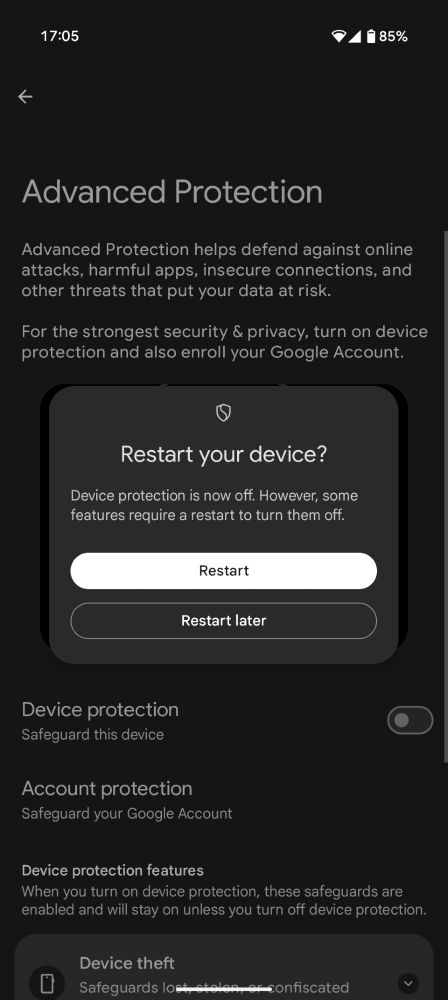
That said, when you try to disable any of these things, it offers you to disable the Advanced Protection mode altogether and it is not hard: biometrics and a restart that can be done later if you want. So it is promising for sure, but as it is implemented not bulletproof for physical access cases.
June 16, 2025 at 3:15 PM
That said, when you try to disable any of these things, it offers you to disable the Advanced Protection mode altogether and it is not hard: biometrics and a restart that can be done later if you want. So it is promising for sure, but as it is implemented not bulletproof for physical access cases.
Enabling Android Advanced Protection on a Pixel from the stable update: very easy to activate, and I haven't noticed any usage problems or incompatibilities. The intrusion logging isn't there yet (so alert on that one), and I couldn't disable Play Protect or enable 2G networks as advertised.


June 16, 2025 at 3:15 PM
Enabling Android Advanced Protection on a Pixel from the stable update: very easy to activate, and I haven't noticed any usage problems or incompatibilities. The intrusion logging isn't there yet (so alert on that one), and I couldn't disable Play Protect or enable 2G networks as advertised.
Tell Washington DC that I'm coming


December 1, 2024 at 12:07 AM
Tell Washington DC that I'm coming
The face of someone who loves rollercoasters 🎢


November 23, 2024 at 7:53 PM
The face of someone who loves rollercoasters 🎢
My lunch today (and his face when he realized it)

November 15, 2023 at 7:27 PM
My lunch today (and his face when he realized it)
Ok searching images in the Bluesky Android app is terrible, also, after a while I'm not even sure if I can add videos, but well, here it is :))

October 7, 2023 at 5:54 AM
Ok searching images in the Bluesky Android app is terrible, also, after a while I'm not even sure if I can add videos, but well, here it is :))
With them colonizing my travel bag I'm not sure if they don't want me to go or if they want me to bring them to the next trip 🤔

July 6, 2023 at 2:11 PM
With them colonizing my travel bag I'm not sure if they don't want me to go or if they want me to bring them to the next trip 🤔
After years of being disconnected with photography, finding by accident a cute frame in my "office" was a nice moment today :)

July 4, 2023 at 9:12 PM
After years of being disconnected with photography, finding by accident a cute frame in my "office" was a nice moment today :)
I'm still not sure..

July 4, 2023 at 2:39 PM
I'm still not sure..