



Callum Mcleod
@almostantarctic.bsky.social
Digital Product @TfL, Formerly @AklTransport • Occasionally dabbling in iOS development • Opinions my own
To set it up, tap on your line in Status, tap the bell icon and hit save!

November 24, 2025 at 11:12 PM
To set it up, tap on your line in Status, tap the bell icon and hit save!
Until this week, TfL Go only let you access bus arrival info if you were near the stop. We realised this was limiting people, so now you can move the map to access arrivals for any stop in London, and on iOS you can also see the route overlaid on the map (Android coming soon). Update now! 😃

October 17, 2025 at 2:17 PM
Until this week, TfL Go only let you access bus arrival info if you were near the stop. We realised this was limiting people, so now you can move the map to access arrivals for any stop in London, and on iOS you can also see the route overlaid on the map (Android coming soon). Update now! 😃
Last week’s Tube & DLR strikes gave us an opportunity to use our relatively new Major disruption notifications feature in TfL Go to help Londoners know about the strike and communicate the changing impacts in advance. I’d love to hear from anyone who received these - how was your experience?


September 17, 2025 at 5:27 PM
Last week’s Tube & DLR strikes gave us an opportunity to use our relatively new Major disruption notifications feature in TfL Go to help Londoners know about the strike and communicate the changing impacts in advance. I’d love to hear from anyone who received these - how was your experience?
Like this? I’ve just tried a default search

April 8, 2025 at 11:08 PM
Like this? I’ve just tried a default search
We’ve just introduced a refreshed design for cycle journeys in TfL Go, including full support for crossing the Thames on the brand new and free Silvertown Cycle Shuttle service from day one on both Android and iOS.
Try it out, and use the built in feedback button to tell us what you think 😃
Try it out, and use the built in feedback button to tell us what you think 😃

April 7, 2025 at 7:44 PM
We’ve just introduced a refreshed design for cycle journeys in TfL Go, including full support for crossing the Thames on the brand new and free Silvertown Cycle Shuttle service from day one on both Android and iOS.
Try it out, and use the built in feedback button to tell us what you think 😃
Try it out, and use the built in feedback button to tell us what you think 😃
Next, we know many people want to plan ahead for a future date, including any disruptions to avoid. We used to have a 'This Weekend' view, but what if you want to know about next Thursday?
The week ahead is a new section, showing planned disruptions for the rest of today, and the next 7 days.
3/n
The week ahead is a new section, showing planned disruptions for the rest of today, and the next 7 days.
3/n

March 27, 2025 at 8:31 PM
Next, we know many people want to plan ahead for a future date, including any disruptions to avoid. We used to have a 'This Weekend' view, but what if you want to know about next Thursday?
The week ahead is a new section, showing planned disruptions for the rest of today, and the next 7 days.
3/n
The week ahead is a new section, showing planned disruptions for the rest of today, and the next 7 days.
3/n
Firstly, we recognised that reading a paragraph of text to figure out if you're going to be impacted isn't easy, so now the status includes a brief description indicating which part of the line is impacted, e.g. North Acton to Ruislip.
2/n
2/n

March 27, 2025 at 8:25 PM
Firstly, we recognised that reading a paragraph of text to figure out if you're going to be impacted isn't easy, so now the status includes a brief description indicating which part of the line is impacted, e.g. North Acton to Ruislip.
2/n
2/n
When travelling by public transport, it's really important to be able to find out whether there are any disruptions that affect my journey. Today we've updated the Tube & Rail Status page on tfl.gov.uk/status-updates with a few changes to make this task easier.
1/n
1/n
March 27, 2025 at 8:19 PM
When travelling by public transport, it's really important to be able to find out whether there are any disruptions that affect my journey. Today we've updated the Tube & Rail Status page on tfl.gov.uk/status-updates with a few changes to make this task easier.
1/n
1/n
As of today, TfL's Oyster and contactless app is no longer available to use - if you want to continue managing your Oyster and contactless cards (topping up, buying travel cards, viewing journey history etc), you'll need to switch to the TfL Go app which added this capability in January.

March 21, 2025 at 11:35 AM
As of today, TfL's Oyster and contactless app is no longer available to use - if you want to continue managing your Oyster and contactless cards (topping up, buying travel cards, viewing journey history etc), you'll need to switch to the TfL Go app which added this capability in January.
Thank you for your thoughts - really helpful. Our search uses a combination of stations and Google data, our stations are displayed like Marble Arch in the screenshot attached.

February 13, 2025 at 2:30 PM
Thank you for your thoughts - really helpful. Our search uses a combination of stations and Google data, our stations are displayed like Marble Arch in the screenshot attached.
Morning! We found a bug in our routing model thanks to you raising this and now it’s working properly 😃

January 9, 2025 at 8:37 AM
Morning! We found a bug in our routing model thanks to you raising this and now it’s working properly 😃
Tonight we released a TfL Go update for iOS (iPhone), with full support for the London Overground changes - please update and check it out!
apps.apple.com/us/app/tfl-g...
Android update will follow soon, but we wanted to get this out as soon it was ready 😃
apps.apple.com/us/app/tfl-g...
Android update will follow soon, but we wanted to get this out as soon it was ready 😃

December 5, 2024 at 10:17 PM
Tonight we released a TfL Go update for iOS (iPhone), with full support for the London Overground changes - please update and check it out!
apps.apple.com/us/app/tfl-g...
Android update will follow soon, but we wanted to get this out as soon it was ready 😃
apps.apple.com/us/app/tfl-g...
Android update will follow soon, but we wanted to get this out as soon it was ready 😃
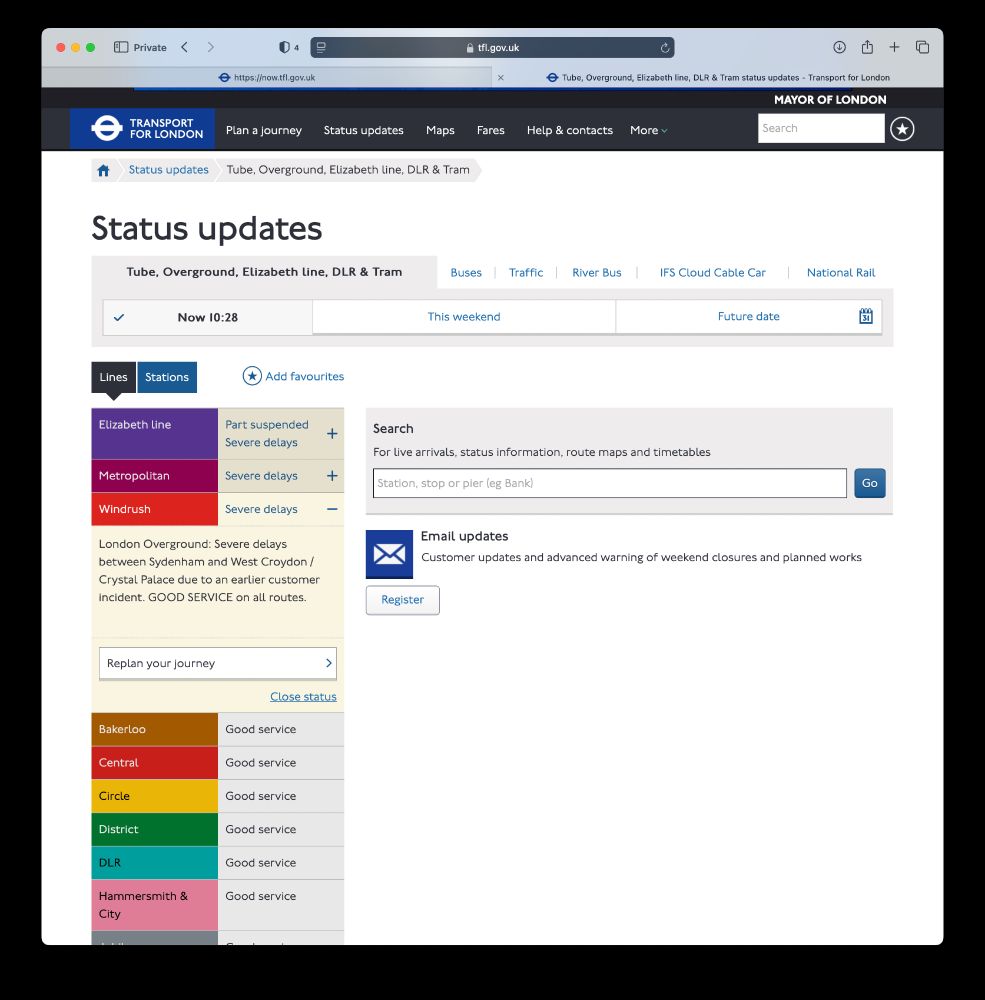
We've also updated the TfL website for London Overground - you can see the new line names across our travel tools like Status updates, Live arrivals, Journey planning etc.



November 26, 2024 at 12:37 PM
We've also updated the TfL website for London Overground - you can see the new line names across our travel tools like Status updates, Live arrivals, Journey planning etc.
We've just updated ESUB (Electronic Service Update Boards) screens with the new London Overground lines - spot it in your local station 😃
#LondonOverground #Windrush #TfL
#LondonOverground #Windrush #TfL

November 26, 2024 at 10:36 AM
We've just updated ESUB (Electronic Service Update Boards) screens with the new London Overground lines - spot it in your local station 😃
#LondonOverground #Windrush #TfL
#LondonOverground #Windrush #TfL
Oyster journey history will be limited to 8 weeks or so, but for my contactless cards I can go back months - do you see a similar dropdown at the top of the Journey history screen?

November 22, 2024 at 5:11 PM
Oyster journey history will be limited to 8 weeks or so, but for my contactless cards I can go back months - do you see a similar dropdown at the top of the Journey history screen?
You can report these direct via Google Maps, using the Suggest an edit option, then choose Add or fix a road.


November 21, 2024 at 7:31 AM
You can report these direct via Google Maps, using the Suggest an edit option, then choose Add or fix a road.