



Have just been cleaning up our Dashboards and deleted 20+ dashboards that have accumulated over the years that nobody ever uses.
#HubShot #HubSpotBasics
Two things I love about the Delete process:
#HubShot #HubSpotBasics
Two things I love about the Delete process:

December 23, 2024 at 1:19 AM
Have just been cleaning up our Dashboards and deleted 20+ dashboards that have accumulated over the years that nobody ever uses.
#HubShot #HubSpotBasics
Two things I love about the Delete process:
#HubShot #HubSpotBasics
Two things I love about the Delete process:
Reminder that you can use Deal Lists in HubSpot Deal Views.
Handy for filtering a view of Deals using advanced criteria (eg a List that joins on associated objects).
#HubSpot #HubSpotBasics
Handy for filtering a view of Deals using advanced criteria (eg a List that joins on associated objects).
#HubSpot #HubSpotBasics


January 2, 2025 at 1:28 AM
Reminder that you can use Deal Lists in HubSpot Deal Views.
Handy for filtering a view of Deals using advanced criteria (eg a List that joins on associated objects).
#HubSpot #HubSpotBasics
Handy for filtering a view of Deals using advanced criteria (eg a List that joins on associated objects).
#HubSpot #HubSpotBasics
Reminder you can easily control what shows in the HubSpot Timeline.
I often remove Workflow and List activity to reduce the noise.
Also, use the Expand/Collapse option eg to easily review all emails you've sent to a contact.
#HubSpot #HubSpotBasics
I often remove Workflow and List activity to reduce the noise.
Also, use the Expand/Collapse option eg to easily review all emails you've sent to a contact.
#HubSpot #HubSpotBasics


January 5, 2025 at 11:41 PM
Reminder you can easily control what shows in the HubSpot Timeline.
I often remove Workflow and List activity to reduce the noise.
Also, use the Expand/Collapse option eg to easily review all emails you've sent to a contact.
#HubSpot #HubSpotBasics
I often remove Workflow and List activity to reduce the noise.
Also, use the Expand/Collapse option eg to easily review all emails you've sent to a contact.
#HubSpot #HubSpotBasics
I'm not going to say this is the most useful thing in HubSpot dashboards, but it is kinda interesting... (and thanks to Marie who alerted me to this ages ago)
You can embed other HubSpot tools into dashboards.
1/4
#HubSpot #HubSpotBasics
You can embed other HubSpot tools into dashboards.
1/4
#HubSpot #HubSpotBasics


December 12, 2024 at 2:57 AM
I'm not going to say this is the most useful thing in HubSpot dashboards, but it is kinda interesting... (and thanks to Marie who alerted me to this ages ago)
You can embed other HubSpot tools into dashboards.
1/4
#HubSpot #HubSpotBasics
You can embed other HubSpot tools into dashboards.
1/4
#HubSpot #HubSpotBasics
Not much difference in HubSpot between:
Marketing > Forms > Analyse
versus:
Reporting > Marketing > Channel > Forms
Reporting path allows comparison on the graph, and list up to 100 without paging.
Forms path has visual bar for the submissions which is nice.
#HubSpot #HubSpotBasics
Marketing > Forms > Analyse
versus:
Reporting > Marketing > Channel > Forms
Reporting path allows comparison on the graph, and list up to 100 without paging.
Forms path has visual bar for the submissions which is nice.
#HubSpot #HubSpotBasics


January 7, 2025 at 5:26 AM
Not much difference in HubSpot between:
Marketing > Forms > Analyse
versus:
Reporting > Marketing > Channel > Forms
Reporting path allows comparison on the graph, and list up to 100 without paging.
Forms path has visual bar for the submissions which is nice.
#HubSpot #HubSpotBasics
Marketing > Forms > Analyse
versus:
Reporting > Marketing > Channel > Forms
Reporting path allows comparison on the graph, and list up to 100 without paging.
Forms path has visual bar for the submissions which is nice.
#HubSpot #HubSpotBasics
I think the Minified Global Search beta is one of my favourite 'it's the little things' updates of the past few months from HubSpot.
I say this because when I go into a portal that doesn't have it I immediately want to turn it on...
#HubSpot #HubSpotBasics
1/3
I say this because when I go into a portal that doesn't have it I immediately want to turn it on...
#HubSpot #HubSpotBasics
1/3


December 12, 2024 at 8:09 PM
I think the Minified Global Search beta is one of my favourite 'it's the little things' updates of the past few months from HubSpot.
I say this because when I go into a portal that doesn't have it I immediately want to turn it on...
#HubSpot #HubSpotBasics
1/3
I say this because when I go into a portal that doesn't have it I immediately want to turn it on...
#HubSpot #HubSpotBasics
1/3
Reminder about HubSpot Bot Filtering
I can't really think of a good reason not to have this on...
(Occasionally we come across portals - usually older - that don't have this on, worth double checking yours)
#HubSpot #HubSpotBasics
I can't really think of a good reason not to have this on...
(Occasionally we come across portals - usually older - that don't have this on, worth double checking yours)
#HubSpot #HubSpotBasics

December 9, 2024 at 6:59 AM
Reminder about HubSpot Bot Filtering
I can't really think of a good reason not to have this on...
(Occasionally we come across portals - usually older - that don't have this on, worth double checking yours)
#HubSpot #HubSpotBasics
I can't really think of a good reason not to have this on...
(Occasionally we come across portals - usually older - that don't have this on, worth double checking yours)
#HubSpot #HubSpotBasics
Reminder you can use associated objects on HubSpot workflow triggers.
(You can also branch within workflows using similar criteria)
Simple example in the screenshot, to trigger on Deals for specific Companies.
#HubSpot #HubSpotBasics
(You can also branch within workflows using similar criteria)
Simple example in the screenshot, to trigger on Deals for specific Companies.
#HubSpot #HubSpotBasics

December 18, 2024 at 5:18 AM
Reminder you can use associated objects on HubSpot workflow triggers.
(You can also branch within workflows using similar criteria)
Simple example in the screenshot, to trigger on Deals for specific Companies.
#HubSpot #HubSpotBasics
(You can also branch within workflows using similar criteria)
Simple example in the screenshot, to trigger on Deals for specific Companies.
#HubSpot #HubSpotBasics
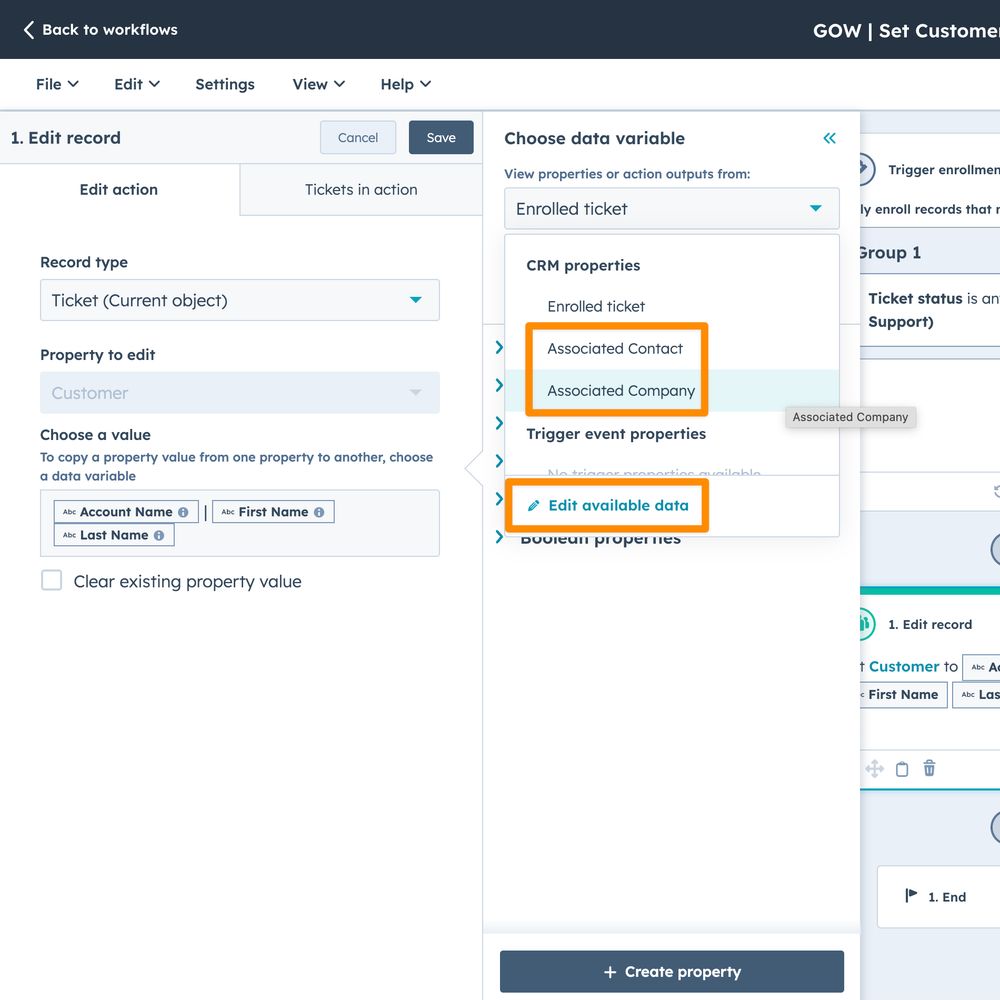
Reminder about using associated objects in HubSpot workflow actions
You can add associated objects as data sources in Workflows, and use them in the Edit Record action
Simple Ticket workflow example that updates a property on the ticket with the Company & Contact details
#HubSpot #HubSpotBasics
You can add associated objects as data sources in Workflows, and use them in the Edit Record action
Simple Ticket workflow example that updates a property on the ticket with the Company & Contact details
#HubSpot #HubSpotBasics
December 24, 2024 at 3:05 AM
Reminder about using associated objects in HubSpot workflow actions
You can add associated objects as data sources in Workflows, and use them in the Edit Record action
Simple Ticket workflow example that updates a property on the ticket with the Company & Contact details
#HubSpot #HubSpotBasics
You can add associated objects as data sources in Workflows, and use them in the Edit Record action
Simple Ticket workflow example that updates a property on the ticket with the Company & Contact details
#HubSpot #HubSpotBasics
Sometimes the feedback from Detractors in HubSpot surveys is super handy - it can highlight the real pain points for listeners (or customers or prospects etc).
Simple example from a HubShots podcast survey below.
1/2
#HubSpot #HubSpotBasics
Simple example from a HubShots podcast survey below.
1/2
#HubSpot #HubSpotBasics

December 17, 2024 at 4:57 AM
Sometimes the feedback from Detractors in HubSpot surveys is super handy - it can highlight the real pain points for listeners (or customers or prospects etc).
Simple example from a HubShots podcast survey below.
1/2
#HubSpot #HubSpotBasics
Simple example from a HubShots podcast survey below.
1/2
#HubSpot #HubSpotBasics
Little tweaks to enriching data keep rolling out. eg you can enrich a List in HubSpot.
#HubSpot #HubSpotBasics
#HubSpot #HubSpotBasics


January 9, 2025 at 5:36 AM
Little tweaks to enriching data keep rolling out. eg you can enrich a List in HubSpot.
#HubSpot #HubSpotBasics
#HubSpot #HubSpotBasics
The HubSpot Workflow Action to add a Note is kinda nice.
(It's been live for a month or so now.)
Works on the main objects (contacts, companies, deals, tickets - also leads) but not custom objects (yet).
#HubSpot #HubSpotBasics
(It's been live for a month or so now.)
Works on the main objects (contacts, companies, deals, tickets - also leads) but not custom objects (yet).
#HubSpot #HubSpotBasics

December 2, 2024 at 6:13 AM
The HubSpot Workflow Action to add a Note is kinda nice.
(It's been live for a month or so now.)
Works on the main objects (contacts, companies, deals, tickets - also leads) but not custom objects (yet).
#HubSpot #HubSpotBasics
(It's been live for a month or so now.)
Works on the main objects (contacts, companies, deals, tickets - also leads) but not custom objects (yet).
#HubSpot #HubSpotBasics
More on Slack notifications from HubSpot - this time via Workflows.
#HubSpot #HubSpotBasics
Lots of flexibility here (simple example via a Company workflow):
#HubSpot #HubSpotBasics
Lots of flexibility here (simple example via a Company workflow):

December 7, 2024 at 8:09 PM
More on Slack notifications from HubSpot - this time via Workflows.
#HubSpot #HubSpotBasics
Lots of flexibility here (simple example via a Company workflow):
#HubSpot #HubSpotBasics
Lots of flexibility here (simple example via a Company workflow):
Quick reminder - you can now set your default email address to use within HubSpot (eg on Ticket replies, Deals, etc).
(Thanks to Roselen for this one)
#HubSpot #HubSpotBasics
(Thanks to Roselen for this one)
#HubSpot #HubSpotBasics


December 16, 2024 at 2:34 AM
Quick reminder - you can now set your default email address to use within HubSpot (eg on Ticket replies, Deals, etc).
(Thanks to Roselen for this one)
#HubSpot #HubSpotBasics
(Thanks to Roselen for this one)
#HubSpot #HubSpotBasics
A reminder (thanks Ian) about Quick Filters in HubSpot.
Very handy, especially for filters that have ranges, since you can very quickly tweak them.
Plus I love how they stay as part of the View.
#HubSpot #HubSpotBasics
Very handy, especially for filters that have ranges, since you can very quickly tweak them.
Plus I love how they stay as part of the View.
#HubSpot #HubSpotBasics


December 18, 2024 at 10:27 PM
A reminder (thanks Ian) about Quick Filters in HubSpot.
Very handy, especially for filters that have ranges, since you can very quickly tweak them.
Plus I love how they stay as part of the View.
#HubSpot #HubSpotBasics
Very handy, especially for filters that have ranges, since you can very quickly tweak them.
Plus I love how they stay as part of the View.
#HubSpot #HubSpotBasics
A reminder that you can tailor your HubSpot notifications very specifically these days.
eg I like getting new ticket notifications in Slack (which I check regularly), but any updates via Email (which I only check a few times during the day).
#HubSpot #HubSpotBasics
eg I like getting new ticket notifications in Slack (which I check regularly), but any updates via Email (which I only check a few times during the day).
#HubSpot #HubSpotBasics


January 3, 2025 at 1:27 AM
A reminder that you can tailor your HubSpot notifications very specifically these days.
eg I like getting new ticket notifications in Slack (which I check regularly), but any updates via Email (which I only check a few times during the day).
#HubSpot #HubSpotBasics
eg I like getting new ticket notifications in Slack (which I check regularly), but any updates via Email (which I only check a few times during the day).
#HubSpot #HubSpotBasics
HubSpot Deal Lists are handy.
And especially when you can join on just about any associated object (including custom objects).
eg Simple Line Items example
#HubSpot #HubSpotBasics
And especially when you can join on just about any associated object (including custom objects).
eg Simple Line Items example
#HubSpot #HubSpotBasics

December 3, 2024 at 8:38 AM
HubSpot Deal Lists are handy.
And especially when you can join on just about any associated object (including custom objects).
eg Simple Line Items example
#HubSpot #HubSpotBasics
And especially when you can join on just about any associated object (including custom objects).
eg Simple Line Items example
#HubSpot #HubSpotBasics
Not having much luck with AI Forecasting in HubSpot so far - getting this message (screenshot from our own portal) in the (admittedly few) client portals we've enabled it in so far as well.
1/2
#HubSpot #HubSpotBasics
1/2
#HubSpot #HubSpotBasics

December 11, 2024 at 7:52 AM
Not having much luck with AI Forecasting in HubSpot so far - getting this message (screenshot from our own portal) in the (admittedly few) client portals we've enabled it in so far as well.
1/2
#HubSpot #HubSpotBasics
1/2
#HubSpot #HubSpotBasics
Reminder you can set up HubSpot workflows to send annually (and other schedules).
Simple example: automate sending out your New Year offers.
#HubSpot #HubSpotBasics
Simple example: automate sending out your New Year offers.
#HubSpot #HubSpotBasics


December 30, 2024 at 10:53 PM
Reminder you can set up HubSpot workflows to send annually (and other schedules).
Simple example: automate sending out your New Year offers.
#HubSpot #HubSpotBasics
Simple example: automate sending out your New Year offers.
#HubSpot #HubSpotBasics
Plus if you'd like to see it in action and play with the controls, you can have a play on this page (bottom right corner to show the control):
https://www.xencreate.com/resources
4/4
#HubSpot #HubSpotBasics
https://www.xencreate.com/resources
4/4
#HubSpot #HubSpotBasics

Resources | XEN Create
Explore our free resources on HubSpot, Midjourney, and more to discover valuable insights. Get access to XEN Create brochures.
www.xencreate.com
December 4, 2024 at 6:28 AM
Plus if you'd like to see it in action and play with the controls, you can have a play on this page (bottom right corner to show the control):
https://www.xencreate.com/resources
4/4
#HubSpot #HubSpotBasics
https://www.xencreate.com/resources
4/4
#HubSpot #HubSpotBasics
Another handy HubSpot update - you can right click on a column heading (eg in a View) and easily add (or remove) columns.
Simpler than using the Edit Columns button at the top right.
(Remember to Save your View after if you want to keep it.)
#HubSpot #HubSpotBasics
Simpler than using the Edit Columns button at the top right.
(Remember to Save your View after if you want to keep it.)
#HubSpot #HubSpotBasics


November 28, 2024 at 1:20 AM
Another handy HubSpot update - you can right click on a column heading (eg in a View) and easily add (or remove) columns.
Simpler than using the Edit Columns button at the top right.
(Remember to Save your View after if you want to keep it.)
#HubSpot #HubSpotBasics
Simpler than using the Edit Columns button at the top right.
(Remember to Save your View after if you want to keep it.)
#HubSpot #HubSpotBasics
A reminder about getting Slack reminders in HubSpot.
I quite like how granular you can make the out-of-the-box 'Other App' notifications (eg Slack) in HubSpot.
#HubSpot #HubSpotBasics
eg to get Task Reminders:
I quite like how granular you can make the out-of-the-box 'Other App' notifications (eg Slack) in HubSpot.
#HubSpot #HubSpotBasics
eg to get Task Reminders:


December 7, 2024 at 4:56 AM
A reminder about getting Slack reminders in HubSpot.
I quite like how granular you can make the out-of-the-box 'Other App' notifications (eg Slack) in HubSpot.
#HubSpot #HubSpotBasics
eg to get Task Reminders:
I quite like how granular you can make the out-of-the-box 'Other App' notifications (eg Slack) in HubSpot.
#HubSpot #HubSpotBasics
eg to get Task Reminders: