




ねじもじなみだ
@yawn404.bsky.social

< Blueskyに新しく来られた方向け >
アカウントを作ったあと、自分の名前の下あたりに「Invalid handle (無効なハンドル)」と表示される場合があります。
この状態だと、何らかの理由でそのアカウントのハンドルは無効になっている(検索しても認識されない)ようです。
時間を置くと解決する場合もあるようですが、
設定
→ 高度な設定:ハンドルを変更
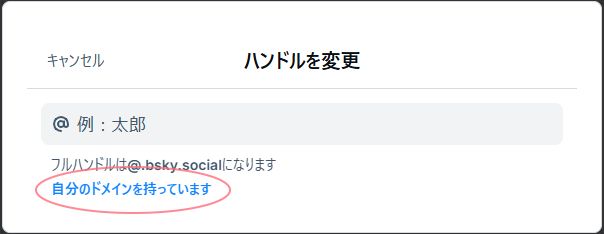
→ 「自分のドメインを持っています」
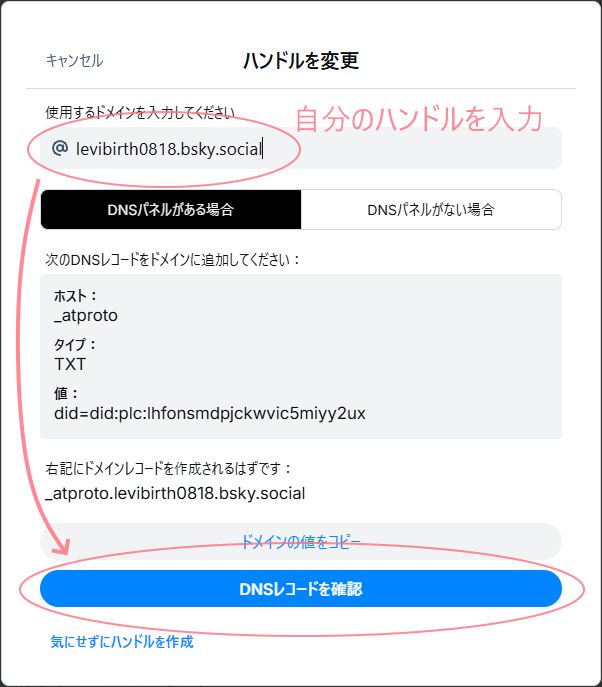
→ ドメイン入力
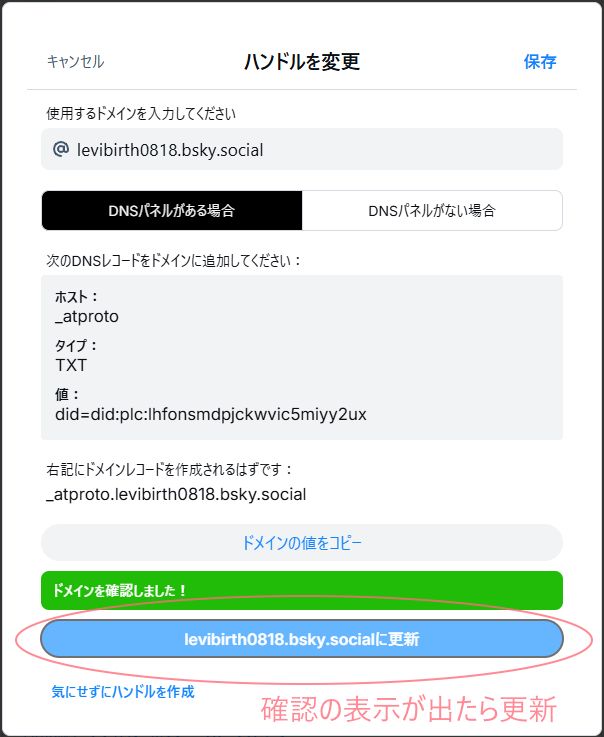
→ DNSレコードを確認
→ 更新
で解決すると思います。
ご参考になれば幸いです。
アカウントを作ったあと、自分の名前の下あたりに「Invalid handle (無効なハンドル)」と表示される場合があります。
この状態だと、何らかの理由でそのアカウントのハンドルは無効になっている(検索しても認識されない)ようです。
時間を置くと解決する場合もあるようですが、
設定
→ 高度な設定:ハンドルを変更
→ 「自分のドメインを持っています」
→ ドメイン入力
→ DNSレコードを確認
→ 更新
で解決すると思います。
ご参考になれば幸いです。
November 14, 2024 at 11:22 PM