




Simsure
@simsure.bsky.social
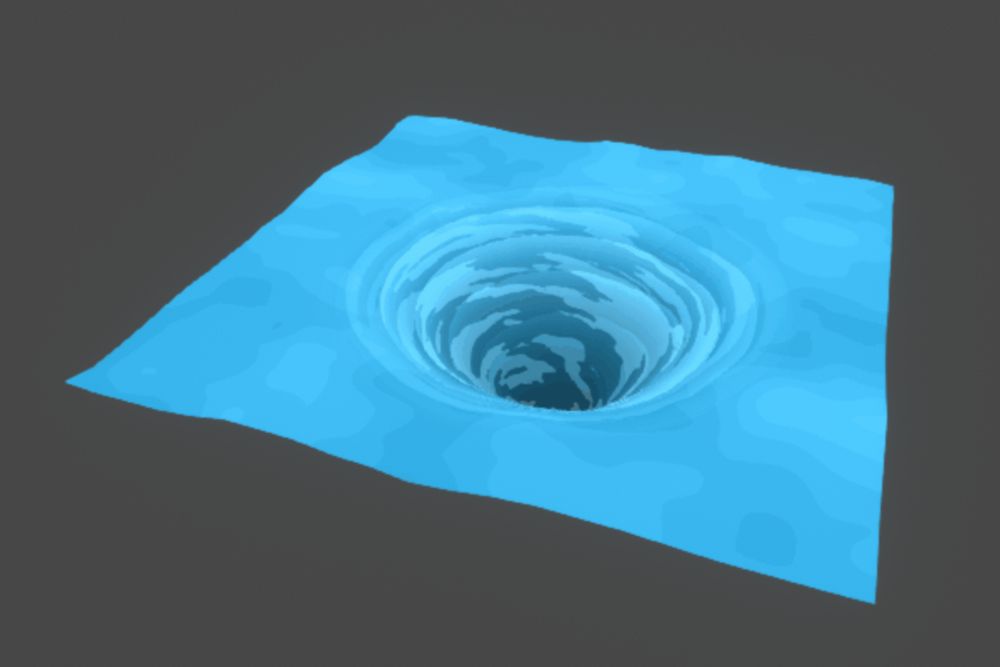
That's it, hope this can help making cool whirlpool or other effects in your games. 🌀❤️
August 7, 2025 at 5:59 PM
That's it, hope this can help making cool whirlpool or other effects in your games. 🌀❤️
And the final touch is making this render three times, tweaking the uniforms to have smaller, faster and more transparent foam under the main one
August 7, 2025 at 5:59 PM
And the final touch is making this render three times, tweaking the uniforms to have smaller, faster and more transparent foam under the main one
The actual color comes not from the shader but from the background texture, you can see how it gives a much better look.
The shader could be modified to make it darker the center, this is just how we did it in our game.
The shader could be modified to make it darker the center, this is just how we did it in our game.
August 7, 2025 at 5:59 PM
The actual color comes not from the shader but from the background texture, you can see how it gives a much better look.
The shader could be modified to make it darker the center, this is just how we did it in our game.
The shader could be modified to make it darker the center, this is just how we did it in our game.
The final steps consist in removing transparent pixels to have a opaque foam, (thanks to the previous step we have a perfect circle and not a square)
With some final inversion and multiplication we get a single float value of our swirling foam, fading as it goes to the center
With some final inversion and multiplication we get a single float value of our swirling foam, fading as it goes to the center

August 7, 2025 at 5:59 PM
The final steps consist in removing transparent pixels to have a opaque foam, (thanks to the previous step we have a perfect circle and not a square)
With some final inversion and multiplication we get a single float value of our swirling foam, fading as it goes to the center
With some final inversion and multiplication we get a single float value of our swirling foam, fading as it goes to the center
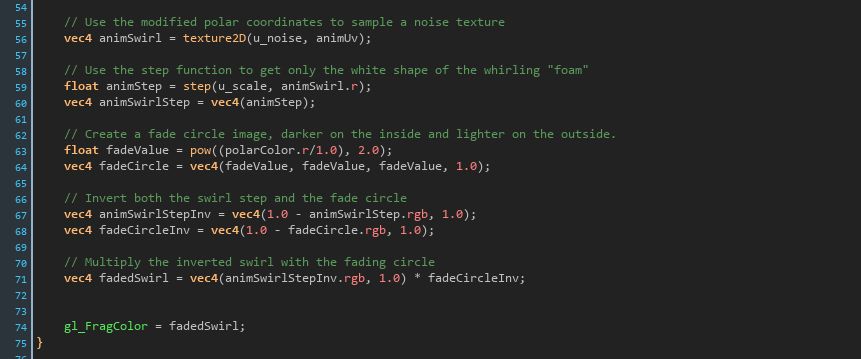
Now using the polarColor.r from before we generate a fading circle image, that will be used to make the edge of the whirlpool blend with the surroundings.
Get the final image by multiplying the inverted circle with the inverted image from the last step
Get the final image by multiplying the inverted circle with the inverted image from the last step
August 7, 2025 at 5:59 PM
Now using the polarColor.r from before we generate a fading circle image, that will be used to make the edge of the whirlpool blend with the surroundings.
Get the final image by multiplying the inverted circle with the inverted image from the last step
Get the final image by multiplying the inverted circle with the inverted image from the last step
With a step function let's get only the white "foam" form the rotating noise image

August 7, 2025 at 5:59 PM
With a step function let's get only the white "foam" form the rotating noise image
The result, we can already see the whirlpoolness
August 7, 2025 at 5:59 PM
The result, we can already see the whirlpoolness
Now we use a noise texture to sample the image that will be the canvas for our whirlpool,
i used a generic noise image (cloud like) found online.
The UV to use for sampling are based on the polar coordinates after some passes.
i used a generic noise image (cloud like) found online.
The UV to use for sampling are based on the polar coordinates after some passes.

August 7, 2025 at 5:59 PM
Now we use a noise texture to sample the image that will be the canvas for our whirlpool,
i used a generic noise image (cloud like) found online.
The UV to use for sampling are based on the polar coordinates after some passes.
i used a generic noise image (cloud like) found online.
The UV to use for sampling are based on the polar coordinates after some passes.

The starting point is a polar coordinate texture, we use this custom function found online that i changed a bit to make it work correctly in GMS

August 7, 2025 at 5:59 PM
The starting point is a polar coordinate texture, we use this custom function found online that i changed a bit to make it work correctly in GMS
First of all i want to thanks @cyanilux.bsky.social, my version is a Game Maker adaptation of his whirlpool shader, and i started by following his tutorial, he make a lot of other cool stuff.
This tutorial is specific for making it work in Game Maker Studio 2
🧵
This tutorial is specific for making it work in Game Maker Studio 2
🧵
August 7, 2025 at 5:59 PM
First of all i want to thanks @cyanilux.bsky.social, my version is a Game Maker adaptation of his whirlpool shader, and i started by following his tutorial, he make a lot of other cool stuff.
This tutorial is specific for making it work in Game Maker Studio 2
🧵
This tutorial is specific for making it work in Game Maker Studio 2
🧵
The last layer of every stack is drawn slightly bigger and with a similar color of the water tile, when the last layer change, it looks like the water adapt perfecly to the object, like an outline.
August 5, 2025 at 4:28 PM
The last layer of every stack is drawn slightly bigger and with a similar color of the water tile, when the last layer change, it looks like the water adapt perfecly to the object, like an outline.
The last layer of every stack is drawn slightly bigger and with a similar color of the water tile, when the last layer change, it looks like the water adapt perfecly to the object, like an outline.
August 5, 2025 at 4:27 PM
The last layer of every stack is drawn slightly bigger and with a similar color of the water tile, when the last layer change, it looks like the water adapt perfecly to the object, like an outline.