



Simone Maranzana
@simonemaranzana.com
Frontend developer and co-founder of justevolve.it and advancedcolumns.com
I understand that the goal is a more generic approach, and the mobile-first strategy is probably geared towards a more skilled audience. However, the data structure (and style engine) should support it—perhaps through a theme.json configuration for pro users?
December 17, 2024 at 11:11 PM
I understand that the goal is a more generic approach, and the mobile-first strategy is probably geared towards a more skilled audience. However, the data structure (and style engine) should support it—perhaps through a theme.json configuration for pro users?
I know—it was just too hard to resist making a joke! 😂
December 17, 2024 at 11:03 PM
I know—it was just too hard to resist making a joke! 😂
Fun fact: since I tend to use at least one height query in every project, we have designed @advancedcolumns to support all kinds of media queries. However, we have temporarily hidden this functionality because it can be too challenging for casual or intermediate users to use
December 17, 2024 at 10:57 PM
Fun fact: since I tend to use at least one height query in every project, we have designed @advancedcolumns to support all kinds of media queries. However, we have temporarily hidden this functionality because it can be too challenging for casual or intermediate users to use
That's why it's called advanced 🙃
December 17, 2024 at 10:53 PM
That's why it's called advanced 🙃
5/ What’s next?
We’re bringing CSS Subgrid support to the next major update of the @advancedcolumns.com #WordPress plugin.
You’ll also get even more controls over individual item dimensions—making it easier than ever to build precise, beautiful layouts.
👇
We’re bringing CSS Subgrid support to the next major update of the @advancedcolumns.com #WordPress plugin.
You’ll also get even more controls over individual item dimensions—making it easier than ever to build precise, beautiful layouts.
👇
December 12, 2024 at 6:53 PM
5/ What’s next?
We’re bringing CSS Subgrid support to the next major update of the @advancedcolumns.com #WordPress plugin.
You’ll also get even more controls over individual item dimensions—making it easier than ever to build precise, beautiful layouts.
👇
We’re bringing CSS Subgrid support to the next major update of the @advancedcolumns.com #WordPress plugin.
You’ll also get even more controls over individual item dimensions—making it easier than ever to build precise, beautiful layouts.
👇
4/ How does CSS Subgrid work?
Subgrid can propagate rows, columns, or both.
This opens the door to much more advanced layout solutions, all while keeping your CSS cleaner and simpler.
I highly recommend @ishadeed.com guide: https://buff.ly/3wMy61j
As always, it explains the concept brilliantly.
Subgrid can propagate rows, columns, or both.
This opens the door to much more advanced layout solutions, all while keeping your CSS cleaner and simpler.
I highly recommend @ishadeed.com guide: https://buff.ly/3wMy61j
As always, it explains the concept brilliantly.

December 12, 2024 at 6:52 PM
4/ How does CSS Subgrid work?
Subgrid can propagate rows, columns, or both.
This opens the door to much more advanced layout solutions, all while keeping your CSS cleaner and simpler.
I highly recommend @ishadeed.com guide: https://buff.ly/3wMy61j
As always, it explains the concept brilliantly.
Subgrid can propagate rows, columns, or both.
This opens the door to much more advanced layout solutions, all while keeping your CSS cleaner and simpler.
I highly recommend @ishadeed.com guide: https://buff.ly/3wMy61j
As always, it explains the concept brilliantly.
3/ What is CSS Subgrid?
Subgrid is a grid propagation method that allows a child element (e.g., a single column) to inherit the grid structure of its parent.
In our example, Subgrid enables you to share the same alignment across all elements in every column—without messy workarounds.
Subgrid is a grid propagation method that allows a child element (e.g., a single column) to inherit the grid structure of its parent.
In our example, Subgrid enables you to share the same alignment across all elements in every column—without messy workarounds.
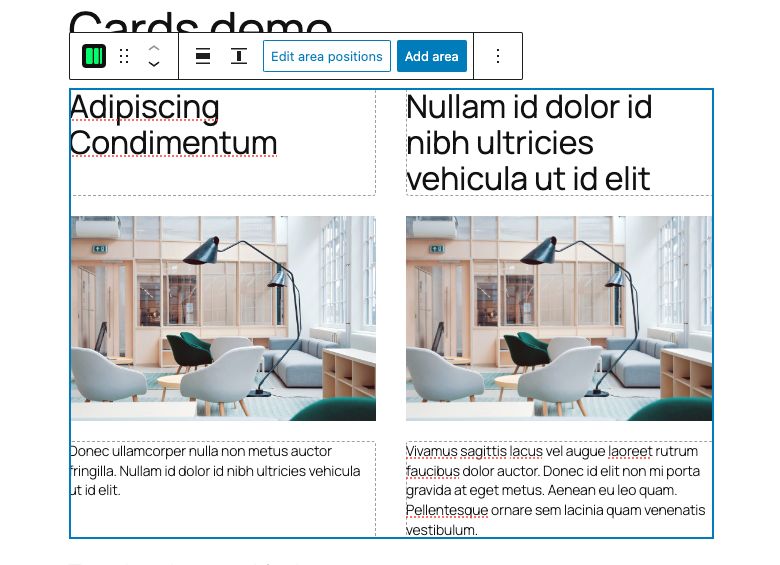
December 12, 2024 at 6:52 PM
3/ What is CSS Subgrid?
Subgrid is a grid propagation method that allows a child element (e.g., a single column) to inherit the grid structure of its parent.
In our example, Subgrid enables you to share the same alignment across all elements in every column—without messy workarounds.
Subgrid is a grid propagation method that allows a child element (e.g., a single column) to inherit the grid structure of its parent.
In our example, Subgrid enables you to share the same alignment across all elements in every column—without messy workarounds.
2/ What’s the challenge here?
You want all elements across the columns to align perfectly—but the nested elements inside each column don’t inherit the parent grid’s structure.
That’s where CSS Subgrid comes in.
You want all elements across the columns to align perfectly—but the nested elements inside each column don’t inherit the parent grid’s structure.
That’s where CSS Subgrid comes in.

December 12, 2024 at 6:52 PM
2/ What’s the challenge here?
You want all elements across the columns to align perfectly—but the nested elements inside each column don’t inherit the parent grid’s structure.
That’s where CSS Subgrid comes in.
You want all elements across the columns to align perfectly—but the nested elements inside each column don’t inherit the parent grid’s structure.
That’s where CSS Subgrid comes in.
Uhm, this is strange since the filter should behave the same as the block.json property. On the frontend, we are using the core get_block_wrapper_attributes function. I did a quick test, and indeed it is not working with the filter, but it is working with the block.json 😕 I need to debug it further
December 7, 2024 at 6:18 PM
Uhm, this is strange since the filter should behave the same as the block.json property. On the frontend, we are using the core get_block_wrapper_attributes function. I did a quick test, and indeed it is not working with the filter, but it is working with the block.json 😕 I need to debug it further
Sure, we will add it in the next update.
Meanwhile, you can enable it using a filter if you want: nickdiego.com/how-to-modif...
Meanwhile, you can enable it using a filter if you want: nickdiego.com/how-to-modif...

How to modify block supports in WordPress using client-side filters
Learn how to add or modify block supports in the Editor using client-side filters. This includes adding functionality not yet in WordPress.
nickdiego.com
December 7, 2024 at 7:16 AM
Sure, we will add it in the next update.
Meanwhile, you can enable it using a filter if you want: nickdiego.com/how-to-modif...
Meanwhile, you can enable it using a filter if you want: nickdiego.com/how-to-modif...
Sounds great! Let me know if you find anything missing that’s not already on our Featurebase board
November 22, 2024 at 2:07 PM
Sounds great! Let me know if you find anything missing that’s not already on our Featurebase board
I’ll add these options to the roadmap on Featurebase for the next release. Do you have any other feedback or anything you feel is missing?
November 22, 2024 at 1:22 PM
I’ll add these options to the roadmap on Featurebase for the next release. Do you have any other feedback or anything you feel is missing?
Sure, it’s definitely possible. Are you looking for a columns or column padding preset (or both)?
November 22, 2024 at 7:45 AM
Sure, it’s definitely possible. Are you looking for a columns or column padding preset (or both)?
It went that way because there was no regulation or structured system to manage notifications. A couple of years ago, a project was started to rethink notification management. Do you know if any progress has been made on that? Will there be something like that in the new admin UI?
November 14, 2024 at 9:29 PM
It went that way because there was no regulation or structured system to manage notifications. A couple of years ago, a project was started to rethink notification management. Do you know if any progress has been made on that? Will there be something like that in the new admin UI?
@buffer.com, but it doesn't support video upload for bsky yet
November 12, 2024 at 11:18 AM
@buffer.com, but it doesn't support video upload for bsky yet