




さとはら
@satohara16.bsky.social
20↑|SideM舞田P、プロセカ、FGO、まほやく、スタレ https://lit.link/satohara
Twitterなにも読み込めなくなっちゃった
November 18, 2025 at 11:45 AM
Twitterなにも読み込めなくなっちゃった
🦋は基本見てるだけでTwitterかmixi2にいることが多いんだけど、結局Twitter以外が盛り上がりに欠けてて今後が心配
January 22, 2025 at 2:13 AM
🦋は基本見てるだけでTwitterかmixi2にいることが多いんだけど、結局Twitter以外が盛り上がりに欠けてて今後が心配
Reposted by さとはら
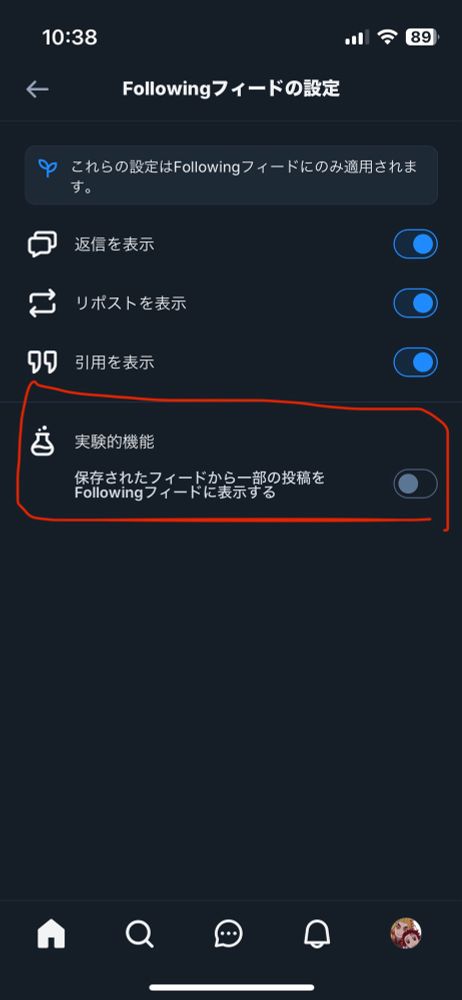
TL(Followingフィード)に知らん垢のポストが流れてくる件について調べてたら『実験的機能のチェックがオンになってる可能性がある』って言ってる人がいてた 設定見てみたらマジであって何それ!?ってなってる
試しにオンにして更新してみたら確かに自分が保存してるフィードからポストがピックアップされて流れてきたので、困ってる人は一回確認してみるといいかもですね
設定→コンテンツ→Followingフィードの設定 やったかな?
試しにオンにして更新してみたら確かに自分が保存してるフィードからポストがピックアップされて流れてきたので、困ってる人は一回確認してみるといいかもですね
設定→コンテンツ→Followingフィードの設定 やったかな?
January 19, 2025 at 1:48 AM
TL(Followingフィード)に知らん垢のポストが流れてくる件について調べてたら『実験的機能のチェックがオンになってる可能性がある』って言ってる人がいてた 設定見てみたらマジであって何それ!?ってなってる
試しにオンにして更新してみたら確かに自分が保存してるフィードからポストがピックアップされて流れてきたので、困ってる人は一回確認してみるといいかもですね
設定→コンテンツ→Followingフィードの設定 やったかな?
試しにオンにして更新してみたら確かに自分が保存してるフィードからポストがピックアップされて流れてきたので、困ってる人は一回確認してみるといいかもですね
設定→コンテンツ→Followingフィードの設定 やったかな?