




QA Sphere
@qasphere.com
AI-Powered Test Management Platform
✳️ Simple
✳️ Speedy
✳️ Secure
Empowering teams to deliver quality software faster 🚀
✳️ Simple
✳️ Speedy
✳️ Secure
Empowering teams to deliver quality software faster 🚀
In the latest whitepaper, 𝘚𝘰𝘧𝘵𝘸𝘢𝘳𝘦 𝘛𝘦𝘴𝘵𝘪𝘯𝘨 𝘔𝘢𝘨𝘢𝘻𝘪𝘯𝘦 explores why QA teams need to invest in tools, workflows, and practices that improve visibility, and how QA Sphere can accelerate teams, ensure alignment, and drive continuous improvement: www.softwaretestingmagazine.com/tools/stream...

December 3, 2025 at 8:12 AM
In the latest whitepaper, 𝘚𝘰𝘧𝘵𝘸𝘢𝘳𝘦 𝘛𝘦𝘴𝘵𝘪𝘯𝘨 𝘔𝘢𝘨𝘢𝘻𝘪𝘯𝘦 explores why QA teams need to invest in tools, workflows, and practices that improve visibility, and how QA Sphere can accelerate teams, ensure alignment, and drive continuous improvement: www.softwaretestingmagazine.com/tools/stream...
🔹Easier editing of Shared Steps from Test Case
You can now edit Shared Steps directly from within a test case. A new option in the step context menu lets you:
Open the shared step in a new tab, or
Refresh it in place after editing
You can now edit Shared Steps directly from within a test case. A new option in the step context menu lets you:
Open the shared step in a new tab, or
Refresh it in place after editing

November 29, 2025 at 7:57 AM
🔹Easier editing of Shared Steps from Test Case
You can now edit Shared Steps directly from within a test case. A new option in the step context menu lets you:
Open the shared step in a new tab, or
Refresh it in place after editing
You can now edit Shared Steps directly from within a test case. A new option in the step context menu lets you:
Open the shared step in a new tab, or
Refresh it in place after editing
🔹Clearer Template behavior without variables
When saving a Template test case without any variables, QA Sphere now shows a clear warning. The message explains that such templates won't be included in test runs, helping you avoid confusion and coverage gaps.
When saving a Template test case without any variables, QA Sphere now shows a clear warning. The message explains that such templates won't be included in test runs, helping you avoid confusion and coverage gaps.

November 29, 2025 at 7:57 AM
🔹Clearer Template behavior without variables
When saving a Template test case without any variables, QA Sphere now shows a clear warning. The message explains that such templates won't be included in test runs, helping you avoid confusion and coverage gaps.
When saving a Template test case without any variables, QA Sphere now shows a clear warning. The message explains that such templates won't be included in test runs, helping you avoid confusion and coverage gaps.
🔹Improved Jira Issue linking in Test Runs
In Test Runs, the Create Jira Issue dialog now has smarter selectors for Epic and Parent issue:
Search by issue title or enter a Jira ID (e.g. KAN-100)
Epics are sorted by creation date (newest first)
In Test Runs, the Create Jira Issue dialog now has smarter selectors for Epic and Parent issue:
Search by issue title or enter a Jira ID (e.g. KAN-100)
Epics are sorted by creation date (newest first)

November 29, 2025 at 7:57 AM
🔹Improved Jira Issue linking in Test Runs
In Test Runs, the Create Jira Issue dialog now has smarter selectors for Epic and Parent issue:
Search by issue title or enter a Jira ID (e.g. KAN-100)
Epics are sorted by creation date (newest first)
In Test Runs, the Create Jira Issue dialog now has smarter selectors for Epic and Parent issue:
Search by issue title or enter a Jira ID (e.g. KAN-100)
Epics are sorted by creation date (newest first)
🔹Smarter Jira linking in Requirements
While creating a Requirement, you can now:
Search existing Jira issues by title or ID
Avoid duplicates by reusing the right Jira issue
Automatically pull the title from the linked Jira issue when you paste a link
While creating a Requirement, you can now:
Search existing Jira issues by title or ID
Avoid duplicates by reusing the right Jira issue
Automatically pull the title from the linked Jira issue when you paste a link


November 29, 2025 at 7:57 AM
🔹Smarter Jira linking in Requirements
While creating a Requirement, you can now:
Search existing Jira issues by title or ID
Avoid duplicates by reusing the right Jira issue
Automatically pull the title from the linked Jira issue when you paste a link
While creating a Requirement, you can now:
Search existing Jira issues by title or ID
Avoid duplicates by reusing the right Jira issue
Automatically pull the title from the linked Jira issue when you paste a link
🔹Convert regular Test Case to Template

November 29, 2025 at 7:57 AM
🔹Convert regular Test Case to Template
🔹Copy links for multiple Test Cases
You can now quickly share test cases with your team using the new Copy Links option for multiple selections. Select several test cases and choose Copy Links to copy them in either:
- Markdown list
- Rich Text (HTML-style links)
You can now quickly share test cases with your team using the new Copy Links option for multiple selections. Select several test cases and choose Copy Links to copy them in either:
- Markdown list
- Rich Text (HTML-style links)


November 29, 2025 at 7:57 AM
🔹Copy links for multiple Test Cases
You can now quickly share test cases with your team using the new Copy Links option for multiple selections. Select several test cases and choose Copy Links to copy them in either:
- Markdown list
- Rich Text (HTML-style links)
You can now quickly share test cases with your team using the new Copy Links option for multiple selections. Select several test cases and choose Copy Links to copy them in either:
- Markdown list
- Rich Text (HTML-style links)
🔹Bulk Test Case creation (easier to find)
The AI-powered Bulk Test Case Creation is now available directly under the Create button on the Test Cases page. Click Create → Bulk Create with AI to generate multiple test cases at once. A keyboard shortcut is also available for even faster access.
The AI-powered Bulk Test Case Creation is now available directly under the Create button on the Test Cases page. Click Create → Bulk Create with AI to generate multiple test cases at once. A keyboard shortcut is also available for even faster access.

November 29, 2025 at 7:57 AM
🔹Bulk Test Case creation (easier to find)
The AI-powered Bulk Test Case Creation is now available directly under the Create button on the Test Cases page. Click Create → Bulk Create with AI to generate multiple test cases at once. A keyboard shortcut is also available for even faster access.
The AI-powered Bulk Test Case Creation is now available directly under the Create button on the Test Cases page. Click Create → Bulk Create with AI to generate multiple test cases at once. A keyboard shortcut is also available for even faster access.
🔹Better layout for large screens
On wide screens, you can now see the folder tree, test case list, and test case preview side by side. You can also resize the drawer and content area by dragging the vertical separator to create the layout that works best for you.
On wide screens, you can now see the folder tree, test case list, and test case preview side by side. You can also resize the drawer and content area by dragging the vertical separator to create the layout that works best for you.

November 29, 2025 at 7:57 AM
🔹Better layout for large screens
On wide screens, you can now see the folder tree, test case list, and test case preview side by side. You can also resize the drawer and content area by dragging the vertical separator to create the layout that works best for you.
On wide screens, you can now see the folder tree, test case list, and test case preview side by side. You can also resize the drawer and content area by dragging the vertical separator to create the layout that works best for you.
𝗤𝗔 𝗦𝗽𝗵𝗲𝗿𝗲 𝗡𝗼𝘃𝗲𝗺𝗯𝗲𝗿 𝗨𝗽𝗱𝗮𝘁𝗲 𝗶𝘀 𝗹𝗶𝘃𝗲 🚀
This release is all about making everyday testing work faster and clearer — especially for teams working with Jira and large test libraries. We focused on improvements that help QA engineers stay productive every day.
Here’s what’s new: 🧵
This release is all about making everyday testing work faster and clearer — especially for teams working with Jira and large test libraries. We focused on improvements that help QA engineers stay productive every day.
Here’s what’s new: 🧵

November 29, 2025 at 7:57 AM
𝗤𝗔 𝗦𝗽𝗵𝗲𝗿𝗲 𝗡𝗼𝘃𝗲𝗺𝗯𝗲𝗿 𝗨𝗽𝗱𝗮𝘁𝗲 𝗶𝘀 𝗹𝗶𝘃𝗲 🚀
This release is all about making everyday testing work faster and clearer — especially for teams working with Jira and large test libraries. We focused on improvements that help QA engineers stay productive every day.
Here’s what’s new: 🧵
This release is all about making everyday testing work faster and clearer — especially for teams working with Jira and large test libraries. We focused on improvements that help QA engineers stay productive every day.
Here’s what’s new: 🧵
Pace over precision – or precision over pace? Shipping fast or quality control? In his latest @dev.to piece, @andrianbdn.bsky.social nails the dilemma every software team faces. Read the article: dev.to/abudantsov/p...

November 26, 2025 at 8:11 AM
Pace over precision – or precision over pace? Shipping fast or quality control? In his latest @dev.to piece, @andrianbdn.bsky.social nails the dilemma every software team faces. Read the article: dev.to/abudantsov/p...
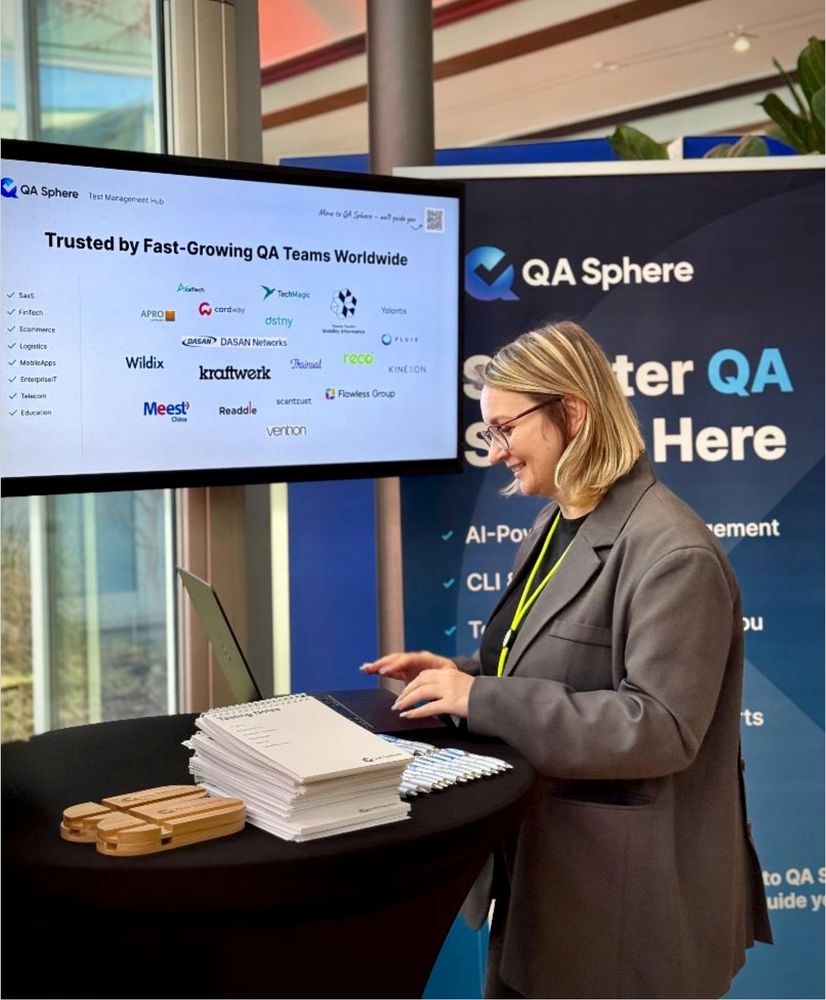
𝗗𝗮𝘆 𝟭 𝗮𝘁 𝗔𝗴𝗶𝗹𝗲 𝗧𝗲𝘀𝘁𝗶𝗻𝗴 𝗗𝗮𝘆𝘀, 𝗮𝗻𝗱 𝘁𝗵𝗲 𝘃𝗶𝗯𝗲 𝗶𝘀 𝗳𝗮𝗻𝘁𝗮𝘀𝘁𝗶𝗰!
🚀We’re excited to sponsor the event and exhibit our product here. We are meeting many passionate QA professionals and diving into conversations about AI in testing, smarter workflows, and the future of test management.
🚀We’re excited to sponsor the event and exhibit our product here. We are meeting many passionate QA professionals and diving into conversations about AI in testing, smarter workflows, and the future of test management.



November 26, 2025 at 8:06 AM
𝗗𝗮𝘆 𝟭 𝗮𝘁 𝗔𝗴𝗶𝗹𝗲 𝗧𝗲𝘀𝘁𝗶𝗻𝗴 𝗗𝗮𝘆𝘀, 𝗮𝗻𝗱 𝘁𝗵𝗲 𝘃𝗶𝗯𝗲 𝗶𝘀 𝗳𝗮𝗻𝘁𝗮𝘀𝘁𝗶𝗰!
🚀We’re excited to sponsor the event and exhibit our product here. We are meeting many passionate QA professionals and diving into conversations about AI in testing, smarter workflows, and the future of test management.
🚀We’re excited to sponsor the event and exhibit our product here. We are meeting many passionate QA professionals and diving into conversations about AI in testing, smarter workflows, and the future of test management.
🎉 𝗤𝗔 𝗦𝗽𝗵𝗲𝗿𝗲 𝗶𝘀 𝗵𝗲𝗮𝗱𝗶𝗻𝗴 𝘁𝗼 𝗔𝗴𝗶𝗹𝗲 𝗧𝗲𝘀𝘁𝗶𝗻𝗴 𝗗𝗮𝘆𝘀 𝟮𝟬𝟮𝟱!
We’re excited to join as a 𝗕𝗿𝗼𝗻𝘇𝗲 𝗦𝗽𝗼𝗻𝘀𝗼𝗿 — come meet us at 𝗕𝗼𝗼𝘁𝗵 #𝟭𝟱.
If you're attending, stop by for a chat about AI-powered test management, real QA workflows, and how we’re helping teams save time and focus on quality.
We’re excited to join as a 𝗕𝗿𝗼𝗻𝘇𝗲 𝗦𝗽𝗼𝗻𝘀𝗼𝗿 — come meet us at 𝗕𝗼𝗼𝘁𝗵 #𝟭𝟱.
If you're attending, stop by for a chat about AI-powered test management, real QA workflows, and how we’re helping teams save time and focus on quality.

November 21, 2025 at 9:57 AM
🎉 𝗤𝗔 𝗦𝗽𝗵𝗲𝗿𝗲 𝗶𝘀 𝗵𝗲𝗮𝗱𝗶𝗻𝗴 𝘁𝗼 𝗔𝗴𝗶𝗹𝗲 𝗧𝗲𝘀𝘁𝗶𝗻𝗴 𝗗𝗮𝘆𝘀 𝟮𝟬𝟮𝟱!
We’re excited to join as a 𝗕𝗿𝗼𝗻𝘇𝗲 𝗦𝗽𝗼𝗻𝘀𝗼𝗿 — come meet us at 𝗕𝗼𝗼𝘁𝗵 #𝟭𝟱.
If you're attending, stop by for a chat about AI-powered test management, real QA workflows, and how we’re helping teams save time and focus on quality.
We’re excited to join as a 𝗕𝗿𝗼𝗻𝘇𝗲 𝗦𝗽𝗼𝗻𝘀𝗼𝗿 — come meet us at 𝗕𝗼𝗼𝘁𝗵 #𝟭𝟱.
If you're attending, stop by for a chat about AI-powered test management, real QA workflows, and how we’re helping teams save time and focus on quality.
💡Connect Your Test Automation to QA Sphere in One Command
Test automation gives you speed - but what about visibility?
In many teams, results from automated tests end up scattered across tools, files, and dashboards.
🎥 Watch how it works:
Test automation gives you speed - but what about visibility?
In many teams, results from automated tests end up scattered across tools, files, and dashboards.
🎥 Watch how it works:
October 30, 2025 at 7:27 PM
💡Connect Your Test Automation to QA Sphere in One Command
Test automation gives you speed - but what about visibility?
In many teams, results from automated tests end up scattered across tools, files, and dashboards.
🎥 Watch how it works:
Test automation gives you speed - but what about visibility?
In many teams, results from automated tests end up scattered across tools, files, and dashboards.
🎥 Watch how it works:
🔹𝗔𝘂𝗱𝗶𝘁 𝗟𝗼𝗴 𝗜𝗺𝗽𝗿𝗼𝘃𝗲𝗺𝗲𝗻𝘁𝘀 – Logs now include project details, filters, and pagination for easier review.

October 16, 2025 at 4:02 PM
🔹𝗔𝘂𝗱𝗶𝘁 𝗟𝗼𝗴 𝗜𝗺𝗽𝗿𝗼𝘃𝗲𝗺𝗲𝗻𝘁𝘀 – Logs now include project details, filters, and pagination for easier review.
🔹𝗟𝗶𝗻𝗸 𝗧𝗲𝘀𝘁 𝗣𝗹𝗮𝗻𝘀 𝗮𝗻𝗱 𝗧𝗲𝘀𝘁 𝗥𝘂𝗻𝘀 𝘁𝗼 𝗝𝗶𝗿𝗮 – Connect your plans and runs directly to Jira in just a few clicks.

October 16, 2025 at 4:02 PM
🔹𝗟𝗶𝗻𝗸 𝗧𝗲𝘀𝘁 𝗣𝗹𝗮𝗻𝘀 𝗮𝗻𝗱 𝗧𝗲𝘀𝘁 𝗥𝘂𝗻𝘀 𝘁𝗼 𝗝𝗶𝗿𝗮 – Connect your plans and runs directly to Jira in just a few clicks.
🔹𝗗𝗶𝗳𝗳 𝗳𝗼𝗿 𝗣𝗮𝗿𝗮𝗺𝗲𝘁𝗲𝗿𝗶𝘇𝗲𝗱 𝗧𝗲𝘀𝘁 𝗖𝗮𝘀𝗲𝘀 – See changes in parameter tables and filled test cases more clearly.

October 16, 2025 at 4:02 PM
🔹𝗗𝗶𝗳𝗳 𝗳𝗼𝗿 𝗣𝗮𝗿𝗮𝗺𝗲𝘁𝗲𝗿𝗶𝘇𝗲𝗱 𝗧𝗲𝘀𝘁 𝗖𝗮𝘀𝗲𝘀 – See changes in parameter tables and filled test cases more clearly.
🔹𝗞𝗲𝘆𝗯𝗼𝗮𝗿𝗱 𝗦𝗵𝗼𝗿𝘁𝗰𝘂𝘁𝘀 𝗼𝗻 𝗧𝗲𝘀𝘁 𝗖𝗮𝘀𝗲𝘀 𝗣𝗮𝗴𝗲 – Work faster with hotkeys. All shortcuts are listed in the sidebar panel

October 16, 2025 at 4:02 PM
🔹𝗞𝗲𝘆𝗯𝗼𝗮𝗿𝗱 𝗦𝗵𝗼𝗿𝘁𝗰𝘂𝘁𝘀 𝗼𝗻 𝗧𝗲𝘀𝘁 𝗖𝗮𝘀𝗲𝘀 𝗣𝗮𝗴𝗲 – Work faster with hotkeys. All shortcuts are listed in the sidebar panel
🚀 𝗢𝗰𝘁𝗼𝗯𝗲𝗿 𝗥𝗲𝗹𝗲𝗮𝘀𝗲 𝗶𝘀 𝗟𝗶𝘃𝗲!
We’ve just rolled out 𝗤𝗔 𝗦𝗽𝗵𝗲𝗿𝗲 𝗢𝗰𝘁𝗼𝗯𝗲𝗿 𝗥𝗲𝗹𝗲𝗮𝘀𝗲, focused on speed, visibility, and smoother collaboration.
Here’s what’s new: 🧵
We’ve just rolled out 𝗤𝗔 𝗦𝗽𝗵𝗲𝗿𝗲 𝗢𝗰𝘁𝗼𝗯𝗲𝗿 𝗥𝗲𝗹𝗲𝗮𝘀𝗲, focused on speed, visibility, and smoother collaboration.
Here’s what’s new: 🧵

October 16, 2025 at 4:02 PM
🚀 𝗢𝗰𝘁𝗼𝗯𝗲𝗿 𝗥𝗲𝗹𝗲𝗮𝘀𝗲 𝗶𝘀 𝗟𝗶𝘃𝗲!
We’ve just rolled out 𝗤𝗔 𝗦𝗽𝗵𝗲𝗿𝗲 𝗢𝗰𝘁𝗼𝗯𝗲𝗿 𝗥𝗲𝗹𝗲𝗮𝘀𝗲, focused on speed, visibility, and smoother collaboration.
Here’s what’s new: 🧵
We’ve just rolled out 𝗤𝗔 𝗦𝗽𝗵𝗲𝗿𝗲 𝗢𝗰𝘁𝗼𝗯𝗲𝗿 𝗥𝗲𝗹𝗲𝗮𝘀𝗲, focused on speed, visibility, and smoother collaboration.
Here’s what’s new: 🧵
🚀 𝗤𝗔 𝗦𝗽𝗵𝗲𝗿𝗲 - 𝗚𝗲𝗻𝗲𝗿𝗮𝗹 𝗣𝗮𝗿𝘁𝗻𝗲𝗿 𝗼𝗳 𝗕𝗲𝘁𝗲𝗹𝗴𝗲𝘂𝘀𝗲 𝟮𝟬𝟮𝟱!
We’re proud to announce that 𝗤𝗔 𝗦𝗽𝗵𝗲𝗿𝗲 will be the 𝗚𝗲𝗻𝗲𝗿𝗮𝗹 𝗣𝗮𝗿𝘁𝗻𝗲𝗿 of 𝗕𝗲𝘁𝗲𝗹𝗴𝗲𝘂𝘀𝗲 - a leading Ukrainian online software testing conference.
𝗕𝗲𝘁𝗲𝗹𝗴𝗲𝘂𝘀𝗲 𝟮𝟬𝟮𝟱 takes place on 18th-19th October. To take part, please visit: betelgeuse.qaukraine.online
We’re proud to announce that 𝗤𝗔 𝗦𝗽𝗵𝗲𝗿𝗲 will be the 𝗚𝗲𝗻𝗲𝗿𝗮𝗹 𝗣𝗮𝗿𝘁𝗻𝗲𝗿 of 𝗕𝗲𝘁𝗲𝗹𝗴𝗲𝘂𝘀𝗲 - a leading Ukrainian online software testing conference.
𝗕𝗲𝘁𝗲𝗹𝗴𝗲𝘂𝘀𝗲 𝟮𝟬𝟮𝟱 takes place on 18th-19th October. To take part, please visit: betelgeuse.qaukraine.online

October 8, 2025 at 9:06 AM
🚀 𝗤𝗔 𝗦𝗽𝗵𝗲𝗿𝗲 - 𝗚𝗲𝗻𝗲𝗿𝗮𝗹 𝗣𝗮𝗿𝘁𝗻𝗲𝗿 𝗼𝗳 𝗕𝗲𝘁𝗲𝗹𝗴𝗲𝘂𝘀𝗲 𝟮𝟬𝟮𝟱!
We’re proud to announce that 𝗤𝗔 𝗦𝗽𝗵𝗲𝗿𝗲 will be the 𝗚𝗲𝗻𝗲𝗿𝗮𝗹 𝗣𝗮𝗿𝘁𝗻𝗲𝗿 of 𝗕𝗲𝘁𝗲𝗹𝗴𝗲𝘂𝘀𝗲 - a leading Ukrainian online software testing conference.
𝗕𝗲𝘁𝗲𝗹𝗴𝗲𝘂𝘀𝗲 𝟮𝟬𝟮𝟱 takes place on 18th-19th October. To take part, please visit: betelgeuse.qaukraine.online
We’re proud to announce that 𝗤𝗔 𝗦𝗽𝗵𝗲𝗿𝗲 will be the 𝗚𝗲𝗻𝗲𝗿𝗮𝗹 𝗣𝗮𝗿𝘁𝗻𝗲𝗿 of 𝗕𝗲𝘁𝗲𝗹𝗴𝗲𝘂𝘀𝗲 - a leading Ukrainian online software testing conference.
𝗕𝗲𝘁𝗲𝗹𝗴𝗲𝘂𝘀𝗲 𝟮𝟬𝟮𝟱 takes place on 18th-19th October. To take part, please visit: betelgeuse.qaukraine.online
🚀 𝗙𝗮𝘀𝘁𝗲𝗿, 𝘀𝗺𝗮𝗿𝘁𝗲𝗿 𝗤𝗔 𝘁𝗲𝘀𝘁𝗶𝗻𝗴 𝗳𝗼𝗿 𝗔𝗣𝗔𝗖 𝘁𝗲𝗮𝗺𝘀
Great news for QA Sphere users in the Asia-Pacific region — we’ve just launched 𝗮𝗽𝟭, our 𝗻𝗲𝘄 𝗔𝗣𝗔𝗖 𝗱𝗲𝗽𝗹𝗼𝘆𝗺𝗲𝗻𝘁 𝗵𝗼𝘀𝘁𝗲𝗱 𝗼𝗻 𝗔𝗪𝗦 𝗦𝗶𝗻𝗴𝗮𝗽𝗼𝗿𝗲 🌏
Great news for QA Sphere users in the Asia-Pacific region — we’ve just launched 𝗮𝗽𝟭, our 𝗻𝗲𝘄 𝗔𝗣𝗔𝗖 𝗱𝗲𝗽𝗹𝗼𝘆𝗺𝗲𝗻𝘁 𝗵𝗼𝘀𝘁𝗲𝗱 𝗼𝗻 𝗔𝗪𝗦 𝗦𝗶𝗻𝗴𝗮𝗽𝗼𝗿𝗲 🌏

September 30, 2025 at 10:38 AM
🚀 𝗙𝗮𝘀𝘁𝗲𝗿, 𝘀𝗺𝗮𝗿𝘁𝗲𝗿 𝗤𝗔 𝘁𝗲𝘀𝘁𝗶𝗻𝗴 𝗳𝗼𝗿 𝗔𝗣𝗔𝗖 𝘁𝗲𝗮𝗺𝘀
Great news for QA Sphere users in the Asia-Pacific region — we’ve just launched 𝗮𝗽𝟭, our 𝗻𝗲𝘄 𝗔𝗣𝗔𝗖 𝗱𝗲𝗽𝗹𝗼𝘆𝗺𝗲𝗻𝘁 𝗵𝗼𝘀𝘁𝗲𝗱 𝗼𝗻 𝗔𝗪𝗦 𝗦𝗶𝗻𝗴𝗮𝗽𝗼𝗿𝗲 🌏
Great news for QA Sphere users in the Asia-Pacific region — we’ve just launched 𝗮𝗽𝟭, our 𝗻𝗲𝘄 𝗔𝗣𝗔𝗖 𝗱𝗲𝗽𝗹𝗼𝘆𝗺𝗲𝗻𝘁 𝗵𝗼𝘀𝘁𝗲𝗱 𝗼𝗻 𝗔𝗪𝗦 𝗦𝗶𝗻𝗴𝗮𝗽𝗼𝗿𝗲 🌏
𝗔𝘂𝗱𝗶𝘁 𝗟𝗼𝗴𝗴𝗶𝗻𝗴 𝗳𝗼𝗿 𝗣𝗿𝗼𝗷𝗲𝗰𝘁 𝗔𝗿𝗰𝗵𝗶𝘃𝗶𝗻𝗴
Full transparency on archive, delete, and unarchive actions.
Full transparency on archive, delete, and unarchive actions.

September 22, 2025 at 11:00 AM
𝗔𝘂𝗱𝗶𝘁 𝗟𝗼𝗴𝗴𝗶𝗻𝗴 𝗳𝗼𝗿 𝗣𝗿𝗼𝗷𝗲𝗰𝘁 𝗔𝗿𝗰𝗵𝗶𝘃𝗶𝗻𝗴
Full transparency on archive, delete, and unarchive actions.
Full transparency on archive, delete, and unarchive actions.
𝗔𝗜-𝗔𝘀𝘀𝗶𝘀𝘁𝗲𝗱 𝗕𝘂𝗹𝗸 𝗖𝗿𝗲𝗮𝘁𝗶𝗼𝗻 𝗳𝗿𝗼𝗺 𝗣𝗗𝗙𝘀
Upload a PDF and generate test cases automatically.
Upload a PDF and generate test cases automatically.

September 22, 2025 at 11:00 AM
𝗔𝗜-𝗔𝘀𝘀𝗶𝘀𝘁𝗲𝗱 𝗕𝘂𝗹𝗸 𝗖𝗿𝗲𝗮𝘁𝗶𝗼𝗻 𝗳𝗿𝗼𝗺 𝗣𝗗𝗙𝘀
Upload a PDF and generate test cases automatically.
Upload a PDF and generate test cases automatically.
𝗕𝘂𝗹𝗸 𝗠𝗼𝘃𝗲 𝗳𝗼𝗿 𝗧𝗲𝘀𝘁 𝗖𝗮𝘀𝗲𝘀 𝗮𝗻𝗱 𝗙𝗼𝗹𝗱𝗲𝗿𝘀
Move multiple cases or folders at once.
Move multiple cases or folders at once.

September 22, 2025 at 11:00 AM
𝗕𝘂𝗹𝗸 𝗠𝗼𝘃𝗲 𝗳𝗼𝗿 𝗧𝗲𝘀𝘁 𝗖𝗮𝘀𝗲𝘀 𝗮𝗻𝗱 𝗙𝗼𝗹𝗱𝗲𝗿𝘀
Move multiple cases or folders at once.
Move multiple cases or folders at once.
𝗙𝗶𝗹𝗲 𝗔𝘁𝘁𝗮𝗰𝗵𝗺𝗲𝗻𝘁𝘀 𝗶𝗻 𝗜𝘀𝘀𝘂𝗲 𝗥𝗲𝗽𝗼𝗿𝘁𝗶𝗻𝗴
Add screenshots, videos, or logs to issues in Jira, GitHub, or Linear.
Add screenshots, videos, or logs to issues in Jira, GitHub, or Linear.

September 22, 2025 at 11:00 AM
𝗙𝗶𝗹𝗲 𝗔𝘁𝘁𝗮𝗰𝗵𝗺𝗲𝗻𝘁𝘀 𝗶𝗻 𝗜𝘀𝘀𝘂𝗲 𝗥𝗲𝗽𝗼𝗿𝘁𝗶𝗻𝗴
Add screenshots, videos, or logs to issues in Jira, GitHub, or Linear.
Add screenshots, videos, or logs to issues in Jira, GitHub, or Linear.