



Marko Zivadinovic | Md3sign
@md3sign.bsky.social
Educator, Mastering Engineer and Founder at Md3sign Studio, the place where you can learn to mix and master from professionals. https://md3sign.com/
CLA 76 Tip ✨
Sometimes, all I want from a compressor is harmonics and the tone it gives.
This is why I'm pressing "COMP OFF" on CLA 76 which enables me to just run my signal through the unit and pick up the tone without compressing my signal.
Sometimes, all I want from a compressor is harmonics and the tone it gives.
This is why I'm pressing "COMP OFF" on CLA 76 which enables me to just run my signal through the unit and pick up the tone without compressing my signal.

July 15, 2025 at 8:10 AM
CLA 76 Tip ✨
Sometimes, all I want from a compressor is harmonics and the tone it gives.
This is why I'm pressing "COMP OFF" on CLA 76 which enables me to just run my signal through the unit and pick up the tone without compressing my signal.
Sometimes, all I want from a compressor is harmonics and the tone it gives.
This is why I'm pressing "COMP OFF" on CLA 76 which enables me to just run my signal through the unit and pick up the tone without compressing my signal.
Drum Bus Compression
1. 3:1 Ratio (4:1 also works)
2. 30ms attack (10-30ms usually works)
3. Fast release so the compressor recovers in time
4. Sidechain filter set at 100Hz for a bit more precise compression
5. About 2-3dB of gain reduction
1. 3:1 Ratio (4:1 also works)
2. 30ms attack (10-30ms usually works)
3. Fast release so the compressor recovers in time
4. Sidechain filter set at 100Hz for a bit more precise compression
5. About 2-3dB of gain reduction

July 14, 2025 at 12:30 PM
Drum Bus Compression
1. 3:1 Ratio (4:1 also works)
2. 30ms attack (10-30ms usually works)
3. Fast release so the compressor recovers in time
4. Sidechain filter set at 100Hz for a bit more precise compression
5. About 2-3dB of gain reduction
1. 3:1 Ratio (4:1 also works)
2. 30ms attack (10-30ms usually works)
3. Fast release so the compressor recovers in time
4. Sidechain filter set at 100Hz for a bit more precise compression
5. About 2-3dB of gain reduction
Analog Color + Analog Width ✨
I'm using SSL Vintage Drive to get some color by adjusting the drive and density.
Following this I'm using SSL Stereo Image to make the stereo field more impressive. Make sure to solo the sides and listen to how wide you want them to be before doing final touches.
I'm using SSL Vintage Drive to get some color by adjusting the drive and density.
Following this I'm using SSL Stereo Image to make the stereo field more impressive. Make sure to solo the sides and listen to how wide you want them to be before doing final touches.

July 13, 2025 at 12:15 PM
Analog Color + Analog Width ✨
I'm using SSL Vintage Drive to get some color by adjusting the drive and density.
Following this I'm using SSL Stereo Image to make the stereo field more impressive. Make sure to solo the sides and listen to how wide you want them to be before doing final touches.
I'm using SSL Vintage Drive to get some color by adjusting the drive and density.
Following this I'm using SSL Stereo Image to make the stereo field more impressive. Make sure to solo the sides and listen to how wide you want them to be before doing final touches.
Spark your Upper Range ✨
Using Weiss Exciter I'm bringing more harmonics around the upper mids & highs which made the master more present.
Select Linear Phase mode, softer filter and mastering mode, that'll make this plugin do wonders.
Using Weiss Exciter I'm bringing more harmonics around the upper mids & highs which made the master more present.
Select Linear Phase mode, softer filter and mastering mode, that'll make this plugin do wonders.

July 12, 2025 at 8:45 AM
Spark your Upper Range ✨
Using Weiss Exciter I'm bringing more harmonics around the upper mids & highs which made the master more present.
Select Linear Phase mode, softer filter and mastering mode, that'll make this plugin do wonders.
Using Weiss Exciter I'm bringing more harmonics around the upper mids & highs which made the master more present.
Select Linear Phase mode, softer filter and mastering mode, that'll make this plugin do wonders.
To get a very fat low end and a lot of transients, try using a bus compressor with following settings:
1. Slow attack (30ms)
2. Fast release (100ms)
3. 3:1-4:1 ratio (3:1 ratio if you want a bit heavier low end)
4. About 1.5-2dB of gain reduction
5. Make up gain so you match the loudness
1. Slow attack (30ms)
2. Fast release (100ms)
3. 3:1-4:1 ratio (3:1 ratio if you want a bit heavier low end)
4. About 1.5-2dB of gain reduction
5. Make up gain so you match the loudness

July 11, 2025 at 10:14 AM
To get a very fat low end and a lot of transients, try using a bus compressor with following settings:
1. Slow attack (30ms)
2. Fast release (100ms)
3. 3:1-4:1 ratio (3:1 ratio if you want a bit heavier low end)
4. About 1.5-2dB of gain reduction
5. Make up gain so you match the loudness
1. Slow attack (30ms)
2. Fast release (100ms)
3. 3:1-4:1 ratio (3:1 ratio if you want a bit heavier low end)
4. About 1.5-2dB of gain reduction
5. Make up gain so you match the loudness
Smashing the Snare ✨
If you want the snare to sound huge, full and outstanding in the mix, try going for a bit harder ratio such as 8:1 or 10:1 using an 1176.
In terms of gain reduction, go anywhere between 4-7dB.
If you want the snare to sound huge, full and outstanding in the mix, try going for a bit harder ratio such as 8:1 or 10:1 using an 1176.
In terms of gain reduction, go anywhere between 4-7dB.

July 10, 2025 at 9:19 AM
Smashing the Snare ✨
If you want the snare to sound huge, full and outstanding in the mix, try going for a bit harder ratio such as 8:1 or 10:1 using an 1176.
In terms of gain reduction, go anywhere between 4-7dB.
If you want the snare to sound huge, full and outstanding in the mix, try going for a bit harder ratio such as 8:1 or 10:1 using an 1176.
In terms of gain reduction, go anywhere between 4-7dB.
T-Racks Dyna-Mu is an outstandingly well made analog emulation I personally love using at the mastering stage to shape the dynamics and get that famously known "glue" effect.
I'm sticking to "soft" mode which engages 1.5:1 ratio, slower attack, fast release and about 1-1.4dB of gain reduction.
I'm sticking to "soft" mode which engages 1.5:1 ratio, slower attack, fast release and about 1-1.4dB of gain reduction.

July 9, 2025 at 7:39 AM
T-Racks Dyna-Mu is an outstandingly well made analog emulation I personally love using at the mastering stage to shape the dynamics and get that famously known "glue" effect.
I'm sticking to "soft" mode which engages 1.5:1 ratio, slower attack, fast release and about 1-1.4dB of gain reduction.
I'm sticking to "soft" mode which engages 1.5:1 ratio, slower attack, fast release and about 1-1.4dB of gain reduction.
Heavy Kick in Mastering 🤯
Try using a saturator like Saturn 2 to make kick stand out at the mastering stage by creating a band around the kick's frequency range.
Then, go for Gentle Saturation mode and use an envelope follower in transient mode to create more movement and natural punch on the kick
Try using a saturator like Saturn 2 to make kick stand out at the mastering stage by creating a band around the kick's frequency range.
Then, go for Gentle Saturation mode and use an envelope follower in transient mode to create more movement and natural punch on the kick

July 8, 2025 at 9:54 AM
Heavy Kick in Mastering 🤯
Try using a saturator like Saturn 2 to make kick stand out at the mastering stage by creating a band around the kick's frequency range.
Then, go for Gentle Saturation mode and use an envelope follower in transient mode to create more movement and natural punch on the kick
Try using a saturator like Saturn 2 to make kick stand out at the mastering stage by creating a band around the kick's frequency range.
Then, go for Gentle Saturation mode and use an envelope follower in transient mode to create more movement and natural punch on the kick
To bring more excitement to the upper mid-range and the top end of your drums, try using Pro MB on your Drum Bus in Expansion mode.
I'm focusing the expansion band starting from about 800-900Hz all the way to the top with fast attack, fast release and slightly harder ratio.
I'm focusing the expansion band starting from about 800-900Hz all the way to the top with fast attack, fast release and slightly harder ratio.

July 7, 2025 at 3:06 PM
To bring more excitement to the upper mid-range and the top end of your drums, try using Pro MB on your Drum Bus in Expansion mode.
I'm focusing the expansion band starting from about 800-900Hz all the way to the top with fast attack, fast release and slightly harder ratio.
I'm focusing the expansion band starting from about 800-900Hz all the way to the top with fast attack, fast release and slightly harder ratio.
DO THIS ON VOCALS 😉
Try compressing around the fundamental of your vocal while expanding around where your vocal is mostly present (likely to be around 2.5kHz).
This will bring your vocals much more upfront in the mix while also making sure that the 250Hz range doesn't mask your upper range.
Try compressing around the fundamental of your vocal while expanding around where your vocal is mostly present (likely to be around 2.5kHz).
This will bring your vocals much more upfront in the mix while also making sure that the 250Hz range doesn't mask your upper range.

July 6, 2025 at 12:37 PM
DO THIS ON VOCALS 😉
Try compressing around the fundamental of your vocal while expanding around where your vocal is mostly present (likely to be around 2.5kHz).
This will bring your vocals much more upfront in the mix while also making sure that the 250Hz range doesn't mask your upper range.
Try compressing around the fundamental of your vocal while expanding around where your vocal is mostly present (likely to be around 2.5kHz).
This will bring your vocals much more upfront in the mix while also making sure that the 250Hz range doesn't mask your upper range.
HARD RATIO, SOFT KNEE?! 🤯
Try using the hardest possible ratio in combination with softer knee on your instruments within Pro C2.
Using a compressor set like this I can notice that the quieter details are boosted and that this kind of processing reminds me of a subtle wave shaping.
Try using the hardest possible ratio in combination with softer knee on your instruments within Pro C2.
Using a compressor set like this I can notice that the quieter details are boosted and that this kind of processing reminds me of a subtle wave shaping.

July 5, 2025 at 2:33 PM
HARD RATIO, SOFT KNEE?! 🤯
Try using the hardest possible ratio in combination with softer knee on your instruments within Pro C2.
Using a compressor set like this I can notice that the quieter details are boosted and that this kind of processing reminds me of a subtle wave shaping.
Try using the hardest possible ratio in combination with softer knee on your instruments within Pro C2.
Using a compressor set like this I can notice that the quieter details are boosted and that this kind of processing reminds me of a subtle wave shaping.
PARALLEL THE SNARE 🥁
Create a parallel channel for your snare and insert any 1176 emulation (I'm going with CLA-76 in this case) with 12:1 ratio, fast attack, faster release and about 10dB of gain reduction.
After doing so, blend the dry & wet signals to your preference.
Create a parallel channel for your snare and insert any 1176 emulation (I'm going with CLA-76 in this case) with 12:1 ratio, fast attack, faster release and about 10dB of gain reduction.
After doing so, blend the dry & wet signals to your preference.

July 4, 2025 at 2:13 PM
PARALLEL THE SNARE 🥁
Create a parallel channel for your snare and insert any 1176 emulation (I'm going with CLA-76 in this case) with 12:1 ratio, fast attack, faster release and about 10dB of gain reduction.
After doing so, blend the dry & wet signals to your preference.
Create a parallel channel for your snare and insert any 1176 emulation (I'm going with CLA-76 in this case) with 12:1 ratio, fast attack, faster release and about 10dB of gain reduction.
After doing so, blend the dry & wet signals to your preference.
Using an auto-pan plugin such as PanCake2 we can automate panning on our percussion bus to just create more movement on the sides.
By doing so, I don't mean using auto-pan at 100%. Keep the mix knob up to 50% or around that value. The rest depends on your personal taste & preference.
By doing so, I don't mean using auto-pan at 100%. Keep the mix knob up to 50% or around that value. The rest depends on your personal taste & preference.

July 3, 2025 at 7:44 PM
Using an auto-pan plugin such as PanCake2 we can automate panning on our percussion bus to just create more movement on the sides.
By doing so, I don't mean using auto-pan at 100%. Keep the mix knob up to 50% or around that value. The rest depends on your personal taste & preference.
By doing so, I don't mean using auto-pan at 100%. Keep the mix knob up to 50% or around that value. The rest depends on your personal taste & preference.
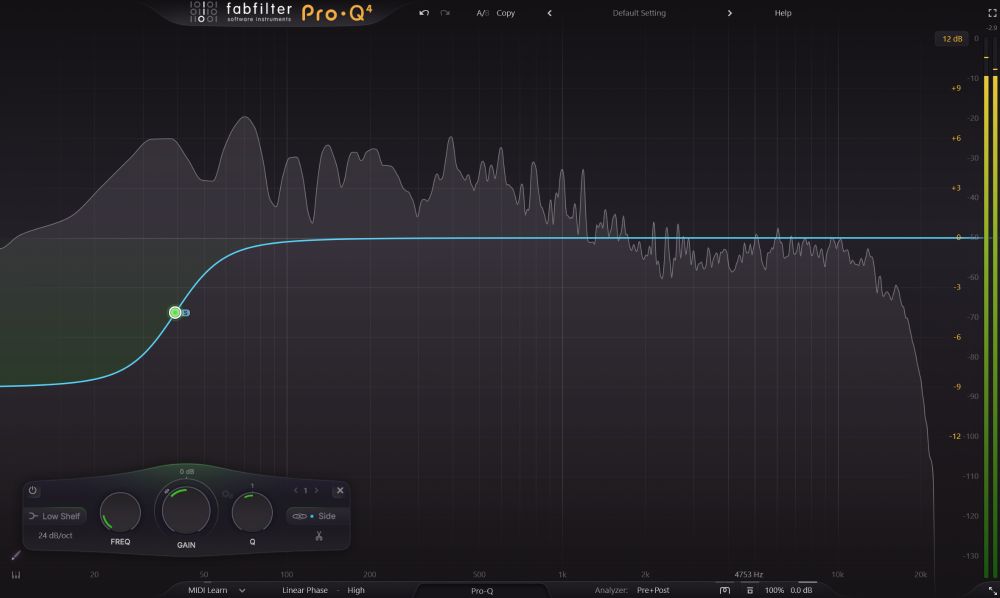
CENTERING THE LOW END ⁉️
First, you need to make sure you have a decent monitoring system in order to be able to tell the differences.
Do this specific adjustment around the fundamental of your bass or a bit above is a great thing, but not in all cases.
First, you need to make sure you have a decent monitoring system in order to be able to tell the differences.
Do this specific adjustment around the fundamental of your bass or a bit above is a great thing, but not in all cases.
July 2, 2025 at 3:42 PM
CENTERING THE LOW END ⁉️
First, you need to make sure you have a decent monitoring system in order to be able to tell the differences.
Do this specific adjustment around the fundamental of your bass or a bit above is a great thing, but not in all cases.
First, you need to make sure you have a decent monitoring system in order to be able to tell the differences.
Do this specific adjustment around the fundamental of your bass or a bit above is a great thing, but not in all cases.
JUICY VOCALS 🎙️
FairChild emulations work wonderful on vocals! I'm tweaking the input gain & threshold until I get about 7dB of gain reduction on the loudest peak.
Following that, I'm setting the time constant to 2nd position which has a bit slower attack, which worked well for me.
FairChild emulations work wonderful on vocals! I'm tweaking the input gain & threshold until I get about 7dB of gain reduction on the loudest peak.
Following that, I'm setting the time constant to 2nd position which has a bit slower attack, which worked well for me.

June 29, 2025 at 11:10 AM
JUICY VOCALS 🎙️
FairChild emulations work wonderful on vocals! I'm tweaking the input gain & threshold until I get about 7dB of gain reduction on the loudest peak.
Following that, I'm setting the time constant to 2nd position which has a bit slower attack, which worked well for me.
FairChild emulations work wonderful on vocals! I'm tweaking the input gain & threshold until I get about 7dB of gain reduction on the loudest peak.
Following that, I'm setting the time constant to 2nd position which has a bit slower attack, which worked well for me.
EXTRA HEADROOM 🔥
This Soothe2 presets is another solution for muddy bass since it enables to save up headroom that you can use later to push the master louder.
Use fast attack & release, ultra setting, some trimming and adjust depth to taste if needed. Consider doing this in Mid/Side mode
This Soothe2 presets is another solution for muddy bass since it enables to save up headroom that you can use later to push the master louder.
Use fast attack & release, ultra setting, some trimming and adjust depth to taste if needed. Consider doing this in Mid/Side mode

June 28, 2025 at 10:25 AM
EXTRA HEADROOM 🔥
This Soothe2 presets is another solution for muddy bass since it enables to save up headroom that you can use later to push the master louder.
Use fast attack & release, ultra setting, some trimming and adjust depth to taste if needed. Consider doing this in Mid/Side mode
This Soothe2 presets is another solution for muddy bass since it enables to save up headroom that you can use later to push the master louder.
Use fast attack & release, ultra setting, some trimming and adjust depth to taste if needed. Consider doing this in Mid/Side mode
CD SAMPLING RATE 🤔
A sampling rate of 44.1 kHz provides a frequency response up to approximately 22 kHz, which is slightly above the upper limit of human hearing. This ensures that the entire audible frequency spectrum can be faithfully captured and reproduced without aliasing.
A sampling rate of 44.1 kHz provides a frequency response up to approximately 22 kHz, which is slightly above the upper limit of human hearing. This ensures that the entire audible frequency spectrum can be faithfully captured and reproduced without aliasing.

June 27, 2025 at 8:57 AM
CD SAMPLING RATE 🤔
A sampling rate of 44.1 kHz provides a frequency response up to approximately 22 kHz, which is slightly above the upper limit of human hearing. This ensures that the entire audible frequency spectrum can be faithfully captured and reproduced without aliasing.
A sampling rate of 44.1 kHz provides a frequency response up to approximately 22 kHz, which is slightly above the upper limit of human hearing. This ensures that the entire audible frequency spectrum can be faithfully captured and reproduced without aliasing.
Warm Vocals 🔥
Using Saturn 2 I'm isolating the band around the fundamental frequency and using "Warm Tube" mode to introduce 2nd order harmonics to that range.
This resulted in a much warmer vocal without amplifying the mud or any other issues within the vocal mix!
Using Saturn 2 I'm isolating the band around the fundamental frequency and using "Warm Tube" mode to introduce 2nd order harmonics to that range.
This resulted in a much warmer vocal without amplifying the mud or any other issues within the vocal mix!

June 26, 2025 at 11:39 AM
Warm Vocals 🔥
Using Saturn 2 I'm isolating the band around the fundamental frequency and using "Warm Tube" mode to introduce 2nd order harmonics to that range.
This resulted in a much warmer vocal without amplifying the mud or any other issues within the vocal mix!
Using Saturn 2 I'm isolating the band around the fundamental frequency and using "Warm Tube" mode to introduce 2nd order harmonics to that range.
This resulted in a much warmer vocal without amplifying the mud or any other issues within the vocal mix!
Mid/Side Saturation 🤯
This kind of saturation allows you to go step beyond regular saturation
The unit that does an amazing job for this is the Black Box HG-2MS. Try introducing different amount of tubes to mono & stereo information
This kind of saturation allows you to go step beyond regular saturation
The unit that does an amazing job for this is the Black Box HG-2MS. Try introducing different amount of tubes to mono & stereo information

June 24, 2025 at 11:59 AM
Mid/Side Saturation 🤯
This kind of saturation allows you to go step beyond regular saturation
The unit that does an amazing job for this is the Black Box HG-2MS. Try introducing different amount of tubes to mono & stereo information
This kind of saturation allows you to go step beyond regular saturation
The unit that does an amazing job for this is the Black Box HG-2MS. Try introducing different amount of tubes to mono & stereo information
Limiting Trick 🤯
Using Sonnox Oxford Limiter, try combining a bit longer attack time and shorter release with "Enhance" fader.
This will naturally make your transients louder and punchier while still making sure you get the desired limiting.
Using Sonnox Oxford Limiter, try combining a bit longer attack time and shorter release with "Enhance" fader.
This will naturally make your transients louder and punchier while still making sure you get the desired limiting.

June 23, 2025 at 8:19 AM
Limiting Trick 🤯
Using Sonnox Oxford Limiter, try combining a bit longer attack time and shorter release with "Enhance" fader.
This will naturally make your transients louder and punchier while still making sure you get the desired limiting.
Using Sonnox Oxford Limiter, try combining a bit longer attack time and shorter release with "Enhance" fader.
This will naturally make your transients louder and punchier while still making sure you get the desired limiting.
Huge kicks using StandardClip
1. Insert StandardClip, increase the input gain (about 1dB would be enough)
2. Reduce the clip fader for about 3-4dB depending on the kick's level
3. Now set the soft-clip saturation to about 25% and listen to how your kick sounds now
1. Insert StandardClip, increase the input gain (about 1dB would be enough)
2. Reduce the clip fader for about 3-4dB depending on the kick's level
3. Now set the soft-clip saturation to about 25% and listen to how your kick sounds now

June 22, 2025 at 10:55 AM
Huge kicks using StandardClip
1. Insert StandardClip, increase the input gain (about 1dB would be enough)
2. Reduce the clip fader for about 3-4dB depending on the kick's level
3. Now set the soft-clip saturation to about 25% and listen to how your kick sounds now
1. Insert StandardClip, increase the input gain (about 1dB would be enough)
2. Reduce the clip fader for about 3-4dB depending on the kick's level
3. Now set the soft-clip saturation to about 25% and listen to how your kick sounds now
IMPRESSIVE & WIDE VOCALS ↔️ ✨
One of the tools I use on vocals is the Softube Layers plugin.
While keeping the mix amount to about 30% I'm tweaking the amount of widening and the layers around until I get that incredible doubling effect on my vocals.
One of the tools I use on vocals is the Softube Layers plugin.
While keeping the mix amount to about 30% I'm tweaking the amount of widening and the layers around until I get that incredible doubling effect on my vocals.

June 20, 2025 at 9:26 AM
IMPRESSIVE & WIDE VOCALS ↔️ ✨
One of the tools I use on vocals is the Softube Layers plugin.
While keeping the mix amount to about 30% I'm tweaking the amount of widening and the layers around until I get that incredible doubling effect on my vocals.
One of the tools I use on vocals is the Softube Layers plugin.
While keeping the mix amount to about 30% I'm tweaking the amount of widening and the layers around until I get that incredible doubling effect on my vocals.
BRIGHT SNARE! 🤯
One of my favorite snare formula is to use IK Multimedia's TEAC A-3340S tape machine.
The way I'm using it is with GP9 (a bit newer type) tape, high speed so I get a bit smoother sound and some EQ settings within the tape itself which depends on my personal preference and liking.
One of my favorite snare formula is to use IK Multimedia's TEAC A-3340S tape machine.
The way I'm using it is with GP9 (a bit newer type) tape, high speed so I get a bit smoother sound and some EQ settings within the tape itself which depends on my personal preference and liking.

June 19, 2025 at 6:26 AM
BRIGHT SNARE! 🤯
One of my favorite snare formula is to use IK Multimedia's TEAC A-3340S tape machine.
The way I'm using it is with GP9 (a bit newer type) tape, high speed so I get a bit smoother sound and some EQ settings within the tape itself which depends on my personal preference and liking.
One of my favorite snare formula is to use IK Multimedia's TEAC A-3340S tape machine.
The way I'm using it is with GP9 (a bit newer type) tape, high speed so I get a bit smoother sound and some EQ settings within the tape itself which depends on my personal preference and liking.
If you know how to operate using clippers, they can give wonders on kicks.
Using this free plugin called FreeClip by VennAudio I'm pulling down the clip fader while selecting Hyperbolic Tan type, which helped to gently clip the kick and give that grit and punch I was looking for.
Using this free plugin called FreeClip by VennAudio I'm pulling down the clip fader while selecting Hyperbolic Tan type, which helped to gently clip the kick and give that grit and punch I was looking for.

June 18, 2025 at 10:30 AM
If you know how to operate using clippers, they can give wonders on kicks.
Using this free plugin called FreeClip by VennAudio I'm pulling down the clip fader while selecting Hyperbolic Tan type, which helped to gently clip the kick and give that grit and punch I was looking for.
Using this free plugin called FreeClip by VennAudio I'm pulling down the clip fader while selecting Hyperbolic Tan type, which helped to gently clip the kick and give that grit and punch I was looking for.
ONLY ONE REVERB?! 🤯
Believe or not, you can use only one type of reverb in the mix, and this is what those old engineers used to do.
You're going to use the same reverb, but with different PREDELAY times. This will result in a different sounding reverb each time which can compliment the mix.
Believe or not, you can use only one type of reverb in the mix, and this is what those old engineers used to do.
You're going to use the same reverb, but with different PREDELAY times. This will result in a different sounding reverb each time which can compliment the mix.

June 17, 2025 at 8:20 AM
ONLY ONE REVERB?! 🤯
Believe or not, you can use only one type of reverb in the mix, and this is what those old engineers used to do.
You're going to use the same reverb, but with different PREDELAY times. This will result in a different sounding reverb each time which can compliment the mix.
Believe or not, you can use only one type of reverb in the mix, and this is what those old engineers used to do.
You're going to use the same reverb, but with different PREDELAY times. This will result in a different sounding reverb each time which can compliment the mix.