




Lancecourse
@lancecourse.bsky.social
https://youtube.com/@lancecourse
Learn Web Development, Programming, & Computer Science
Enhance your tech skills with with a daily dose of tech tips! Explore concise courses and tutorials in web development, programming, and computer science.
Learn Web Development, Programming, & Computer Science
Enhance your tech skills with with a daily dose of tech tips! Explore concise courses and tutorials in web development, programming, and computer science.
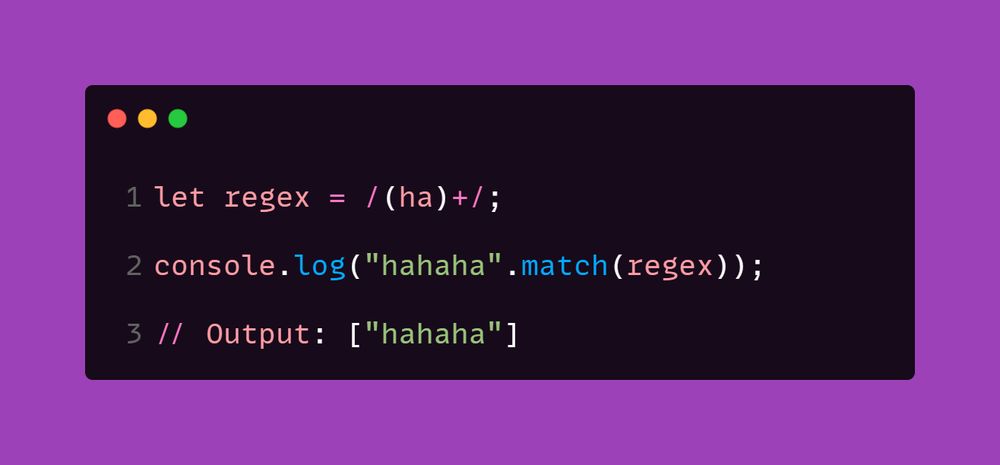
LESSON 66 - Grouping & Capturing in Regular Expressions
--> Explanation:
Grouping is mainly used for repeating multiple characters together and capturing substrings.
--> More details & Practice:
lancecourse.com/courses/java...
--> Explanation:
Grouping is mainly used for repeating multiple characters together and capturing substrings.
--> More details & Practice:
lancecourse.com/courses/java...
March 31, 2025 at 5:11 AM
LESSON 66 - Grouping & Capturing in Regular Expressions
--> Explanation:
Grouping is mainly used for repeating multiple characters together and capturing substrings.
--> More details & Practice:
lancecourse.com/courses/java...
--> Explanation:
Grouping is mainly used for repeating multiple characters together and capturing substrings.
--> More details & Practice:
lancecourse.com/courses/java...
LESSON 65 - Character Classes in Regular Expressions
--> Explanation:
* Character classes provide *powerful shortcuts* for matching groups of characters.
* \d, \w, \s, and their uppercase versions have *opposite meanings*.
* Useful for *validations and text processing*.
--> Explanation:
* Character classes provide *powerful shortcuts* for matching groups of characters.
* \d, \w, \s, and their uppercase versions have *opposite meanings*.
* Useful for *validations and text processing*.

March 30, 2025 at 5:56 AM
LESSON 65 - Character Classes in Regular Expressions
--> Explanation:
* Character classes provide *powerful shortcuts* for matching groups of characters.
* \d, \w, \s, and their uppercase versions have *opposite meanings*.
* Useful for *validations and text processing*.
--> Explanation:
* Character classes provide *powerful shortcuts* for matching groups of characters.
* \d, \w, \s, and their uppercase versions have *opposite meanings*.
* Useful for *validations and text processing*.
LESSON 63 - Regular Expressions: Character Classes and Special Characters
*--> Explanation:*
- `[a-z]` → Any lowercase letter
- `[A-Z]` → Any uppercase letter
- `[0-9]` → Any digit
- `[aeiou]` → Any vowel
- `[^a-z]` → NOT a lowercase letter
*--> Explanation:*
- `[a-z]` → Any lowercase letter
- `[A-Z]` → Any uppercase letter
- `[0-9]` → Any digit
- `[aeiou]` → Any vowel
- `[^a-z]` → NOT a lowercase letter

March 28, 2025 at 4:55 AM
LESSON 63 - Regular Expressions: Character Classes and Special Characters
*--> Explanation:*
- `[a-z]` → Any lowercase letter
- `[A-Z]` → Any uppercase letter
- `[0-9]` → Any digit
- `[aeiou]` → Any vowel
- `[^a-z]` → NOT a lowercase letter
*--> Explanation:*
- `[a-z]` → Any lowercase letter
- `[A-Z]` → Any uppercase letter
- `[0-9]` → Any digit
- `[aeiou]` → Any vowel
- `[^a-z]` → NOT a lowercase letter
LESSON 62 - Basic Regular Expression Patterns in JavaScript
- Regular expressions are used for pattern matching in JavaScript.
- Common patterns include `\d`, `\w`, `\s`, `.`, `^`, and `$`.
- Flags like `i` make the matching case-insensitive.
- Regular expressions are used for pattern matching in JavaScript.
- Common patterns include `\d`, `\w`, `\s`, `.`, `^`, and `$`.
- Flags like `i` make the matching case-insensitive.

March 27, 2025 at 4:49 AM
LESSON 62 - Basic Regular Expression Patterns in JavaScript
- Regular expressions are used for pattern matching in JavaScript.
- Common patterns include `\d`, `\w`, `\s`, `.`, `^`, and `$`.
- Flags like `i` make the matching case-insensitive.
- Regular expressions are used for pattern matching in JavaScript.
- Common patterns include `\d`, `\w`, `\s`, `.`, `^`, and `$`.
- Flags like `i` make the matching case-insensitive.
LESSON 61 - Introduction to Regular Expressions in JavaScript
Regular Expressions (RegEx) are patterns used to match character combinations in strings. In JavaScript, RegEx is used with methods like test() and match() for searching and replacing text.
Regular Expressions (RegEx) are patterns used to match character combinations in strings. In JavaScript, RegEx is used with methods like test() and match() for searching and replacing text.

March 26, 2025 at 4:37 AM
LESSON 61 - Introduction to Regular Expressions in JavaScript
Regular Expressions (RegEx) are patterns used to match character combinations in strings. In JavaScript, RegEx is used with methods like test() and match() for searching and replacing text.
Regular Expressions (RegEx) are patterns used to match character combinations in strings. In JavaScript, RegEx is used with methods like test() and match() for searching and replacing text.
LESSON 53- JavaScript sessionStorage
* sessionStorage stores data only for the session (until the tab is closed).
* Use it for *temporary data* that should not persist across multiple visits.
* Use sessionStorage.setItem(), getItem(), removeItem(), and clear() to manage stored values.
* sessionStorage stores data only for the session (until the tab is closed).
* Use it for *temporary data* that should not persist across multiple visits.
* Use sessionStorage.setItem(), getItem(), removeItem(), and clear() to manage stored values.

March 20, 2025 at 11:31 AM
LESSON 53- JavaScript sessionStorage
* sessionStorage stores data only for the session (until the tab is closed).
* Use it for *temporary data* that should not persist across multiple visits.
* Use sessionStorage.setItem(), getItem(), removeItem(), and clear() to manage stored values.
* sessionStorage stores data only for the session (until the tab is closed).
* Use it for *temporary data* that should not persist across multiple visits.
* Use sessionStorage.setItem(), getItem(), removeItem(), and clear() to manage stored values.
LESSON 52 - Working with #localStorage in #JavaScript
--> Explanation:
* Stores data with no expiration.
* Stores only strings (you need to convert objects/arrays to JSON).
* Can store up to 5MB of data per domain.
* Only accessible from the same origin (same protocol, domain, and port).
--> Explanation:
* Stores data with no expiration.
* Stores only strings (you need to convert objects/arrays to JSON).
* Can store up to 5MB of data per domain.
* Only accessible from the same origin (same protocol, domain, and port).

March 18, 2025 at 5:59 AM
LESSON 52 - Working with #localStorage in #JavaScript
--> Explanation:
* Stores data with no expiration.
* Stores only strings (you need to convert objects/arrays to JSON).
* Can store up to 5MB of data per domain.
* Only accessible from the same origin (same protocol, domain, and port).
--> Explanation:
* Stores data with no expiration.
* Stores only strings (you need to convert objects/arrays to JSON).
* Can store up to 5MB of data per domain.
* Only accessible from the same origin (same protocol, domain, and port).
LESSON 51 - Introduction to Browser Storage
--> Explanation:
1. localStorage – Stores data with no expiration. Data remains even after the browser is closed.
2. sessionStorage – Stores data for the duration of a page session. Data is lost when the page is closed.
--> Explanation:
1. localStorage – Stores data with no expiration. Data remains even after the browser is closed.
2. sessionStorage – Stores data for the duration of a page session. Data is lost when the page is closed.

March 17, 2025 at 5:40 AM
LESSON 51 - Introduction to Browser Storage
--> Explanation:
1. localStorage – Stores data with no expiration. Data remains even after the browser is closed.
2. sessionStorage – Stores data for the duration of a page session. Data is lost when the page is closed.
--> Explanation:
1. localStorage – Stores data with no expiration. Data remains even after the browser is closed.
2. sessionStorage – Stores data for the duration of a page session. Data is lost when the page is closed.
LESSON 50 - JavaScript Mouse Events
* JavaScript provides various mouse events like click, mouseover, mousemove, and mouseleave.
* mouseenter and mouseleave do not bubble, while mouseover and mouseout do bubble.
* Mouse events allow us to create dynamic and interactive webpages.
* JavaScript provides various mouse events like click, mouseover, mousemove, and mouseleave.
* mouseenter and mouseleave do not bubble, while mouseover and mouseout do bubble.
* Mouse events allow us to create dynamic and interactive webpages.

March 16, 2025 at 4:14 AM
LESSON 50 - JavaScript Mouse Events
* JavaScript provides various mouse events like click, mouseover, mousemove, and mouseleave.
* mouseenter and mouseleave do not bubble, while mouseover and mouseout do bubble.
* Mouse events allow us to create dynamic and interactive webpages.
* JavaScript provides various mouse events like click, mouseover, mousemove, and mouseleave.
* mouseenter and mouseleave do not bubble, while mouseover and mouseout do bubble.
* Mouse events allow us to create dynamic and interactive webpages.
LESSON 49 - JavaScript Event Object
--> Explanation:
1. *keydown* – Fires when a key is pressed down.
2. *keyup* – Fires when a key is released.
3. *keypress* (Deprecated) – Previously used for character keys but now replaced by keydown and keyup.
--> Explanation:
1. *keydown* – Fires when a key is pressed down.
2. *keyup* – Fires when a key is released.
3. *keypress* (Deprecated) – Previously used for character keys but now replaced by keydown and keyup.

March 15, 2025 at 4:45 AM
LESSON 49 - JavaScript Event Object
--> Explanation:
1. *keydown* – Fires when a key is pressed down.
2. *keyup* – Fires when a key is released.
3. *keypress* (Deprecated) – Previously used for character keys but now replaced by keydown and keyup.
--> Explanation:
1. *keydown* – Fires when a key is pressed down.
2. *keyup* – Fires when a key is released.
3. *keypress* (Deprecated) – Previously used for character keys but now replaced by keydown and keyup.
LESSON 48 - #JavaScript Event Object
--> Explanation:
- Gives access to *event properties* (e.g., mouse position, key pressed).
- Helps prevent *default behavior* (e.g., stopping a form from submitting).
- Allows *event delegation*, which helps manage multiple elements efficiently.
--> Explanation:
- Gives access to *event properties* (e.g., mouse position, key pressed).
- Helps prevent *default behavior* (e.g., stopping a form from submitting).
- Allows *event delegation*, which helps manage multiple elements efficiently.

March 13, 2025 at 4:52 AM
LESSON 48 - #JavaScript Event Object
--> Explanation:
- Gives access to *event properties* (e.g., mouse position, key pressed).
- Helps prevent *default behavior* (e.g., stopping a form from submitting).
- Allows *event delegation*, which helps manage multiple elements efficiently.
--> Explanation:
- Gives access to *event properties* (e.g., mouse position, key pressed).
- Helps prevent *default behavior* (e.g., stopping a form from submitting).
- Allows *event delegation*, which helps manage multiple elements efficiently.
LESSON 47 - Different Types of JavaScript Events
--> Explanation:
- resize -> When the window is resized
- scroll -> When the user scrolls
- load -> When the page is fully loaded
- unload -> When the user leaves the page
--> More details & Practice:
lancecourse.com/en/courses/j...
--> Explanation:
- resize -> When the window is resized
- scroll -> When the user scrolls
- load -> When the page is fully loaded
- unload -> When the user leaves the page
--> More details & Practice:
lancecourse.com/en/courses/j...

March 12, 2025 at 5:30 AM
LESSON 47 - Different Types of JavaScript Events
--> Explanation:
- resize -> When the window is resized
- scroll -> When the user scrolls
- load -> When the page is fully loaded
- unload -> When the user leaves the page
--> More details & Practice:
lancecourse.com/en/courses/j...
--> Explanation:
- resize -> When the window is resized
- scroll -> When the user scrolls
- load -> When the page is fully loaded
- unload -> When the user leaves the page
--> More details & Practice:
lancecourse.com/en/courses/j...
LESSON 46 - Handling Events in JavaScript
--> Explanation:
* addEventListener() allows handling multiple events per element.
* Use "click", "mouseover", "keyup", and many more event types.
* Events make web pages interactive and dynamic.
--> Explanation:
* addEventListener() allows handling multiple events per element.
* Use "click", "mouseover", "keyup", and many more event types.
* Events make web pages interactive and dynamic.

March 11, 2025 at 4:48 AM
LESSON 46 - Handling Events in JavaScript
--> Explanation:
* addEventListener() allows handling multiple events per element.
* Use "click", "mouseover", "keyup", and many more event types.
* Events make web pages interactive and dynamic.
--> Explanation:
* addEventListener() allows handling multiple events per element.
* Use "click", "mouseover", "keyup", and many more event types.
* Events make web pages interactive and dynamic.
LESSON 45 - Modifying CSS with #JavaScript
- To create *dynamic UI changes*.
- To apply styles *based on user interactions*.
- To make elements responsive to *events and conditions*.
- To create *dynamic UI changes*.
- To apply styles *based on user interactions*.
- To make elements responsive to *events and conditions*.

March 10, 2025 at 5:57 AM
LESSON 45 - Modifying CSS with #JavaScript
- To create *dynamic UI changes*.
- To apply styles *based on user interactions*.
- To make elements responsive to *events and conditions*.
- To create *dynamic UI changes*.
- To apply styles *based on user interactions*.
- To make elements responsive to *events and conditions*.
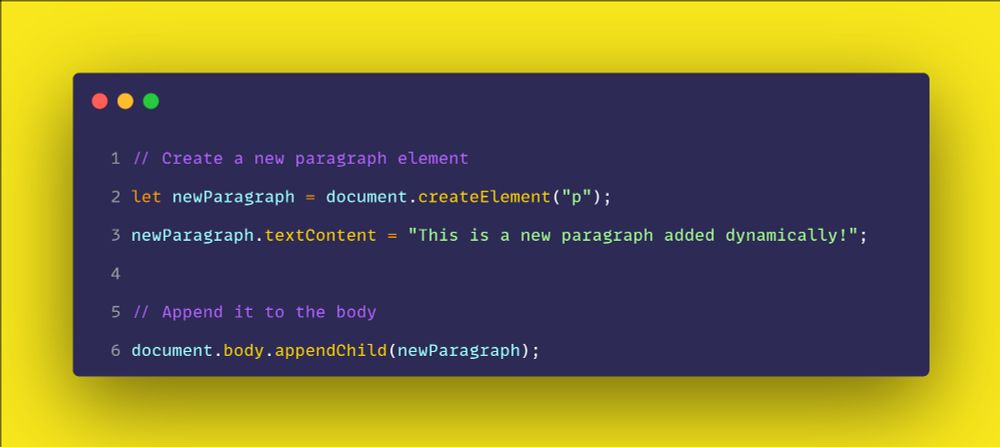
LESSON 44 - Adding and Removing Elements in the DOM
--> Explanation:
* createElement() is used to create new elements dynamically.
* appendChild() adds an element to the DOM.
* remove() deletes an element from the DOM.
* JavaScript allows adding and removing elements efficiently.
--> Explanation:
* createElement() is used to create new elements dynamically.
* appendChild() adds an element to the DOM.
* remove() deletes an element from the DOM.
* JavaScript allows adding and removing elements efficiently.
March 9, 2025 at 4:38 AM
LESSON 44 - Adding and Removing Elements in the DOM
--> Explanation:
* createElement() is used to create new elements dynamically.
* appendChild() adds an element to the DOM.
* remove() deletes an element from the DOM.
* JavaScript allows adding and removing elements efficiently.
--> Explanation:
* createElement() is used to create new elements dynamically.
* appendChild() adds an element to the DOM.
* remove() deletes an element from the DOM.
* JavaScript allows adding and removing elements efficiently.
Lesson 43 - Modifying Elements in the DOM
✅ .textContent modifies text without parsing HTML.
✅ .innerHTML modifies text and *parses* HTML.
✅ .setAttribute() changes element attributes.
✅ .style.property modifies styles dynamically.
✅ .classList helps *add, remove, or toggle* classes.
✅ .textContent modifies text without parsing HTML.
✅ .innerHTML modifies text and *parses* HTML.
✅ .setAttribute() changes element attributes.
✅ .style.property modifies styles dynamically.
✅ .classList helps *add, remove, or toggle* classes.

March 7, 2025 at 6:04 AM
Lesson 43 - Modifying Elements in the DOM
✅ .textContent modifies text without parsing HTML.
✅ .innerHTML modifies text and *parses* HTML.
✅ .setAttribute() changes element attributes.
✅ .style.property modifies styles dynamically.
✅ .classList helps *add, remove, or toggle* classes.
✅ .textContent modifies text without parsing HTML.
✅ .innerHTML modifies text and *parses* HTML.
✅ .setAttribute() changes element attributes.
✅ .style.property modifies styles dynamically.
✅ .classList helps *add, remove, or toggle* classes.
LESSON 42 - Selecting Elements in the DOM
*`getElementById()`* selects a single element by `id`.
*`getElementsByClassName()`* and *`getElementsByTagName()`* return HTMLCollections.
.... lancecourse.com/en/courses/j...
*`getElementById()`* selects a single element by `id`.
*`getElementsByClassName()`* and *`getElementsByTagName()`* return HTMLCollections.
.... lancecourse.com/en/courses/j...

March 5, 2025 at 5:06 AM
LESSON 42 - Selecting Elements in the DOM
*`getElementById()`* selects a single element by `id`.
*`getElementsByClassName()`* and *`getElementsByTagName()`* return HTMLCollections.
.... lancecourse.com/en/courses/j...
*`getElementById()`* selects a single element by `id`.
*`getElementsByClassName()`* and *`getElementsByTagName()`* return HTMLCollections.
.... lancecourse.com/en/courses/j...
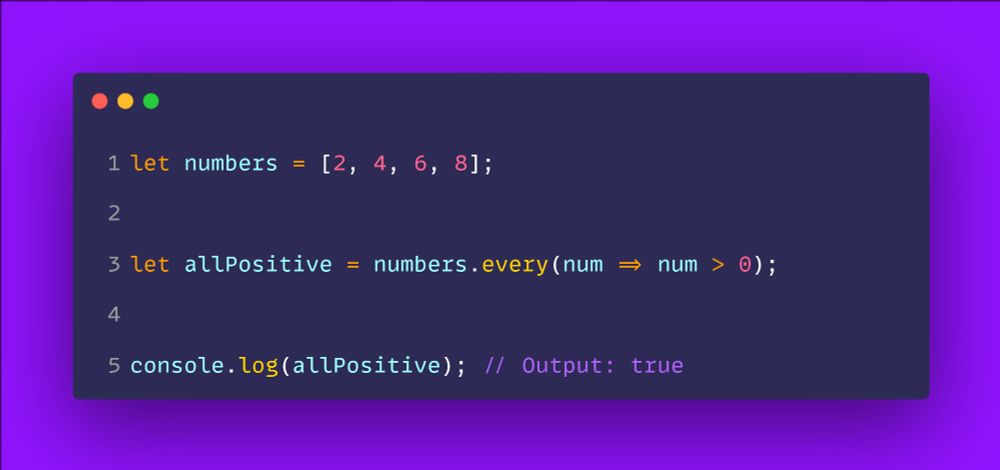
LESSON 40 - JAVASCRIPT ARRAY METHODS - every()
--> Explanation:
- It runs a *callback function* on every element in the array.
- If *all elements* satisfy the condition, it returns true.
- If *at least one* element fails, it returns false.
- It *does not modify the original array*.
--> Explanation:
- It runs a *callback function* on every element in the array.
- If *all elements* satisfy the condition, it returns true.
- If *at least one* element fails, it returns false.
- It *does not modify the original array*.
March 4, 2025 at 2:53 PM
LESSON 40 - JAVASCRIPT ARRAY METHODS - every()
--> Explanation:
- It runs a *callback function* on every element in the array.
- If *all elements* satisfy the condition, it returns true.
- If *at least one* element fails, it returns false.
- It *does not modify the original array*.
--> Explanation:
- It runs a *callback function* on every element in the array.
- If *all elements* satisfy the condition, it returns true.
- If *at least one* element fails, it returns false.
- It *does not modify the original array*.
LESSON 40 - JAVASCRIPT ARRAY METHODS - every()
- It runs a *callback function* on every element in the array.
- If *all elements* satisfy the condition, it returns true.
- If *at least one* element fails, it returns false.
- It *does not modify the original array*.
lancecourse.com/en/courses/j...
- It runs a *callback function* on every element in the array.
- If *all elements* satisfy the condition, it returns true.
- If *at least one* element fails, it returns false.
- It *does not modify the original array*.
lancecourse.com/en/courses/j...
March 3, 2025 at 5:06 AM
LESSON 40 - JAVASCRIPT ARRAY METHODS - every()
- It runs a *callback function* on every element in the array.
- If *all elements* satisfy the condition, it returns true.
- If *at least one* element fails, it returns false.
- It *does not modify the original array*.
lancecourse.com/en/courses/j...
- It runs a *callback function* on every element in the array.
- If *all elements* satisfy the condition, it returns true.
- If *at least one* element fails, it returns false.
- It *does not modify the original array*.
lancecourse.com/en/courses/j...
LESSON 39 - #JAVASCRIPT ARRAY METHODS - sort()
- The method *modifies the original array* instead of creating a new one.
- Sorting is based on *string Unicode code points* unless a compare function is used.
- If elements are numbers, a compare function is needed to avoid incorrect sorting.
- The method *modifies the original array* instead of creating a new one.
- Sorting is based on *string Unicode code points* unless a compare function is used.
- If elements are numbers, a compare function is needed to avoid incorrect sorting.

March 2, 2025 at 11:42 AM
LESSON 39 - #JAVASCRIPT ARRAY METHODS - sort()
- The method *modifies the original array* instead of creating a new one.
- Sorting is based on *string Unicode code points* unless a compare function is used.
- If elements are numbers, a compare function is needed to avoid incorrect sorting.
- The method *modifies the original array* instead of creating a new one.
- Sorting is based on *string Unicode code points* unless a compare function is used.
- If elements are numbers, a compare function is needed to avoid incorrect sorting.
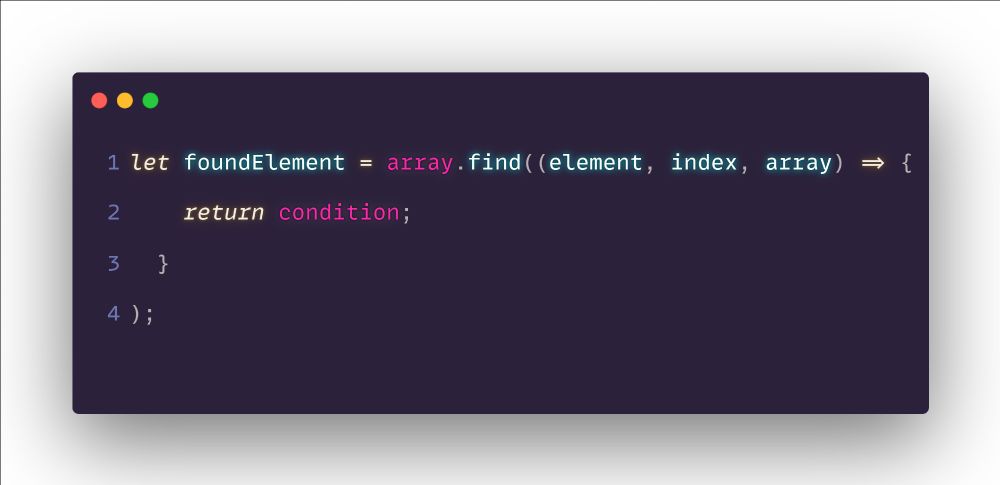
LESSON 36 - JAVASCRIPT ARRAY METHODS - find()
- It loops through the array and applies a *callback function* to each element.
- If an element *meets the condition*, it is returned immediately.
- If *no element matches*, it returns undefined.
-->Details & Practice
lancecourse.com/en/courses/j...
- It loops through the array and applies a *callback function* to each element.
- If an element *meets the condition*, it is returned immediately.
- If *no element matches*, it returns undefined.
-->Details & Practice
lancecourse.com/en/courses/j...
February 27, 2025 at 5:40 AM
LESSON 36 - JAVASCRIPT ARRAY METHODS - find()
- It loops through the array and applies a *callback function* to each element.
- If an element *meets the condition*, it is returned immediately.
- If *no element matches*, it returns undefined.
-->Details & Practice
lancecourse.com/en/courses/j...
- It loops through the array and applies a *callback function* to each element.
- If an element *meets the condition*, it is returned immediately.
- If *no element matches*, it returns undefined.
-->Details & Practice
lancecourse.com/en/courses/j...
LESSON 35 - JAVASCRIPT ARRAY METHODS - reduce()
--> Explanation:
- The method applies a callback function to each element.
- It accumulates values based on the function.
- It returns a single result (e.g., total sum, max value, concatenated string).
--> Explanation:
- The method applies a callback function to each element.
- It accumulates values based on the function.
- It returns a single result (e.g., total sum, max value, concatenated string).

February 26, 2025 at 5:02 AM
LESSON 35 - JAVASCRIPT ARRAY METHODS - reduce()
--> Explanation:
- The method applies a callback function to each element.
- It accumulates values based on the function.
- It returns a single result (e.g., total sum, max value, concatenated string).
--> Explanation:
- The method applies a callback function to each element.
- It accumulates values based on the function.
- It returns a single result (e.g., total sum, max value, concatenated string).
LESSON 34 - JAVASCRIPT ARRAY METHODS - filter()
Explanation:
- filter() loops through an array and includes only elements that *return true* from the callback function.
Explanation:
- filter() loops through an array and includes only elements that *return true* from the callback function.

February 25, 2025 at 5:43 AM
LESSON 34 - JAVASCRIPT ARRAY METHODS - filter()
Explanation:
- filter() loops through an array and includes only elements that *return true* from the callback function.
Explanation:
- filter() loops through an array and includes only elements that *return true* from the callback function.
- It simplifies the process of traversing/iterating over arrays.
- forEach() executes a provided function once for each array element:
-> currentValue: The current element being processed.
-> index (optional): The index of the current element
-> array (optional): The array forEach was called upon.
- forEach() executes a provided function once for each array element:
-> currentValue: The current element being processed.
-> index (optional): The index of the current element
-> array (optional): The array forEach was called upon.

February 23, 2025 at 5:43 AM
- It simplifies the process of traversing/iterating over arrays.
- forEach() executes a provided function once for each array element:
-> currentValue: The current element being processed.
-> index (optional): The index of the current element
-> array (optional): The array forEach was called upon.
- forEach() executes a provided function once for each array element:
-> currentValue: The current element being processed.
-> index (optional): The index of the current element
-> array (optional): The array forEach was called upon.
LESSON 31 - JAVASCRIPT MATH OBJECT
*--> Explanation:*
- An *array* is a list-like object used to store multiple values.
- Elements in an array are indexed starting from *0*
- Arrays can hold elements of different types (numbers, strings, objects, etc.)
*--> Explanation:*
- An *array* is a list-like object used to store multiple values.
- Elements in an array are indexed starting from *0*
- Arrays can hold elements of different types (numbers, strings, objects, etc.)

February 22, 2025 at 5:13 AM
LESSON 31 - JAVASCRIPT MATH OBJECT
*--> Explanation:*
- An *array* is a list-like object used to store multiple values.
- Elements in an array are indexed starting from *0*
- Arrays can hold elements of different types (numbers, strings, objects, etc.)
*--> Explanation:*
- An *array* is a list-like object used to store multiple values.
- Elements in an array are indexed starting from *0*
- Arrays can hold elements of different types (numbers, strings, objects, etc.)