



@kuscamara.bsky.social
Reposted

💡 CSS Tip!
Save this code for the future! A CSS-only way to read the value of an input range without the need for JavaScript. Powered by modern features (scroll-driven animations, attr(), @property)
More detail & Examples: css-tip.com/value-input/
#CSS
Save this code for the future! A CSS-only way to read the value of an input range without the need for JavaScript. Powered by modern features (scroll-driven animations, attr(), @property)
More detail & Examples: css-tip.com/value-input/
#CSS
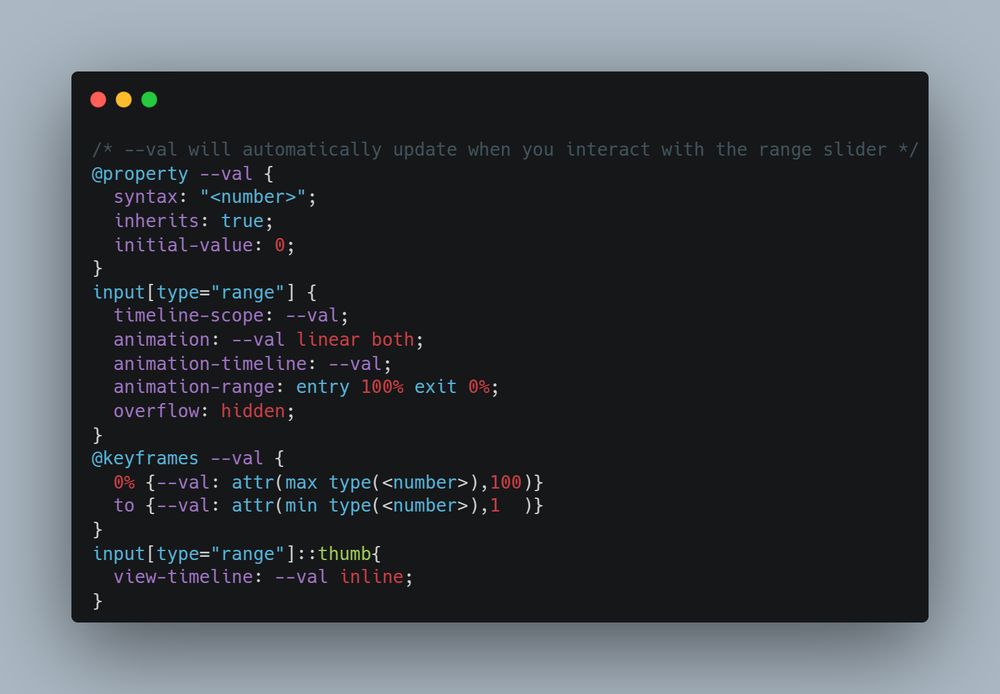
March 5, 2025 at 11:16 AM
💡 CSS Tip!
Save this code for the future! A CSS-only way to read the value of an input range without the need for JavaScript. Powered by modern features (scroll-driven animations, attr(), @property)
More detail & Examples: css-tip.com/value-input/
#CSS
Save this code for the future! A CSS-only way to read the value of an input range without the need for JavaScript. Powered by modern features (scroll-driven animations, attr(), @property)
More detail & Examples: css-tip.com/value-input/
#CSS
Reposted
💡 CSS Tip!
Transform the native range slider into an interactive star rating component using a few lines of CSS and 0 JavaScript.
✅ Single-element
✅ No inline styles
✅ Less than 15 declarations
✅ Using the new attr() function 🥳
Code & Demo: css-tip.com/star-rating/
#CSS
Transform the native range slider into an interactive star rating component using a few lines of CSS and 0 JavaScript.
✅ Single-element
✅ No inline styles
✅ Less than 15 declarations
✅ Using the new attr() function 🥳
Code & Demo: css-tip.com/star-rating/
#CSS
January 24, 2025 at 11:28 AM
💡 CSS Tip!
Transform the native range slider into an interactive star rating component using a few lines of CSS and 0 JavaScript.
✅ Single-element
✅ No inline styles
✅ Less than 15 declarations
✅ Using the new attr() function 🥳
Code & Demo: css-tip.com/star-rating/
#CSS
Transform the native range slider into an interactive star rating component using a few lines of CSS and 0 JavaScript.
✅ Single-element
✅ No inline styles
✅ Less than 15 declarations
✅ Using the new attr() function 🥳
Code & Demo: css-tip.com/star-rating/
#CSS
Reposted

🌠 A long-requested CSS feature is the ability to transition height between a known value (`height: 20rem`) and a derived one (`height: auto`).
A new global CSS property makes this possible now. 😄
html {
interpolate-size: allow-keywords;
}
More info in thread 🧵
A new global CSS property makes this possible now. 😄
html {
interpolate-size: allow-keywords;
}
More info in thread 🧵
January 7, 2025 at 4:09 PM
🌠 A long-requested CSS feature is the ability to transition height between a known value (`height: 20rem`) and a derived one (`height: auto`).
A new global CSS property makes this possible now. 😄
html {
interpolate-size: allow-keywords;
}
More info in thread 🧵
A new global CSS property makes this possible now. 😄
html {
interpolate-size: allow-keywords;
}
More info in thread 🧵