



Kristijan Kralj
@kristijankralj.bsky.social
Helping .NET developers master the latest tech and industry best practices.
90% of C# projects don’t need Kubernetes, microservices, or separate read/write DBs early on.
Start simple. Ship fast. Get feedback.
Then evolve.
This repo shows how:
github.com/evolutionary...
Simple scales. Complexity fails.
Start simple. Ship fast. Get feedback.
Then evolve.
This repo shows how:
github.com/evolutionary...
Simple scales. Complexity fails.

October 15, 2025 at 6:23 AM
90% of C# projects don’t need Kubernetes, microservices, or separate read/write DBs early on.
Start simple. Ship fast. Get feedback.
Then evolve.
This repo shows how:
github.com/evolutionary...
Simple scales. Complexity fails.
Start simple. Ship fast. Get feedback.
Then evolve.
This repo shows how:
github.com/evolutionary...
Simple scales. Complexity fails.
Git merge be like:

August 9, 2025 at 6:11 AM
Git merge be like:
.NET developers:
Want to avoid painful bugs, security holes, and spaghetti code?
Here are 10 silent killers I see over and over - even in "enterprise" apps:
#dotnet
Want to avoid painful bugs, security holes, and spaghetti code?
Here are 10 silent killers I see over and over - even in "enterprise" apps:
#dotnet

July 30, 2025 at 6:23 AM
.NET developers:
Want to avoid painful bugs, security holes, and spaghetti code?
Here are 10 silent killers I see over and over - even in "enterprise" apps:
#dotnet
Want to avoid painful bugs, security holes, and spaghetti code?
Here are 10 silent killers I see over and over - even in "enterprise" apps:
#dotnet
I used to think microservices were the modern way to start.
But they add pain early on:
– Debugging hell
– Infra overhead
– CI/CD complexity
Most apps don't need that upfront.
Start with (modular) monolith:
Clean boundaries, fast loops, easier debugging.
It's a launchpad. Not legacy.
#dotnet
But they add pain early on:
– Debugging hell
– Infra overhead
– CI/CD complexity
Most apps don't need that upfront.
Start with (modular) monolith:
Clean boundaries, fast loops, easier debugging.
It's a launchpad. Not legacy.
#dotnet

July 29, 2025 at 6:10 AM
I used to think microservices were the modern way to start.
But they add pain early on:
– Debugging hell
– Infra overhead
– CI/CD complexity
Most apps don't need that upfront.
Start with (modular) monolith:
Clean boundaries, fast loops, easier debugging.
It's a launchpad. Not legacy.
#dotnet
But they add pain early on:
– Debugging hell
– Infra overhead
– CI/CD complexity
Most apps don't need that upfront.
Start with (modular) monolith:
Clean boundaries, fast loops, easier debugging.
It's a launchpad. Not legacy.
#dotnet
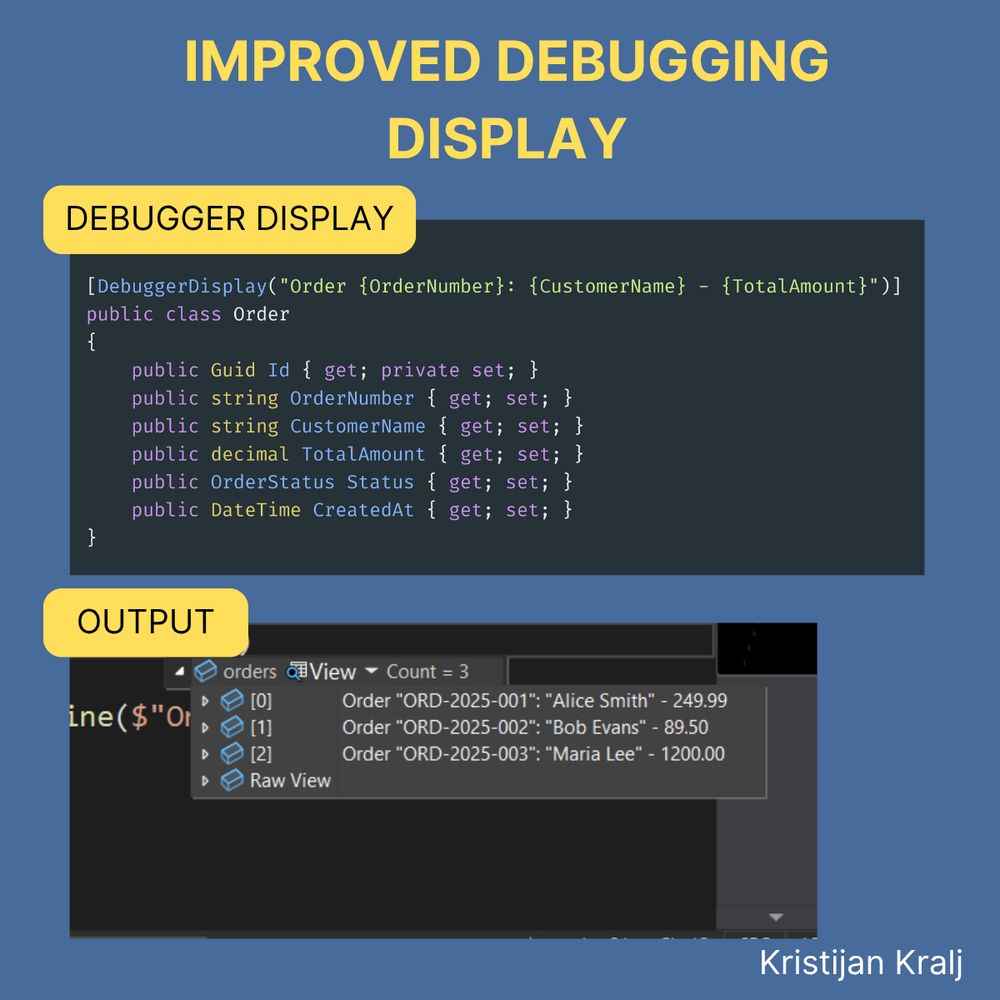
Most .NET devs ignore this.
But it makes debugging 10x easier.
Instead of {Namespace.ObjectName}, you can show:
Order ORD-2025-001: Alice Smith - 249.99
The trick?
Add [DebuggerDisplay] to your class.
Next time you're confused in the watch window, remember: it can be readable.
#dotnet
But it makes debugging 10x easier.
Instead of {Namespace.ObjectName}, you can show:
Order ORD-2025-001: Alice Smith - 249.99
The trick?
Add [DebuggerDisplay] to your class.
Next time you're confused in the watch window, remember: it can be readable.
#dotnet
July 28, 2025 at 8:06 AM
Most .NET devs ignore this.
But it makes debugging 10x easier.
Instead of {Namespace.ObjectName}, you can show:
Order ORD-2025-001: Alice Smith - 249.99
The trick?
Add [DebuggerDisplay] to your class.
Next time you're confused in the watch window, remember: it can be readable.
#dotnet
But it makes debugging 10x easier.
Instead of {Namespace.ObjectName}, you can show:
Order ORD-2025-001: Alice Smith - 249.99
The trick?
Add [DebuggerDisplay] to your class.
Next time you're confused in the watch window, remember: it can be readable.
#dotnet
Me after switching from a mapping library to manual mapping:

April 20, 2025 at 11:37 AM
Me after switching from a mapping library to manual mapping:

Want to build apps on Azure?
Know these 3 cloud types:
☁ IAAS – You manage apps & data; the provider handles hardware & networking.
☁ PAAS – The provider manages infra & OS; you focus on code.
☁ SAAS – Fully built apps; least flexible but easiest to use.
#dotnet
Know these 3 cloud types:
☁ IAAS – You manage apps & data; the provider handles hardware & networking.
☁ PAAS – The provider manages infra & OS; you focus on code.
☁ SAAS – Fully built apps; least flexible but easiest to use.
#dotnet

February 8, 2025 at 3:30 PM
Want to build apps on Azure?
Know these 3 cloud types:
☁ IAAS – You manage apps & data; the provider handles hardware & networking.
☁ PAAS – The provider manages infra & OS; you focus on code.
☁ SAAS – Fully built apps; least flexible but easiest to use.
#dotnet
Know these 3 cloud types:
☁ IAAS – You manage apps & data; the provider handles hardware & networking.
☁ PAAS – The provider manages infra & OS; you focus on code.
☁ SAAS – Fully built apps; least flexible but easiest to use.
#dotnet
1 simple productivity hack for smart C# developers:
(that I recently discovered)
Create multiple classes at once in Visual Studio 2022.
How to do it?
In the "Add New Item" window, type multiple class names separated by a comma.
P.S. See the below video of this in action.
#dotnet
(that I recently discovered)
Create multiple classes at once in Visual Studio 2022.
How to do it?
In the "Add New Item" window, type multiple class names separated by a comma.
P.S. See the below video of this in action.
#dotnet
February 5, 2025 at 3:30 PM
1 simple productivity hack for smart C# developers:
(that I recently discovered)
Create multiple classes at once in Visual Studio 2022.
How to do it?
In the "Add New Item" window, type multiple class names separated by a comma.
P.S. See the below video of this in action.
#dotnet
(that I recently discovered)
Create multiple classes at once in Visual Studio 2022.
How to do it?
In the "Add New Item" window, type multiple class names separated by a comma.
P.S. See the below video of this in action.
#dotnet
Lack of simplicity, not lack of time, is a true enemy in every .NET project.
You don't need more complexity.
You need more simplicity.
If you want to learn how to evolve .NET projects, here's a useful GitHub repository:
https://buff.ly/3CzSE2u
Start simple.
Evolve as needed.
#dotnet
You don't need more complexity.
You need more simplicity.
If you want to learn how to evolve .NET projects, here's a useful GitHub repository:
https://buff.ly/3CzSE2u
Start simple.
Evolve as needed.
#dotnet

February 4, 2025 at 3:30 PM
Lack of simplicity, not lack of time, is a true enemy in every .NET project.
You don't need more complexity.
You need more simplicity.
If you want to learn how to evolve .NET projects, here's a useful GitHub repository:
https://buff.ly/3CzSE2u
Start simple.
Evolve as needed.
#dotnet
You don't need more complexity.
You need more simplicity.
If you want to learn how to evolve .NET projects, here's a useful GitHub repository:
https://buff.ly/3CzSE2u
Start simple.
Evolve as needed.
#dotnet
Instead of having a big method with 5+ parameters,
Do this:
1. Create a new class.
2. The properties on the class are the same as method parameters.
3. Replace the parameters with the new class.
4. Update the method calls.
This will quickly improve the maintainability of your code.
Do this:
1. Create a new class.
2. The properties on the class are the same as method parameters.
3. Replace the parameters with the new class.
4. Update the method calls.
This will quickly improve the maintainability of your code.

January 24, 2025 at 3:30 PM
Instead of having a big method with 5+ parameters,
Do this:
1. Create a new class.
2. The properties on the class are the same as method parameters.
3. Replace the parameters with the new class.
4. Update the method calls.
This will quickly improve the maintainability of your code.
Do this:
1. Create a new class.
2. The properties on the class are the same as method parameters.
3. Replace the parameters with the new class.
4. Update the method calls.
This will quickly improve the maintainability of your code.