




@extasae.bsky.social
Reposted


Reposted

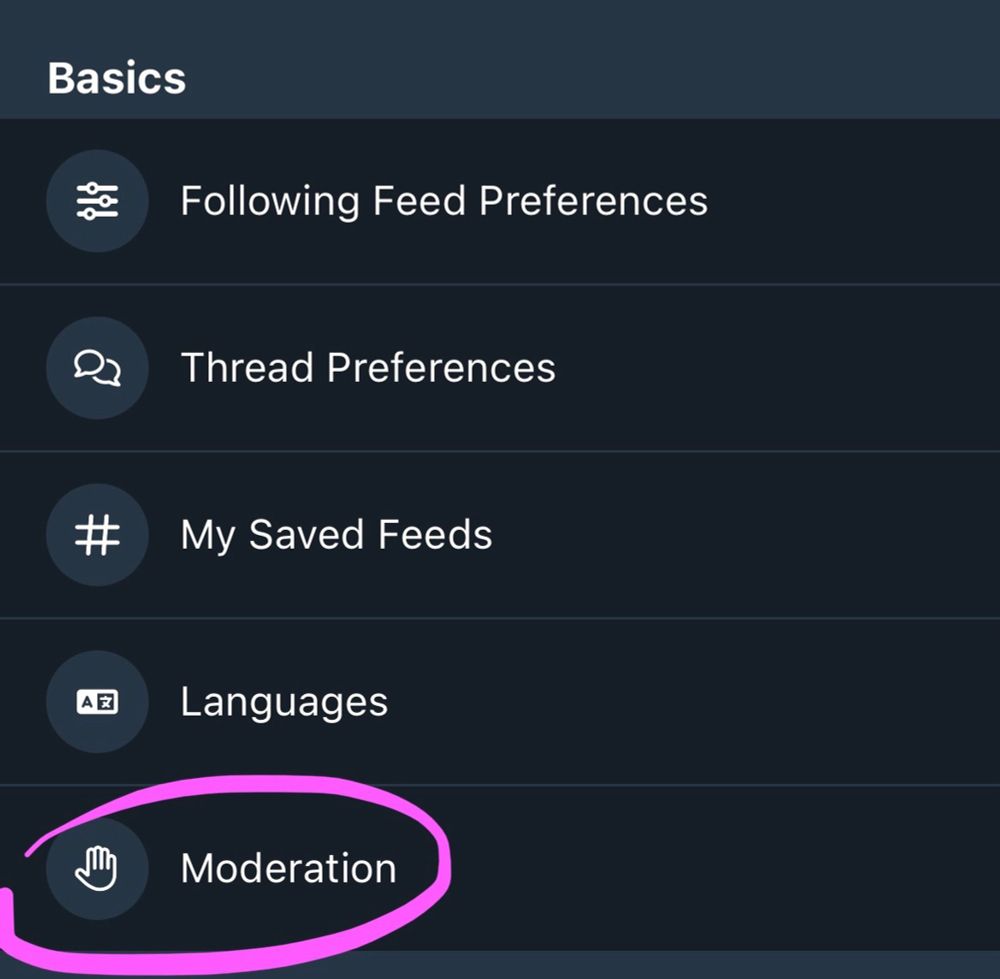
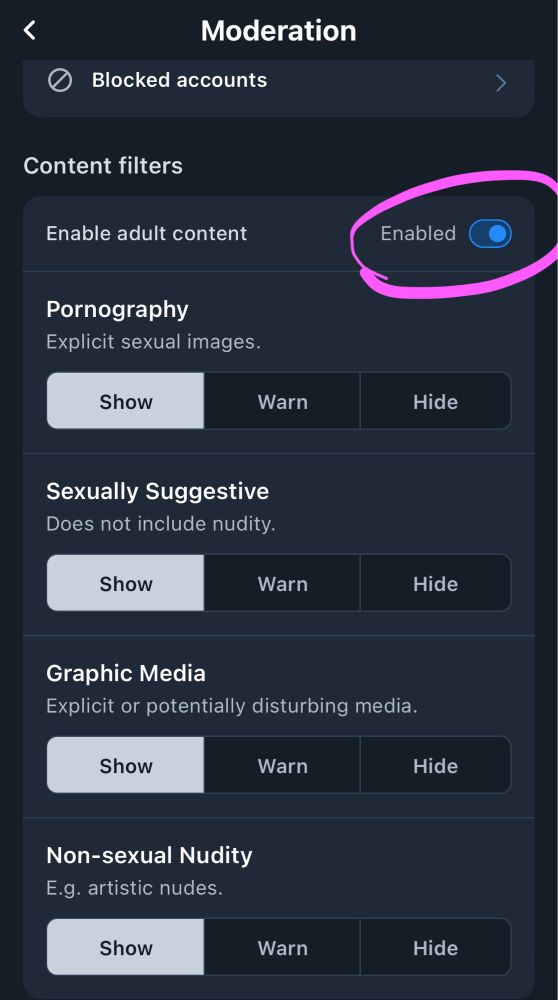
Reposting this-- Bluesky hides NSFW posts from you by default so you'll miss my work if you don't turn it on:
SETTINGS > MODERATION> Set toggle to Enabled
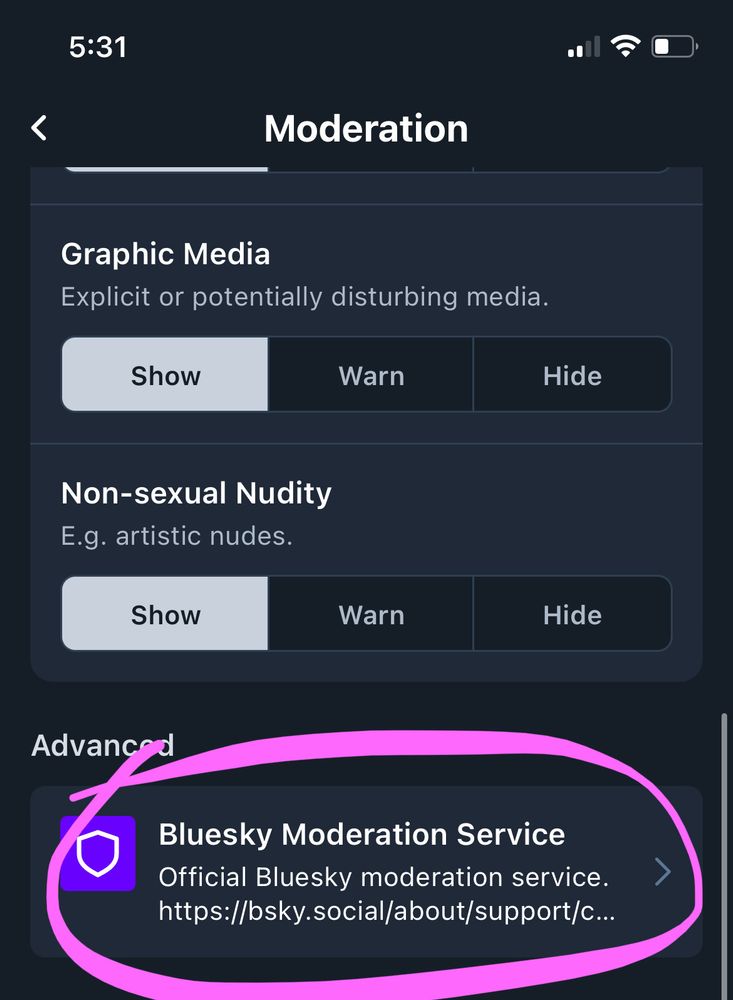
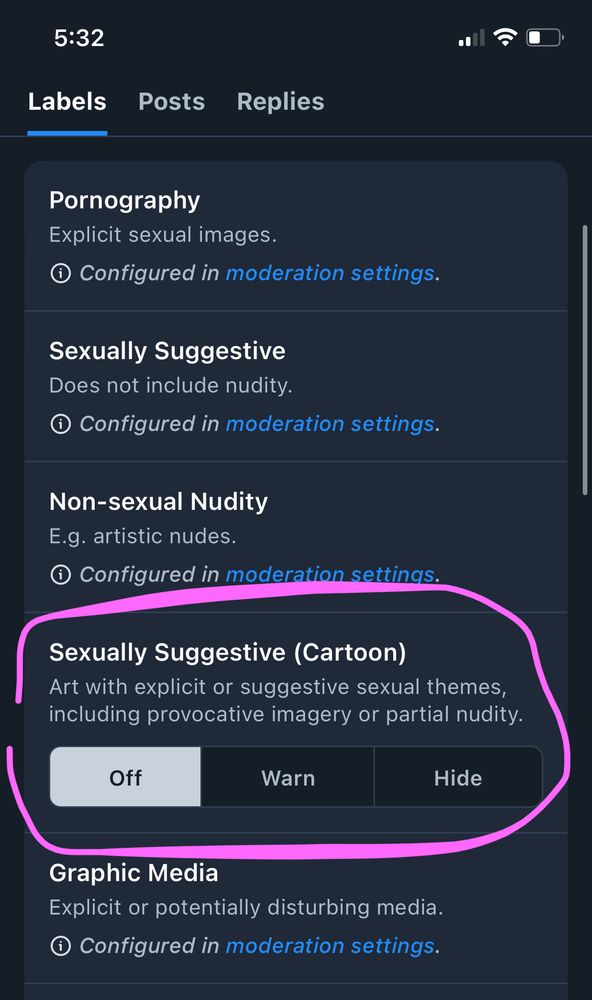
✨ Also be sure to turn on "sexually suggestive (cartoon)" setting:
SETTINGS > MODERATION > Bluesky Moderation Service > Set to "off"
SETTINGS > MODERATION> Set toggle to Enabled
✨ Also be sure to turn on "sexually suggestive (cartoon)" setting:
SETTINGS > MODERATION > Bluesky Moderation Service > Set to "off"
October 16, 2024 at 7:16 PM
Reposting this-- Bluesky hides NSFW posts from you by default so you'll miss my work if you don't turn it on:
SETTINGS > MODERATION> Set toggle to Enabled
✨ Also be sure to turn on "sexually suggestive (cartoon)" setting:
SETTINGS > MODERATION > Bluesky Moderation Service > Set to "off"
SETTINGS > MODERATION> Set toggle to Enabled
✨ Also be sure to turn on "sexually suggestive (cartoon)" setting:
SETTINGS > MODERATION > Bluesky Moderation Service > Set to "off"
Reposted

I feel like I need to tap the sign cause I keep seeing people trying to "dunk" on hateful peeps on my feed.
This ISN'T TWITTER.
Please don't make it into it.
This ISN'T TWITTER.
Please don't make it into it.

October 7, 2024 at 7:52 PM
I feel like I need to tap the sign cause I keep seeing people trying to "dunk" on hateful peeps on my feed.
This ISN'T TWITTER.
Please don't make it into it.
This ISN'T TWITTER.
Please don't make it into it.
Reposted

artists!
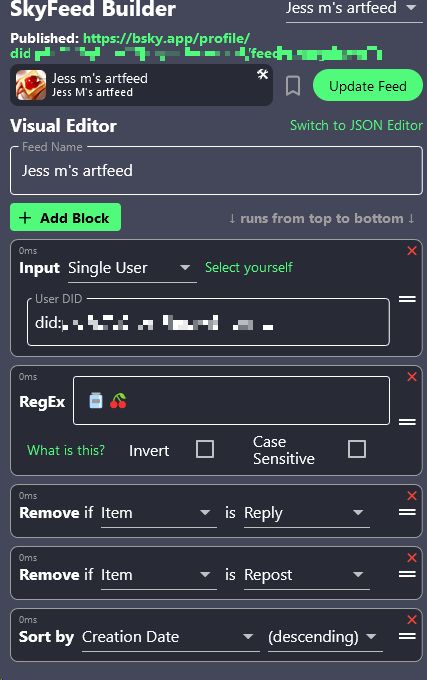
you can make your own media tab, here's how!
-log in to skyfeed.app
-click "feed builder"
-copy the settings below, make an art tag/keyword
-add an icon and a name/description, copy that link.
now you can add that link in your bio, and clicking it will show ONLY your tagged art!
you can make your own media tab, here's how!
-log in to skyfeed.app
-click "feed builder"
-copy the settings below, make an art tag/keyword
-add an icon and a name/description, copy that link.
now you can add that link in your bio, and clicking it will show ONLY your tagged art!
July 4, 2023 at 11:53 PM
artists!
you can make your own media tab, here's how!
-log in to skyfeed.app
-click "feed builder"
-copy the settings below, make an art tag/keyword
-add an icon and a name/description, copy that link.
now you can add that link in your bio, and clicking it will show ONLY your tagged art!
you can make your own media tab, here's how!
-log in to skyfeed.app
-click "feed builder"
-copy the settings below, make an art tag/keyword
-add an icon and a name/description, copy that link.
now you can add that link in your bio, and clicking it will show ONLY your tagged art!
Reposted

I hope one day Elon Musk knows I personally hate him
October 16, 2024 at 7:14 PM
I hope one day Elon Musk knows I personally hate him
Reposted
lmao hey new bluesky users check this out
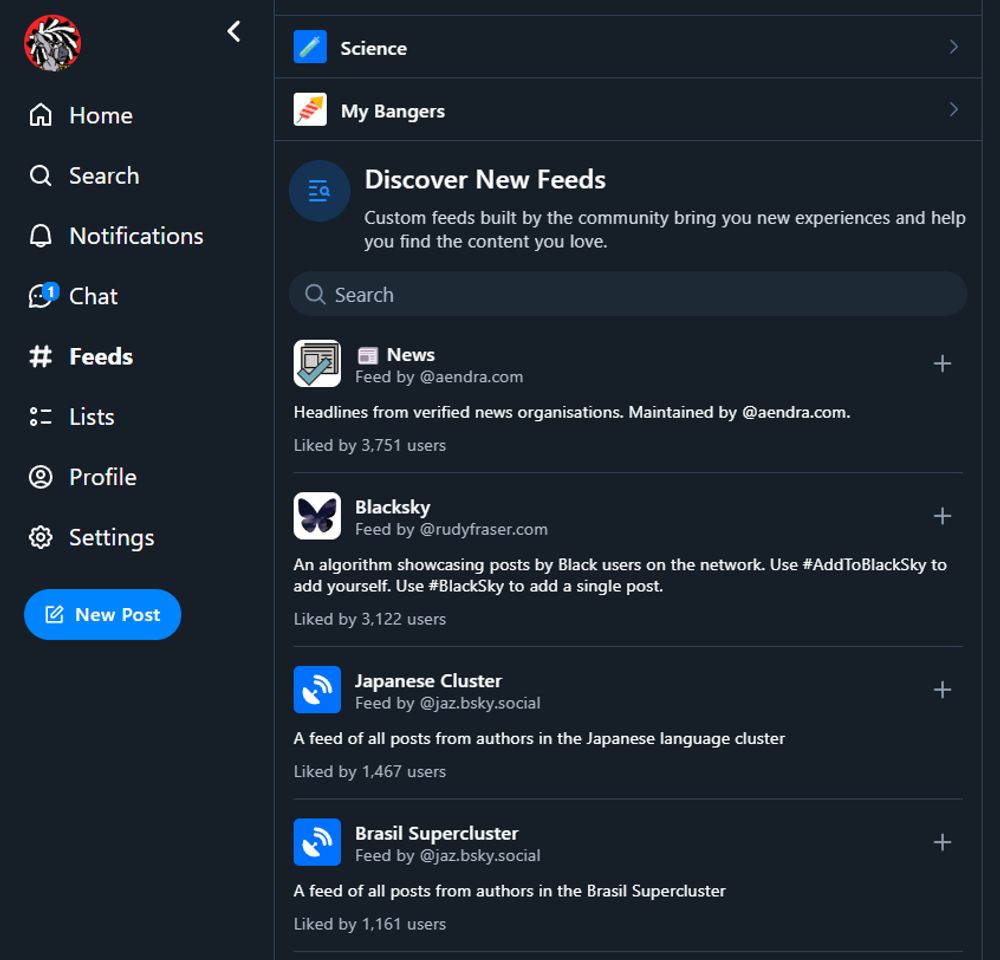
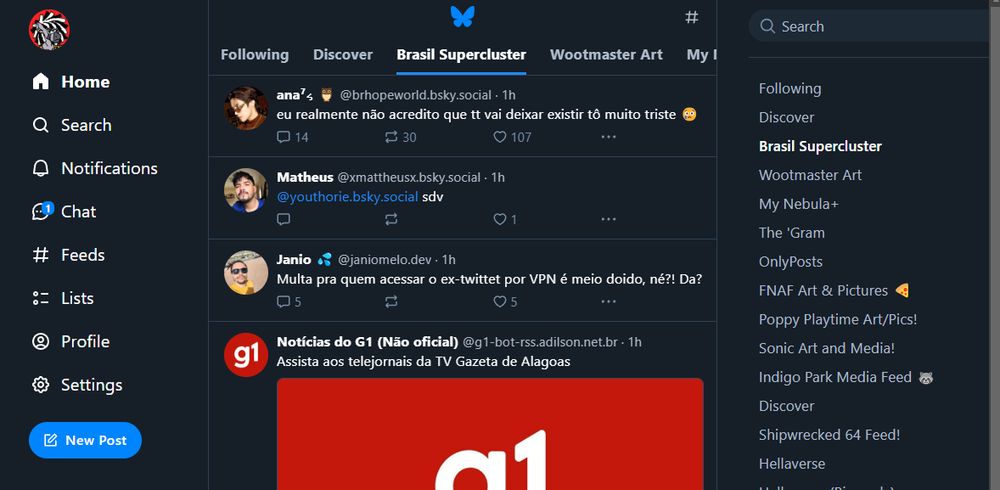
Now that Twitter is banned in Brazil, I figured I would make a quick guide on how to get started on Bluesky!
Bsky is all about CHOOSING the algorithm you want to use, which are called Feeds. There are Feeds for EVERYTHING. Search for ones you like in the Feeds tab, pin them to your page, and voila!
Bsky is all about CHOOSING the algorithm you want to use, which are called Feeds. There are Feeds for EVERYTHING. Search for ones you like in the Feeds tab, pin them to your page, and voila!
October 16, 2024 at 11:35 PM
lmao hey new bluesky users check this out
Reposted

It’s been a while and I wanna follow more artists! ART SHARE!!! Please drop your fav pieces!! I wanna see all ur beautiful stuff 🫴


October 17, 2024 at 1:55 AM
It’s been a while and I wanna follow more artists! ART SHARE!!! Please drop your fav pieces!! I wanna see all ur beautiful stuff 🫴
Reposted

btw for everyone joining bsky today but worried about trying to find their friends from back on twitter: ✨ sky follower bridge ✨ is an extension on chrome and firefox that lets you sort through your following on twitter to see if any of them have associated bsky accounts
October 16, 2024 at 10:09 PM
btw for everyone joining bsky today but worried about trying to find their friends from back on twitter: ✨ sky follower bridge ✨ is an extension on chrome and firefox that lets you sort through your following on twitter to see if any of them have associated bsky accounts
Reposted


Reposted

Hey Twitter refugees. If you're an Original Character artist/writer/game dev/etc, consider tagging your stuff with #OCsky so the OC enjoyers on here can find your stuff.
I also have some OC feeds (feeds are like custom algorithms and topical timelines) on my profile, in the feeds tab.
I also have some OC feeds (feeds are like custom algorithms and topical timelines) on my profile, in the feeds tab.
bsky.app
October 17, 2024 at 3:10 AM
Hey Twitter refugees. If you're an Original Character artist/writer/game dev/etc, consider tagging your stuff with #OCsky so the OC enjoyers on here can find your stuff.
I also have some OC feeds (feeds are like custom algorithms and topical timelines) on my profile, in the feeds tab.
I also have some OC feeds (feeds are like custom algorithms and topical timelines) on my profile, in the feeds tab.
Reposted
Hi, quick lowdown:
-the For You feed is called Discover here.
-add the Mentions and Quotes feeds to see those.
-You can filter posts by tag, so tag your artwork to make it easier to find.
-use the Sky Follower Bridge plugin to find your twitter moots
-we have video, DMs, pinned posts now
-the For You feed is called Discover here.
-add the Mentions and Quotes feeds to see those.
-You can filter posts by tag, so tag your artwork to make it easier to find.
-use the Sky Follower Bridge plugin to find your twitter moots
-we have video, DMs, pinned posts now
October 17, 2024 at 12:30 AM
Hi, quick lowdown:
-the For You feed is called Discover here.
-add the Mentions and Quotes feeds to see those.
-You can filter posts by tag, so tag your artwork to make it easier to find.
-use the Sky Follower Bridge plugin to find your twitter moots
-we have video, DMs, pinned posts now
-the For You feed is called Discover here.
-add the Mentions and Quotes feeds to see those.
-You can filter posts by tag, so tag your artwork to make it easier to find.
-use the Sky Follower Bridge plugin to find your twitter moots
-we have video, DMs, pinned posts now
Reposted


October 14, 2024 at 1:59 AM