



Adler Dias
@adlerdias.bsky.social
Poeta frustrado e filósofo de bar. Propôs uma série de teorias que o mundo achou por bem ignorar.
Reposted by Adler Dias

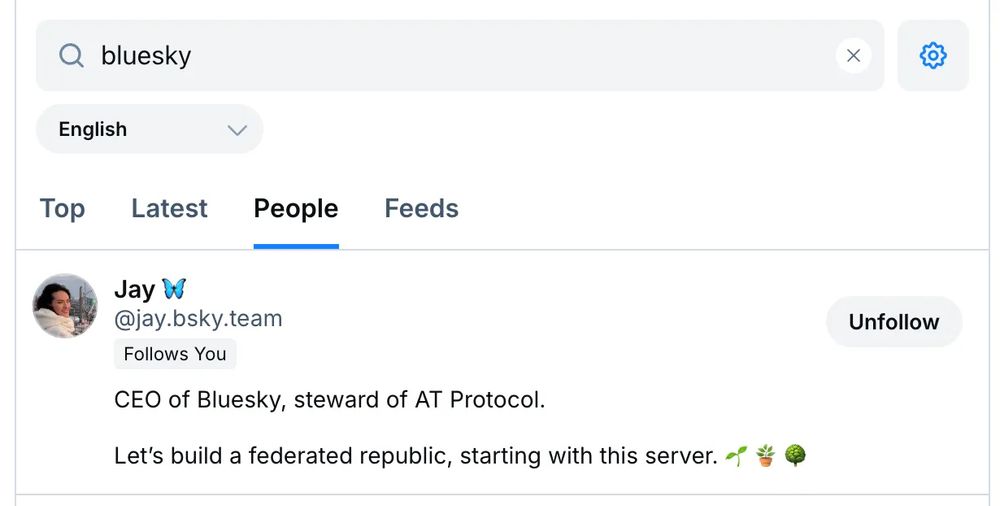
📢 1.92 is rolling out now (4/5)
Search now includes an options “cog” button. You can tap that to control which languages will be included in your results.
Search now includes an options “cog” button. You can tap that to control which languages will be included in your results.
October 10, 2024 at 10:29 PM
📢 1.92 is rolling out now (4/5)
Search now includes an options “cog” button. You can tap that to control which languages will be included in your results.
Search now includes an options “cog” button. You can tap that to control which languages will be included in your results.
é uma maneira de auto verificação e identificação. o perfil do deputado eleito seria nome@camara.leg.br, do candango do stf nome@stf.jus.br
September 5, 2024 at 12:19 PM
é uma maneira de auto verificação e identificação. o perfil do deputado eleito seria nome@camara.leg.br, do candango do stf nome@stf.jus.br
tá de sacanagem, kkkkkk
August 31, 2024 at 3:51 PM
tá de sacanagem, kkkkkk