



@vpanov.bsky.social
I've been using this with PostCSS fallback for a while, and it works just fine. Browser support is not here yet, unfortunately :(
January 23, 2026 at 9:03 AM
I've been using this with PostCSS fallback for a while, and it works just fine. Browser support is not here yet, unfortunately :(
Yeah, I saw his post somewhere (probably here on Bluesky), if you mean this demo
codepen.io/bramus/pen/d....
Maybe combined with new if() functions I can do what I want. Would be an interesting challenge.
codepen.io/bramus/pen/d....
Maybe combined with new if() functions I can do what I want. Would be an interesting challenge.

CSS scroll-direction detection with Scroll-Driven Animations with moving header
...
codepen.io
December 23, 2025 at 6:30 PM
Yeah, I saw his post somewhere (probably here on Bluesky), if you mean this demo
codepen.io/bramus/pen/d....
Maybe combined with new if() functions I can do what I want. Would be an interesting challenge.
codepen.io/bramus/pen/d....
Maybe combined with new if() functions I can do what I want. Would be an interesting challenge.
Oh, I'm so sorry for disturbing you. Have a great day!
And thank you for the demo.
And thank you for the demo.
December 23, 2025 at 6:19 PM
Oh, I'm so sorry for disturbing you. Have a great day!
And thank you for the demo.
And thank you for the demo.
I think it will be easier to understand my intention if you see an example.
I want to be able to show/hide header like it's done here (works on mobile devices only), but without JS.
www.motorsport.com
The problem with JS is that it requires to add/remove class, which causes style recalculations.
I want to be able to show/hide header like it's done here (works on mobile devices only), but without JS.
www.motorsport.com
The problem with JS is that it requires to add/remove class, which causes style recalculations.

Motorsport.com: F1 News, MotoGP, NASCAR, Rallying and more
View the latest auto racing results, news and driver standings. We cover Formula 1, MotoGP, NASCAR, Indycar and all other driving categories.
www.motorsport.com
December 23, 2025 at 5:35 PM
I think it will be easier to understand my intention if you see an example.
I want to be able to show/hide header like it's done here (works on mobile devices only), but without JS.
www.motorsport.com
The problem with JS is that it requires to add/remove class, which causes style recalculations.
I want to be able to show/hide header like it's done here (works on mobile devices only), but without JS.
www.motorsport.com
The problem with JS is that it requires to add/remove class, which causes style recalculations.
Please correct me if I'm wrong, but those would only trigger once I reach specific point in the document.
What I want is to have relative value based on current scroll position. Like this codepen.io/bramus/pen/q..., but not immediate, to accommodate for small scrolling corrections.
What I want is to have relative value based on current scroll position. Like this codepen.io/bramus/pen/q..., but not immediate, to accommodate for small scrolling corrections.

Hidey Bar Demo (Hide on Scroll Down, Show on Scroll Up // Scroll State Queries)
...
codepen.io
December 23, 2025 at 4:48 PM
Please correct me if I'm wrong, but those would only trigger once I reach specific point in the document.
What I want is to have relative value based on current scroll position. Like this codepen.io/bramus/pen/q..., but not immediate, to accommodate for small scrolling corrections.
What I want is to have relative value based on current scroll position. Like this codepen.io/bramus/pen/q..., but not immediate, to accommodate for small scrolling corrections.
Hello @una.im,
Is there a plan to support range syntax, something similar to this chrome.dev/css-wrapped-...?
e.g.
@container scroll-state(scrolled: bottom > 40px) {
...
}
This would be helpful if I want to show/hide header after [x]px of scrolling up/down. Or how would you approach this?
Is there a plan to support range syntax, something similar to this chrome.dev/css-wrapped-...?
e.g.
@container scroll-state(scrolled: bottom > 40px) {
...
}
This would be helpful if I want to show/hide header after [x]px of scrolling up/down. Or how would you approach this?

CSS Wrapped 2025
Sculpt dynamic interfaces, stretch your imagination, and play with these 22 powerful new CSS features that landed in Chrome this year.
chrome.dev
December 23, 2025 at 8:00 AM
Hello @una.im,
Is there a plan to support range syntax, something similar to this chrome.dev/css-wrapped-...?
e.g.
@container scroll-state(scrolled: bottom > 40px) {
...
}
This would be helpful if I want to show/hide header after [x]px of scrolling up/down. Or how would you approach this?
Is there a plan to support range syntax, something similar to this chrome.dev/css-wrapped-...?
e.g.
@container scroll-state(scrolled: bottom > 40px) {
...
}
This would be helpful if I want to show/hide header after [x]px of scrolling up/down. Or how would you approach this?
Thank you, Jen!
I understand why it's impossible for a browser to detect which image to use until the layout is ready, but it's really hard and error prone to manually provide correct sizing for all possible cases with such a dynamic layout.
I understand why it's impossible for a browser to detect which image to use until the layout is ready, but it's really hard and error prone to manually provide correct sizing for all possible cases with such a dynamic layout.
December 23, 2025 at 7:24 AM
Thank you, Jen!
I understand why it's impossible for a browser to detect which image to use until the layout is ready, but it's really hard and error prone to manually provide correct sizing for all possible cases with such a dynamic layout.
I understand why it's impossible for a browser to detect which image to use until the layout is ready, but it's really hard and error prone to manually provide correct sizing for all possible cases with such a dynamic layout.
Great stuff, now the only problem is how to write responsive srcset for all of this. Is there any change that dealing with those would become easier?
December 21, 2025 at 9:18 AM
Great stuff, now the only problem is how to write responsive srcset for all of this. Is there any change that dealing with those would become easier?
Reposted

Check out all the revised demos of Grid Lanes in Safari Technology Preview 234!
webkit.org/demos/grid3/
webkit.org/demos/grid3/

December 20, 2025 at 1:31 AM
Check out all the revised demos of Grid Lanes in Safari Technology Preview 234!
webkit.org/demos/grid3/
webkit.org/demos/grid3/
Reposted
Have you been wishing masonry layouts would just hurry up and arrive in CSS?? Well, happy holidays!
webkit.org/blog/17660/i...
webkit.org/blog/17660/i...

Introducing CSS Grid Lanes
It’s here!
webkit.org
December 19, 2025 at 9:33 PM
Have you been wishing masonry layouts would just hurry up and arrive in CSS?? Well, happy holidays!
webkit.org/blog/17660/i...
webkit.org/blog/17660/i...
Reposted

Team Cherry Holiday Sign-off! Hollow Knight: Silksong - Sea of Sorrow revealed, the original Hollow Knight refreshed, and more!
Read the blog post here: www.teamcherry.com.au/blog/holiday...
Read the blog post here: www.teamcherry.com.au/blog/holiday...

December 16, 2025 at 12:49 AM
Team Cherry Holiday Sign-off! Hollow Knight: Silksong - Sea of Sorrow revealed, the original Hollow Knight refreshed, and more!
Read the blog post here: www.teamcherry.com.au/blog/holiday...
Read the blog post here: www.teamcherry.com.au/blog/holiday...
and to allow better control over this we can have additional attribute (or something), e.g. `delayeduntil="[visible|never|idle]"`
December 12, 2025 at 8:13 AM
and to allow better control over this we can have additional attribute (or something), e.g. `delayeduntil="[visible|never|idle]"`
@jakearchibald.com I'm wondering whether it will delay swapping of content for hidden blocks?
I have something similar built using JS, where complex menu is rendered into template and only rendered once drawer with this menu is opened by user. This would help keep HTML size under control.
I have something similar built using JS, where complex menu is rendered into template and only rendered once drawer with this menu is opened by user. This would help keep HTML size under control.
December 12, 2025 at 8:07 AM
@jakearchibald.com I'm wondering whether it will delay swapping of content for hidden blocks?
I have something similar built using JS, where complex menu is rendered into template and only rendered once drawer with this menu is opened by user. This would help keep HTML size under control.
I have something similar built using JS, where complex menu is rendered into template and only rendered once drawer with this menu is opened by user. This would help keep HTML size under control.
Reposted

Current Status: having way too much fun with Scroll-Triggered Animations in Chrome 145 🤩
The thing you have to wrap your head around is that there are 2 ranges at play: an activation and an active range. Once activated the trigger won’t deactivate until the subject has left the active range.
The thing you have to wrap your head around is that there are 2 ranges at play: an activation and an active range. Once activated the trigger won’t deactivate until the subject has left the active range.
December 11, 2025 at 12:43 PM
Current Status: having way too much fun with Scroll-Triggered Animations in Chrome 145 🤩
The thing you have to wrap your head around is that there are 2 ranges at play: an activation and an active range. Once activated the trigger won’t deactivate until the subject has left the active range.
The thing you have to wrap your head around is that there are 2 ranges at play: an activation and an active range. Once activated the trigger won’t deactivate until the subject has left the active range.
Reposted

We've got some updates on TypeScript 7! The new native port
- can type-check any project
- supports --build and --incremental
- has rich editor features implemented
- is still 10x faster
and is ready for you to try today!
devblogs.microsoft.com/typescript/p...
- can type-check any project
- supports --build and --incremental
- has rich editor features implemented
- is still 10x faster
and is ready for you to try today!
devblogs.microsoft.com/typescript/p...

Progress on TypeScript 7 - December 2025 - TypeScript
Earlier this year, the TypeScript team announced that we’ve been porting the compiler and language service to native code to take advantage of better raw performance, memory usage, and parallelism. Th...
devblogs.microsoft.com
December 2, 2025 at 5:48 PM
We've got some updates on TypeScript 7! The new native port
- can type-check any project
- supports --build and --incremental
- has rich editor features implemented
- is still 10x faster
and is ready for you to try today!
devblogs.microsoft.com/typescript/p...
- can type-check any project
- supports --build and --incremental
- has rich editor features implemented
- is still 10x faster
and is ready for you to try today!
devblogs.microsoft.com/typescript/p...

Reposted

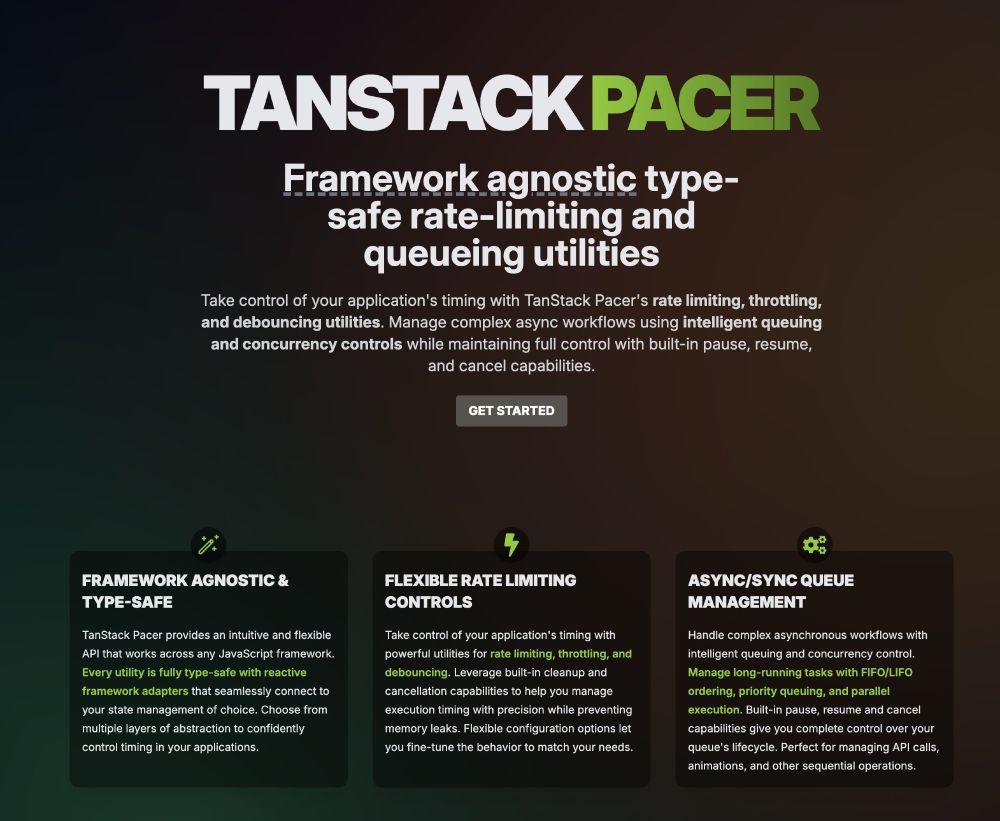
Soft launching a new TanStack library today.
Check out TanStack Pacer! A small utility library for debouncing, throttling, rate limiting, queuing, and task pooling.
It's in alpha, but can't wait to see how this might evolve.
Check it out at: tanstack.com/pacer
Check out TanStack Pacer! A small utility library for debouncing, throttling, rate limiting, queuing, and task pooling.
It's in alpha, but can't wait to see how this might evolve.
Check it out at: tanstack.com/pacer
April 7, 2025 at 1:30 PM
Soft launching a new TanStack library today.
Check out TanStack Pacer! A small utility library for debouncing, throttling, rate limiting, queuing, and task pooling.
It's in alpha, but can't wait to see how this might evolve.
Check it out at: tanstack.com/pacer
Check out TanStack Pacer! A small utility library for debouncing, throttling, rate limiting, queuing, and task pooling.
It's in alpha, but can't wait to see how this might evolve.
Check it out at: tanstack.com/pacer
Reposted

Enroll in the Practical Accessibility course here: practical-accessibility.today

The Practical Accessibility Course
A get-right-down-to-it online course for Web designers and developers who want to start creating more accessible Web user interfaces and digital products today
practical-accessibility.today
April 2, 2025 at 5:51 PM
Enroll in the Practical Accessibility course here: practical-accessibility.today
Reposted

I think Meta's going to win the AI race lads!

March 29, 2025 at 10:19 AM
I think Meta's going to win the AI race lads!
Reposted
There it is! Finally, a real solution for how to style all of the HTML form controls using your own custom CSS to change anything — building on an interoperable UA set of defaults.
First, styling the in-page part of controls + the popover for <select>. (Later we’ll do popovers for more things.)
First, styling the in-page part of controls + the popover for <select>. (Later we’ll do popovers for more things.)

March 21, 2025 at 11:21 PM
There it is! Finally, a real solution for how to style all of the HTML form controls using your own custom CSS to change anything — building on an interoperable UA set of defaults.
First, styling the in-page part of controls + the popover for <select>. (Later we’ll do popovers for more things.)
First, styling the in-page part of controls + the popover for <select>. (Later we’ll do popovers for more things.)
Reposted

March 13, 2025 at 9:13 PM
Reposted
Today we're thrilled to announce our effort to port the TypeScript compiler and language service to native code, gaining a 10x speed boost in build times and editor responsiveness!
devblogs.microsoft.com/typescript/t...
devblogs.microsoft.com/typescript/t...
A 10x Faster TypeScript - TypeScript
Embarking on a native port of the existing TypeScript compiler and toolset to achieve a 10x performance speed-up.
devblogs.microsoft.com
March 11, 2025 at 2:36 PM
Today we're thrilled to announce our effort to port the TypeScript compiler and language service to native code, gaining a 10x speed boost in build times and editor responsiveness!
devblogs.microsoft.com/typescript/t...
devblogs.microsoft.com/typescript/t...
Reposted

Tomorrow! Join @kettanaito.com (creator of mswjs.io) and @kylegach.com (DX eng at Storybook) for a live discussion around mocking and UI testing. We'll walk through techniques and leave lots of time to answer your questions.
Register here: us02web.zoom.us/webinar/regi...
Register here: us02web.zoom.us/webinar/regi...

March 11, 2025 at 4:19 PM
Tomorrow! Join @kettanaito.com (creator of mswjs.io) and @kylegach.com (DX eng at Storybook) for a live discussion around mocking and UI testing. We'll walk through techniques and leave lots of time to answer your questions.
Register here: us02web.zoom.us/webinar/regi...
Register here: us02web.zoom.us/webinar/regi...
Reposted

🚨 Announcing the new @typescriptlang.org compiler: native and 10× Faster and written in @golang.org
March 11, 2025 at 3:48 PM
🚨 Announcing the new @typescriptlang.org compiler: native and 10× Faster and written in @golang.org
Reposted

💡 CSS Tip!
Do you know that One-Time password field? You can create it using only one input and a few lines of #CSS.
The HTML:
Code & Demo: css-tip.com/single-digit...
As a bonus, you can control the number of characters by adjusting the "maxlength" attribute.
Do you know that One-Time password field? You can create it using only one input and a few lines of #CSS.
The HTML:
Code & Demo: css-tip.com/single-digit...
As a bonus, you can control the number of characters by adjusting the "maxlength" attribute.
February 13, 2025 at 12:57 PM
💡 CSS Tip!
Do you know that One-Time password field? You can create it using only one input and a few lines of #CSS.
The HTML:
Code & Demo: css-tip.com/single-digit...
As a bonus, you can control the number of characters by adjusting the "maxlength" attribute.
Do you know that One-Time password field? You can create it using only one input and a few lines of #CSS.
The HTML:
Code & Demo: css-tip.com/single-digit...
As a bonus, you can control the number of characters by adjusting the "maxlength" attribute.