




r12a
@r12a.bsky.social
Apps and information related to language and writing systems.
Posts originate from 🐘 https://typo.social/@ri
Posts originate from 🐘 https://typo.social/@ri
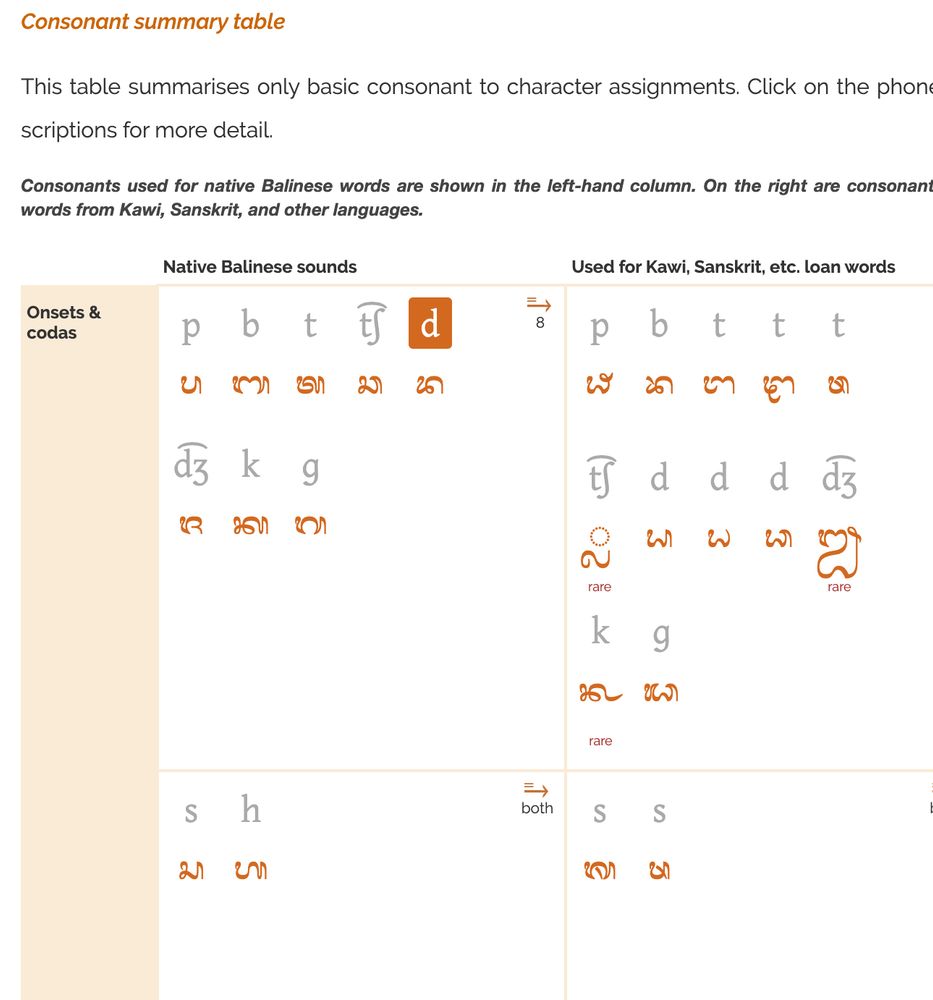
2. A new top-level section, Vowel Absence, has been added to nearly all pages, to describe how codas and consonant clusters work.
Eg.
- r12a.github.io/scripts/bali...
- r12a.github.io/scripts/bali...
Eg.
- r12a.github.io/scripts/bali...
- r12a.github.io/scripts/bali...


September 23, 2025 at 4:27 PM
2. A new top-level section, Vowel Absence, has been added to nearly all pages, to describe how codas and consonant clusters work.
Eg.
- r12a.github.io/scripts/bali...
- r12a.github.io/scripts/bali...
Eg.
- r12a.github.io/scripts/bali...
- r12a.github.io/scripts/bali...
Orthography notes: new features.
1. the IPA-to-character summary tables at the start of the Vowels and the Consonants sections are synced with IPA-to-character mapping lists at the end of those sections. Click on the IPA in the former to jump to the latter for more detailed descriptions.
1. the IPA-to-character summary tables at the start of the Vowels and the Consonants sections are synced with IPA-to-character mapping lists at the end of those sections. Click on the IPA in the former to jump to the latter for more detailed descriptions.
September 23, 2025 at 4:27 PM
Orthography notes: new features.
1. the IPA-to-character summary tables at the start of the Vowels and the Consonants sections are synced with IPA-to-character mapping lists at the end of those sections. Click on the IPA in the former to jump to the latter for more detailed descriptions.
1. the IPA-to-character summary tables at the start of the Vowels and the Consonants sections are synced with IPA-to-character mapping lists at the end of those sections. Click on the IPA in the former to jump to the latter for more detailed descriptions.
UNIVIEW has been updated from 17beta to support the changes for Unicode 17.0 in the final release.
r12a.github.io/uniview/
r12a.github.io/uniview/
UniViewSVG 17
r12a.github.io
September 23, 2025 at 4:24 PM
UNIVIEW has been updated from 17beta to support the changes for Unicode 17.0 in the final release.
r12a.github.io/uniview/
r12a.github.io/uniview/
UNICODE 17 IS RELEASED !
Announcement: blog.unicode.org/2025/09/unic...
Latest core spec online: www.unicode.org/versions/lat...
New scripts: Beria Erfe, Tolong Siki, Tai Yo, Sidetic
Announcement: blog.unicode.org/2025/09/unic...
Latest core spec online: www.unicode.org/versions/lat...
New scripts: Beria Erfe, Tolong Siki, Tai Yo, Sidetic

Unicode 17.0 Release Announcement
Announcing The Unicode® Standard, Version 17.0 The Unicode Standard is the foundation for all global digital communications, providing the e...
blog.unicode.org
September 10, 2025 at 12:26 PM
UNICODE 17 IS RELEASED !
Announcement: blog.unicode.org/2025/09/unic...
Latest core spec online: www.unicode.org/versions/lat...
New scripts: Beria Erfe, Tolong Siki, Tai Yo, Sidetic
Announcement: blog.unicode.org/2025/09/unic...
Latest core spec online: www.unicode.org/versions/lat...
New scripts: Beria Erfe, Tolong Siki, Tai Yo, Sidetic
UNIKEMET DATA in the EGYPTIAN HIEROGLYPH PICKER
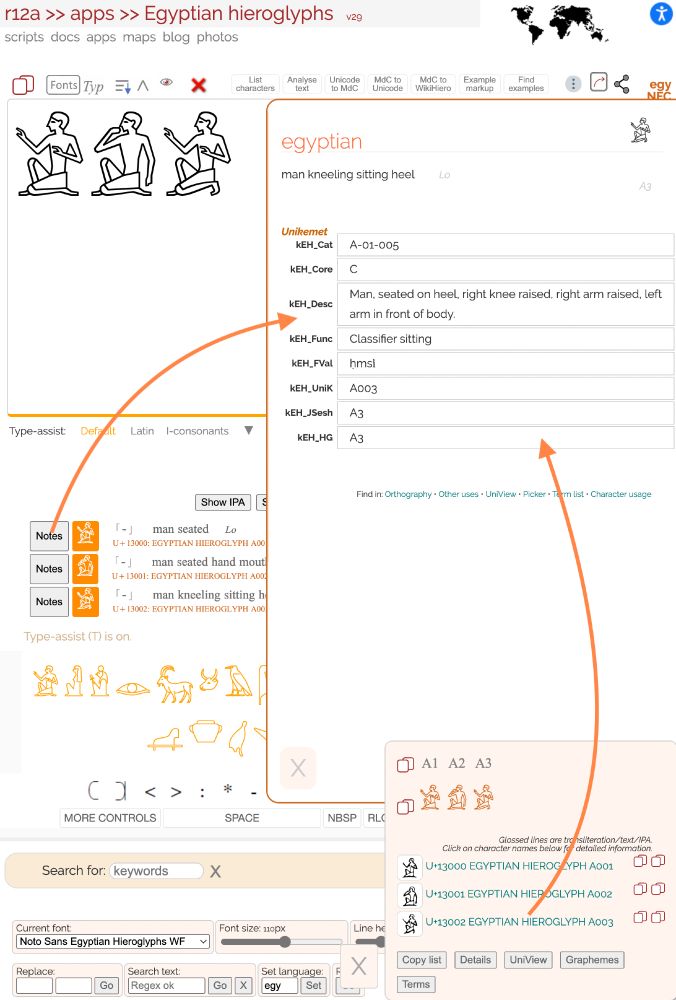
When you bring up detailed notes about a character it now shows Unikemet data.
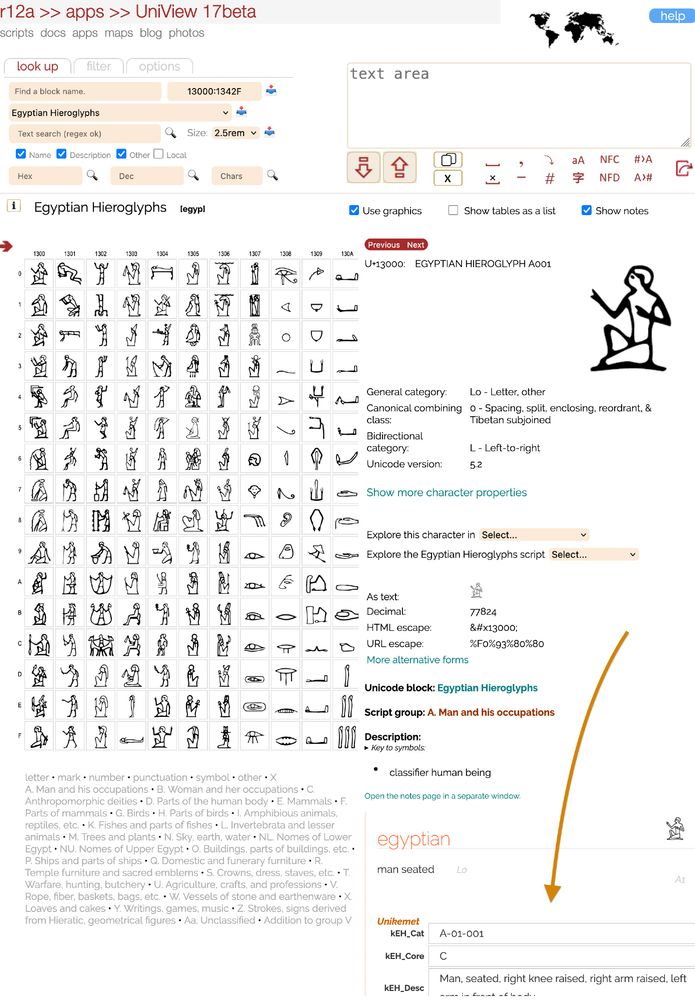
The Unikemet data is also available in UniView.
Try it at r12a.github.io/pickers/egyp/
When you bring up detailed notes about a character it now shows Unikemet data.
The Unikemet data is also available in UniView.
Try it at r12a.github.io/pickers/egyp/
June 17, 2025 at 9:56 AM
UNIKEMET DATA in the EGYPTIAN HIEROGLYPH PICKER
When you bring up detailed notes about a character it now shows Unikemet data.
The Unikemet data is also available in UniView.
Try it at r12a.github.io/pickers/egyp/
When you bring up detailed notes about a character it now shows Unikemet data.
The Unikemet data is also available in UniView.
Try it at r12a.github.io/pickers/egyp/
- all Unicode format controls can be found under MORE CONTROLS
- mousing over a character reveals its description as well as the code point, and its MdC notation
Extended-A is not yet supported.
- mousing over a character reveals its description as well as the code point, and its MdC notation
Extended-A is not yet supported.
June 16, 2025 at 10:42 AM
- all Unicode format controls can be found under MORE CONTROLS
- mousing over a character reveals its description as well as the code point, and its MdC notation
Extended-A is not yet supported.
- mousing over a character reveals its description as well as the code point, and its MdC notation
Extended-A is not yet supported.
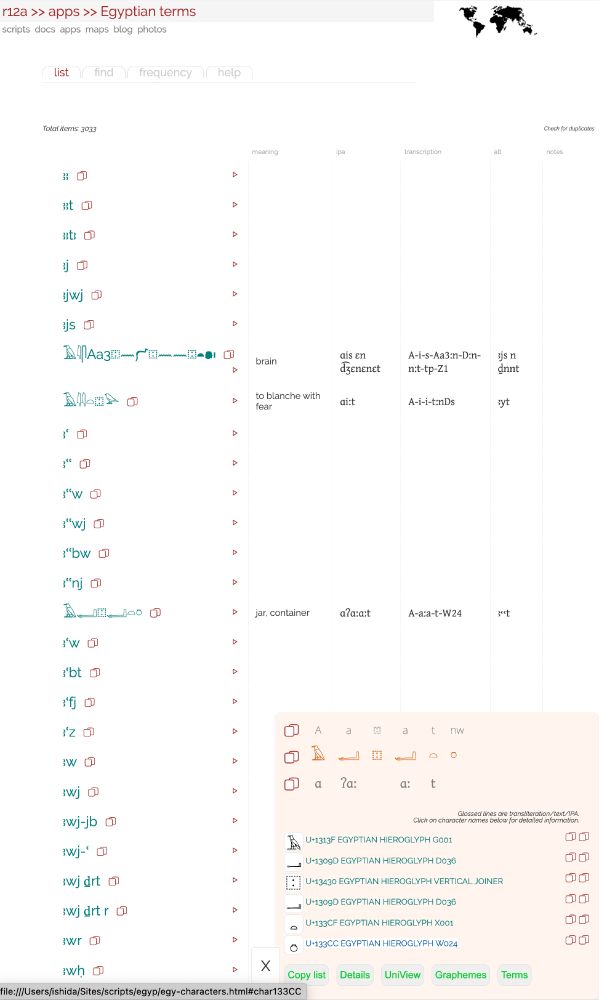
EGYPTIAN HIEROGLYPH PICKER
r12a.github.io/pickers/egyp/
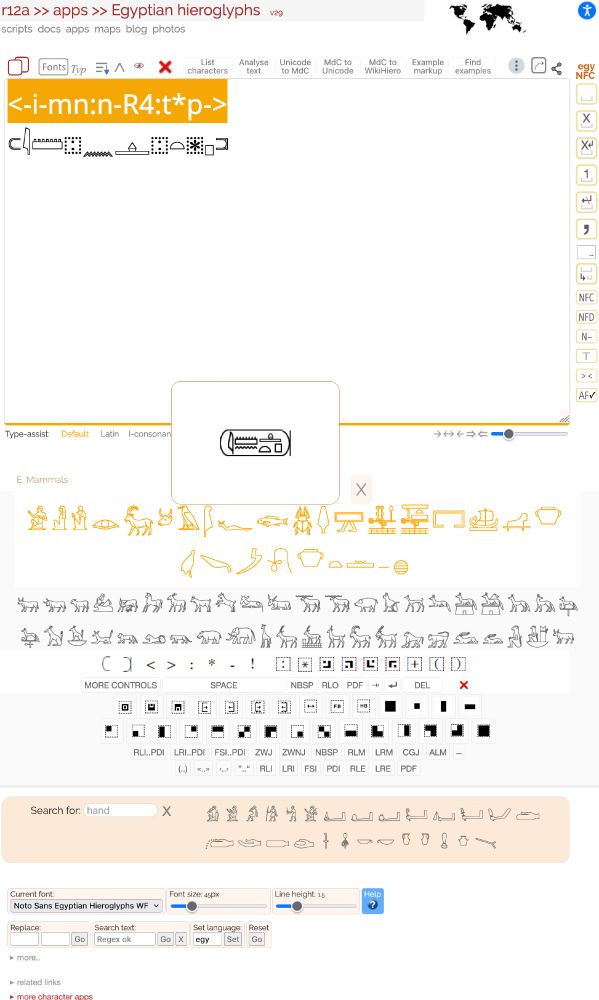
Rewritten to fix bugs, update, & add new features:
- new term list with 3033 entries (though most still need to have hieroglyphs, etc, added)
- MdC to WikiHiero converter displays results in a popup
r12a.github.io/pickers/egyp/
Rewritten to fix bugs, update, & add new features:
- new term list with 3033 entries (though most still need to have hieroglyphs, etc, added)
- MdC to WikiHiero converter displays results in a popup
June 16, 2025 at 10:42 AM
EGYPTIAN HIEROGLYPH PICKER
r12a.github.io/pickers/egyp/
Rewritten to fix bugs, update, & add new features:
- new term list with 3033 entries (though most still need to have hieroglyphs, etc, added)
- MdC to WikiHiero converter displays results in a popup
r12a.github.io/pickers/egyp/
Rewritten to fix bugs, update, & add new features:
- new term list with 3033 entries (though most still need to have hieroglyphs, etc, added)
- MdC to WikiHiero converter displays results in a popup
For the Unicode announcement, see blog.unicode.org/2025/05/unic...
Unicode 17.0 Beta Review Open
The beta review period for Unicode ® 17.0 has started and is open until July 1, 2025. The beta is intended primarily for review of characte...
blog.unicode.org
May 20, 2025 at 8:35 PM
For the Unicode announcement, see blog.unicode.org/2025/05/unic...
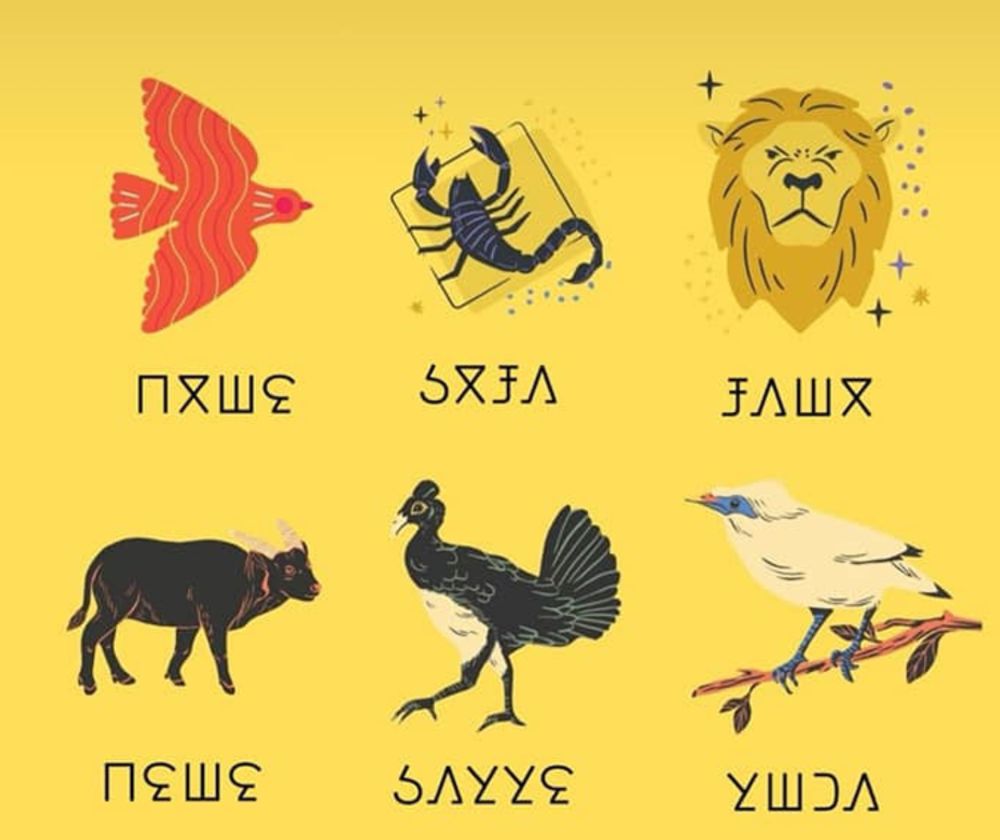
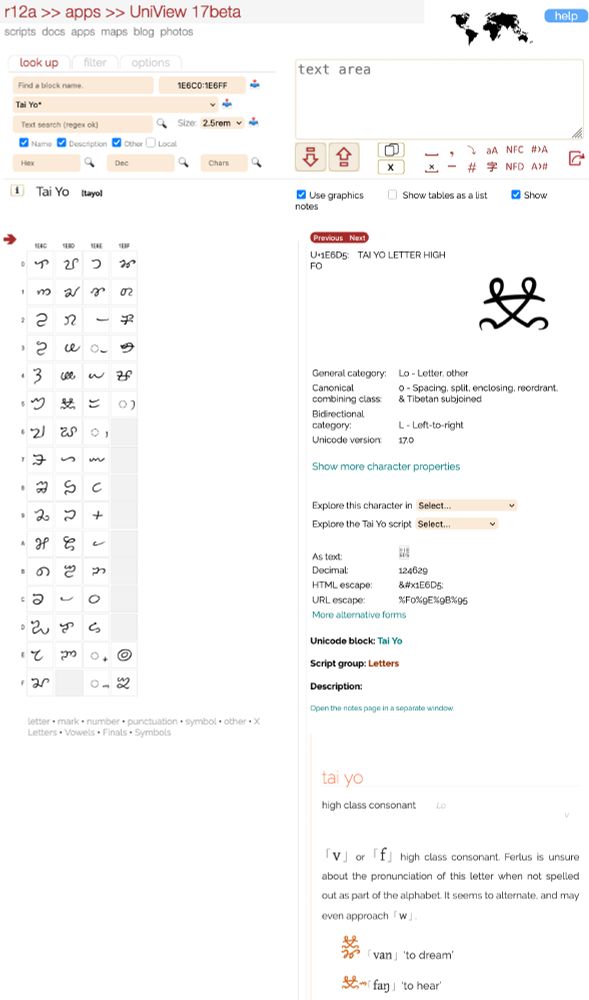
Orthography notes, plus term lists, & pickers, are also available for 3 of the new scripts:
- Beria Erfe r12a.github.io/scripts/berf...
- Tolong Siki r12a.github.io/scripts/tols...
- Tai Yo r12a.github.io/scripts/tayo...
- Beria Erfe r12a.github.io/scripts/berf...
- Tolong Siki r12a.github.io/scripts/tols...
- Tai Yo r12a.github.io/scripts/tayo...
Zaghawa orthography notes
Summary of the Beria Erfe script.
r12a.github.io
May 20, 2025 at 8:30 PM
Orthography notes, plus term lists, & pickers, are also available for 3 of the new scripts:
- Beria Erfe r12a.github.io/scripts/berf...
- Tolong Siki r12a.github.io/scripts/tols...
- Tai Yo r12a.github.io/scripts/tayo...
- Beria Erfe r12a.github.io/scripts/berf...
- Tolong Siki r12a.github.io/scripts/tols...
- Tai Yo r12a.github.io/scripts/tayo...
May 20, 2025 at 8:30 PM
There may also be a need for a new character.
Changes also incorporate general revisions that are slowly being rolled out across all pages.
Changes also incorporate general revisions that are slowly being rolled out across all pages.
May 20, 2025 at 12:11 PM
There may also be a need for a new character.
Changes also incorporate general revisions that are slowly being rolled out across all pages.
Changes also incorporate general revisions that are slowly being rolled out across all pages.
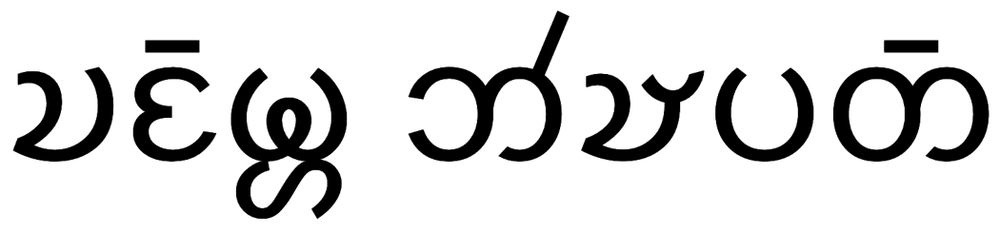
Chakma orthography notes updated.
r12a.github.io/scripts/cakm...
There is still much more to understand about how the Chakma script works, but the notes have been updated to talk about simplified vs traditional orthographies, and some clarifications around onsets, finals, and consonant clusters.
r12a.github.io/scripts/cakm...
There is still much more to understand about how the Chakma script works, but the notes have been updated to talk about simplified vs traditional orthographies, and some clarifications around onsets, finals, and consonant clusters.
May 20, 2025 at 12:11 PM
Chakma orthography notes updated.
r12a.github.io/scripts/cakm...
There is still much more to understand about how the Chakma script works, but the notes have been updated to talk about simplified vs traditional orthographies, and some clarifications around onsets, finals, and consonant clusters.
r12a.github.io/scripts/cakm...
There is still much more to understand about how the Chakma script works, but the notes have been updated to talk about simplified vs traditional orthographies, and some clarifications around onsets, finals, and consonant clusters.
Most term lists for these orthographies have also seen a significant increase in the number of terms and transcriptions.
April 26, 2025 at 6:31 AM
Most term lists for these orthographies have also seen a significant increase in the number of terms and transcriptions.
INDIC orthography notes sections on vowels, consonants, encoding choices, and shaping have been largely rewritten for Hindi, Malayalam, Gujarati, Kashmiri (deva), Tamil, Bengali, Odia, Punjabi, Telugu, and Sinhala.
r12a.github.io/scripts/inde...
r12a.github.io/scripts/inde...

April 26, 2025 at 6:31 AM
INDIC orthography notes sections on vowels, consonants, encoding choices, and shaping have been largely rewritten for Hindi, Malayalam, Gujarati, Kashmiri (deva), Tamil, Bengali, Odia, Punjabi, Telugu, and Sinhala.
r12a.github.io/scripts/inde...
r12a.github.io/scripts/inde...
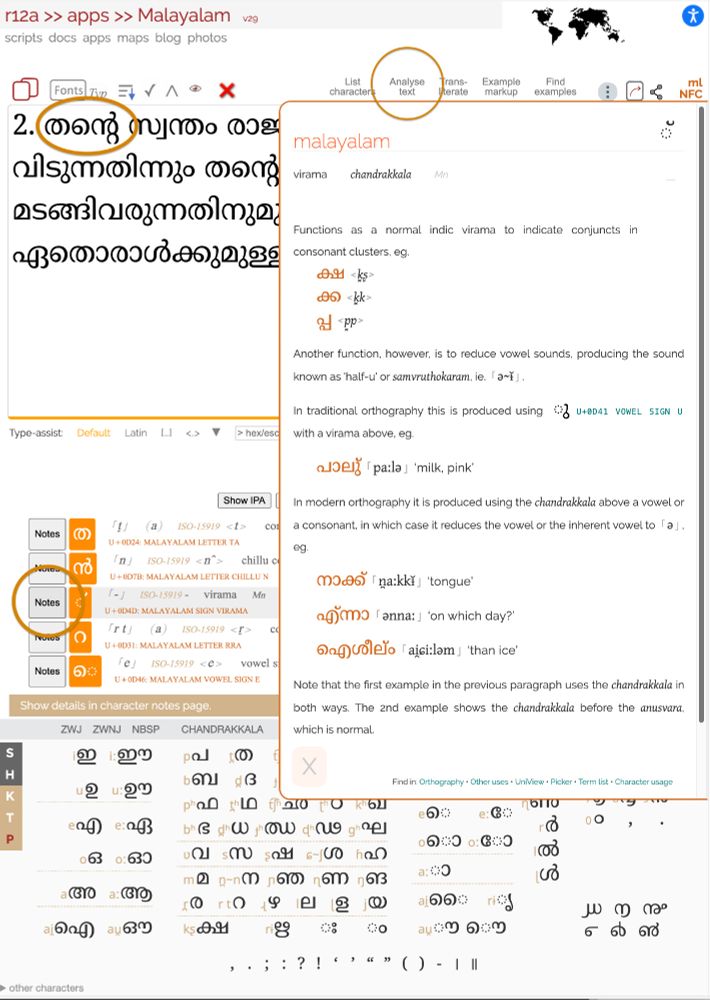
The notes can also be accessed via the Analyse Text control. When the data appears, click on the Notes to see the notes.
April 16, 2025 at 11:33 AM
The notes can also be accessed via the Analyse Text control. When the data appears, click on the Notes to see the notes.
NEW PICKER FEATURE: In-page notes
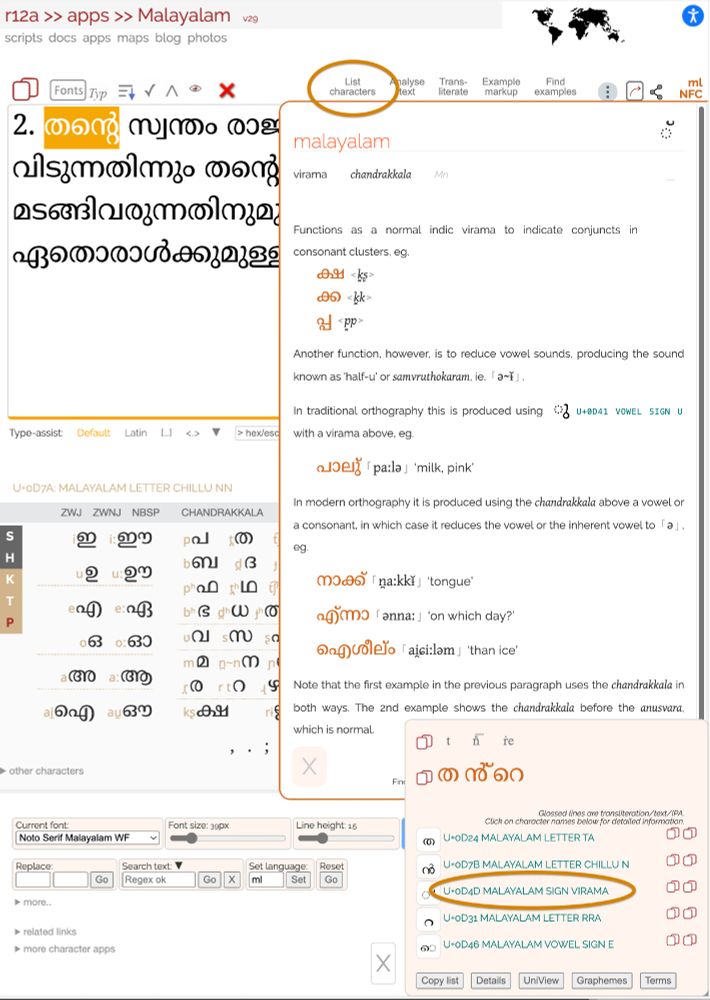
Highlight some text, click on List Characters, then click on a character name in the popup. This will display any available notes about that character in the right half of the screen.
Try it: r12a.github.io/pickers/mlym...
Highlight some text, click on List Characters, then click on a character name in the popup. This will display any available notes about that character in the right half of the screen.
Try it: r12a.github.io/pickers/mlym...
April 16, 2025 at 11:33 AM
NEW PICKER FEATURE: In-page notes
Highlight some text, click on List Characters, then click on a character name in the popup. This will display any available notes about that character in the right half of the screen.
Try it: r12a.github.io/pickers/mlym...
Highlight some text, click on List Characters, then click on a character name in the popup. This will display any available notes about that character in the right half of the screen.
Try it: r12a.github.io/pickers/mlym...
NEW PICKER FEATURE: Copy list items to clipboard
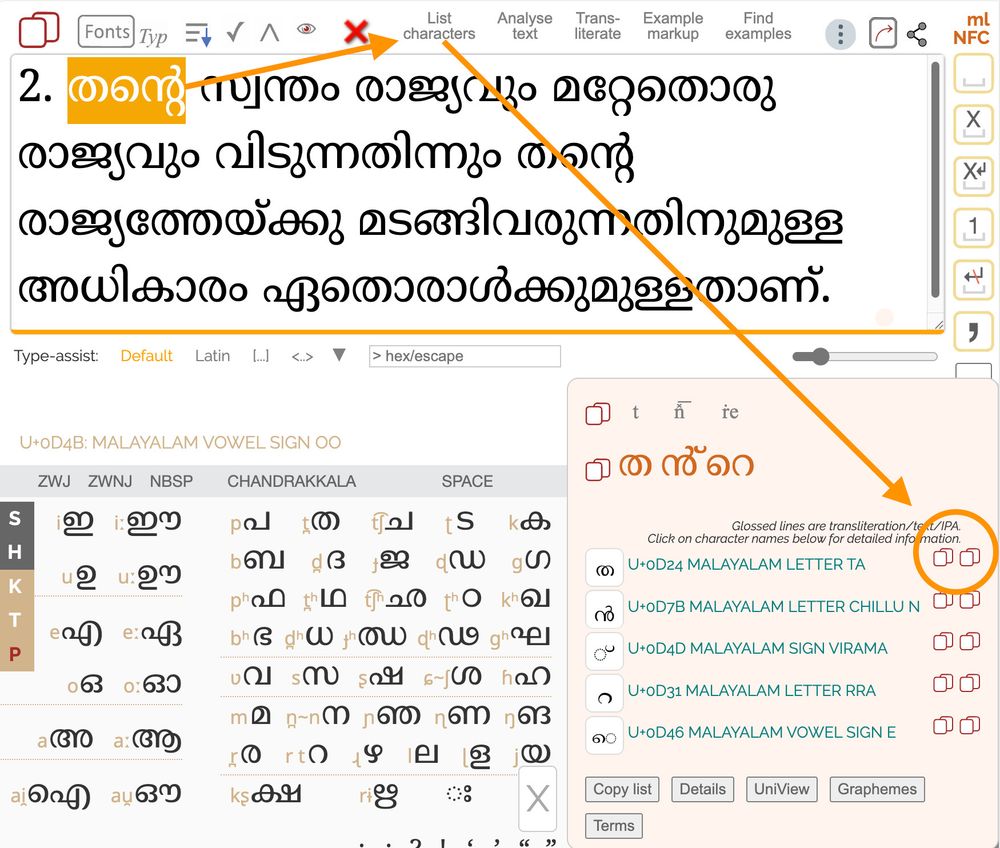
When you select List Characters, each line in the list has 2 icons to the right. The first copies just the character; the second copies just the Unicode name.
When you select List Characters, each line in the list has 2 icons to the right. The first copies just the character; the second copies just the Unicode name.
April 16, 2025 at 11:31 AM
NEW PICKER FEATURE: Copy list items to clipboard
When you select List Characters, each line in the list has 2 icons to the right. The first copies just the character; the second copies just the Unicode name.
When you select List Characters, each line in the list has 2 icons to the right. The first copies just the character; the second copies just the Unicode name.
Tip: In Blink/Gecko browsers this is just 1 tab key press away from the text area. Two tabs takes you to the control to input characters as escapes/code points.
April 8, 2025 at 4:33 AM
Tip: In Blink/Gecko browsers this is just 1 tab key press away from the text area. Two tabs takes you to the control to input characters as escapes/code points.
NEW PICKER FEATURE: New font size slider
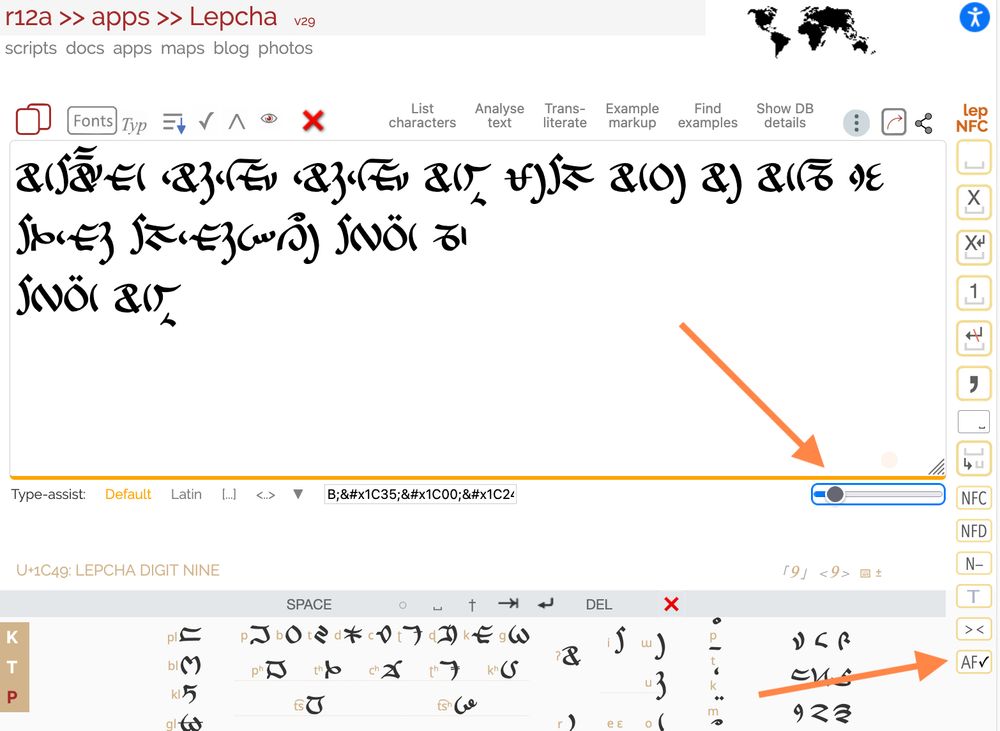
An extra font size slider has been added just below the bottom right of the text area. The autofocus control that used to be here can now be found as an icon to the right.
An extra font size slider has been added just below the bottom right of the text area. The autofocus control that used to be here can now be found as an icon to the right.
April 8, 2025 at 4:33 AM
NEW PICKER FEATURE: New font size slider
An extra font size slider has been added just below the bottom right of the text area. The autofocus control that used to be here can now be found as an icon to the right.
An extra font size slider has been added just below the bottom right of the text area. The autofocus control that used to be here can now be found as an icon to the right.
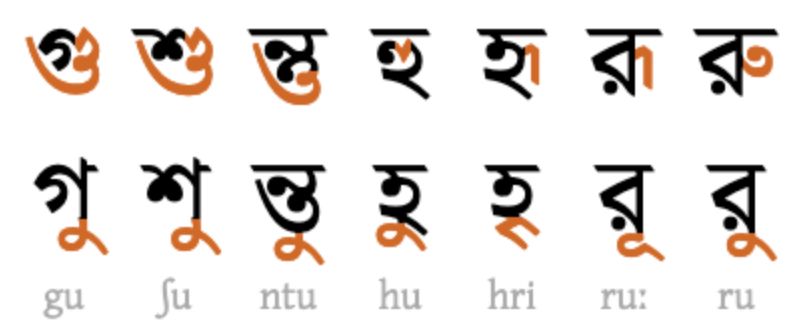
BENGALI VOWEL LIGATURES
The Bengali orthography notes section r12a.github.io/scripts/beng... now shows which Noto/System fonts support ligation for ru, rū, etc. And which browsers support associated ZWJ and ZWNJ behaviours. (It's very complicated!)
The Bengali orthography notes section r12a.github.io/scripts/beng... now shows which Noto/System fonts support ligation for ru, rū, etc. And which browsers support associated ZWJ and ZWNJ behaviours. (It's very complicated!)
March 31, 2025 at 7:01 AM
BENGALI VOWEL LIGATURES
The Bengali orthography notes section r12a.github.io/scripts/beng... now shows which Noto/System fonts support ligation for ru, rū, etc. And which browsers support associated ZWJ and ZWNJ behaviours. (It's very complicated!)
The Bengali orthography notes section r12a.github.io/scripts/beng... now shows which Noto/System fonts support ligation for ru, rū, etc. And which browsers support associated ZWJ and ZWNJ behaviours. (It's very complicated!)
However, if the text area includes several lines of text, that icon removes the line breaks, too.
The new icon collapses spaces while retaining the line breaks.
The new icon collapses spaces while retaining the line breaks.
March 16, 2025 at 6:58 AM
However, if the text area includes several lines of text, that icon removes the line breaks, too.
The new icon collapses spaces while retaining the line breaks.
The new icon collapses spaces while retaining the line breaks.
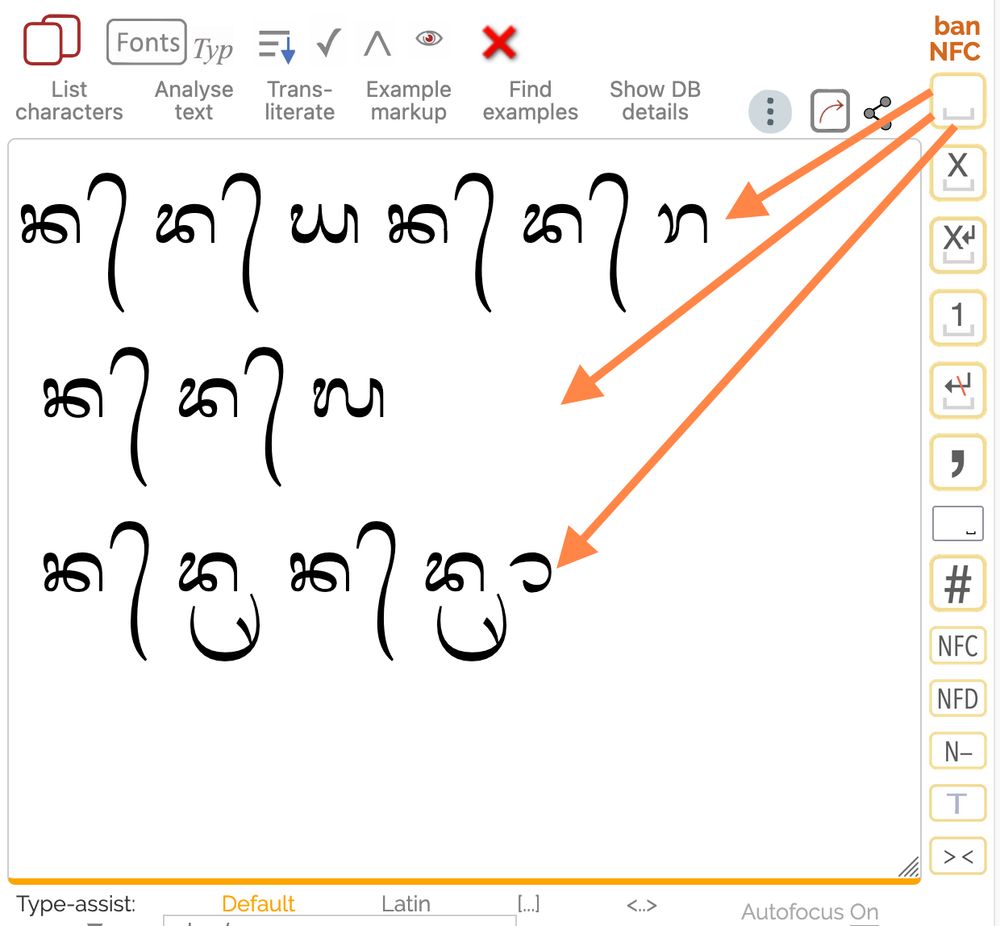
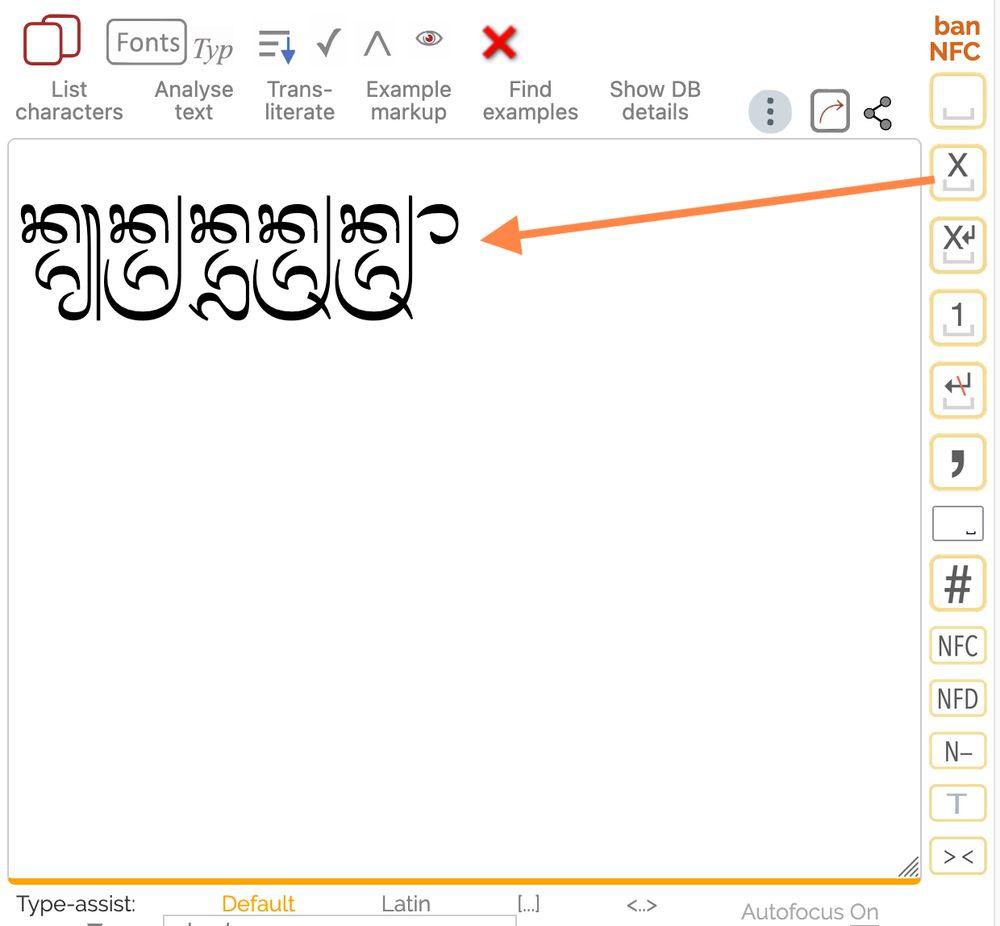
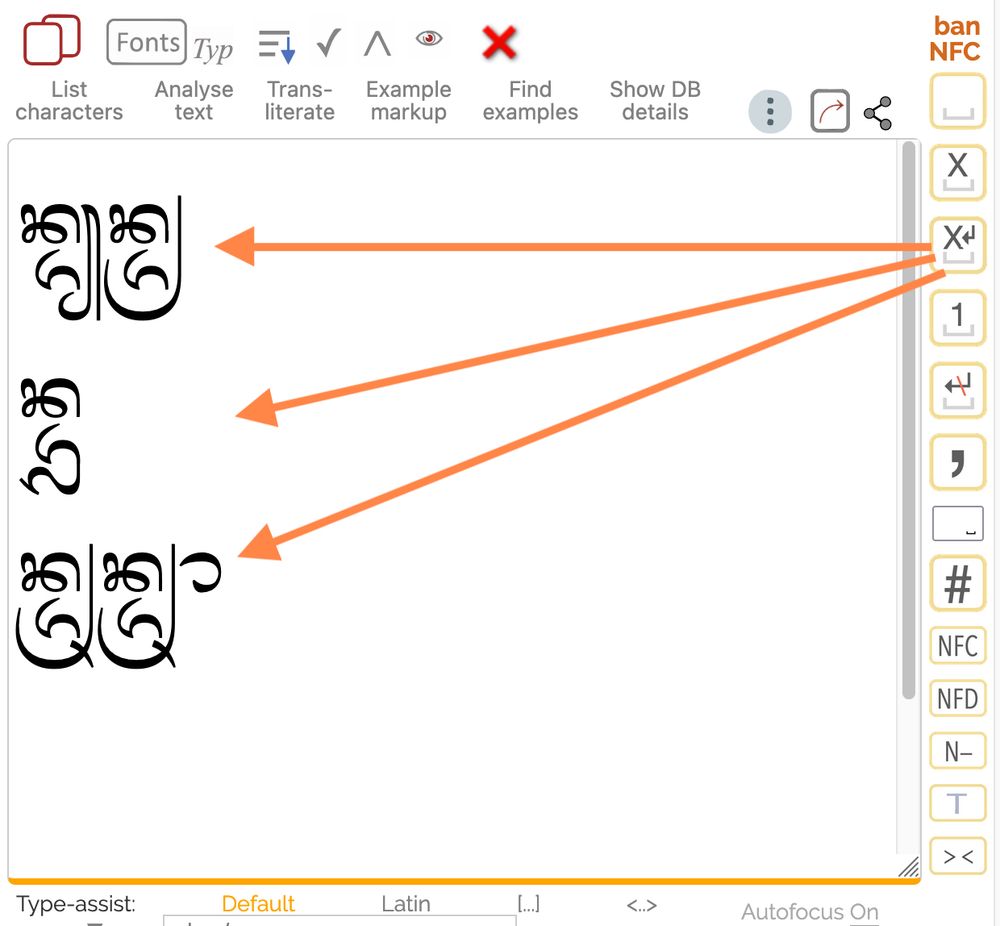
NEW PICKER FEATURE: Collapse spaces but keep lines
Pickers make it easy to rearrange/add/delete/change combining marks by clicking on an icon to the right of the text area which adds space(s) between each character. Clicking another icon removes the spaces once the edits are complete.
Pickers make it easy to rearrange/add/delete/change combining marks by clicking on an icon to the right of the text area which adds space(s) between each character. Clicking another icon removes the spaces once the edits are complete.
March 16, 2025 at 6:58 AM
NEW PICKER FEATURE: Collapse spaces but keep lines
Pickers make it easy to rearrange/add/delete/change combining marks by clicking on an icon to the right of the text area which adds space(s) between each character. Clicking another icon removes the spaces once the edits are complete.
Pickers make it easy to rearrange/add/delete/change combining marks by clicking on an icon to the right of the text area which adds space(s) between each character. Clicking another icon removes the spaces once the edits are complete.
NEW PICKER FEATURE: Render HTML
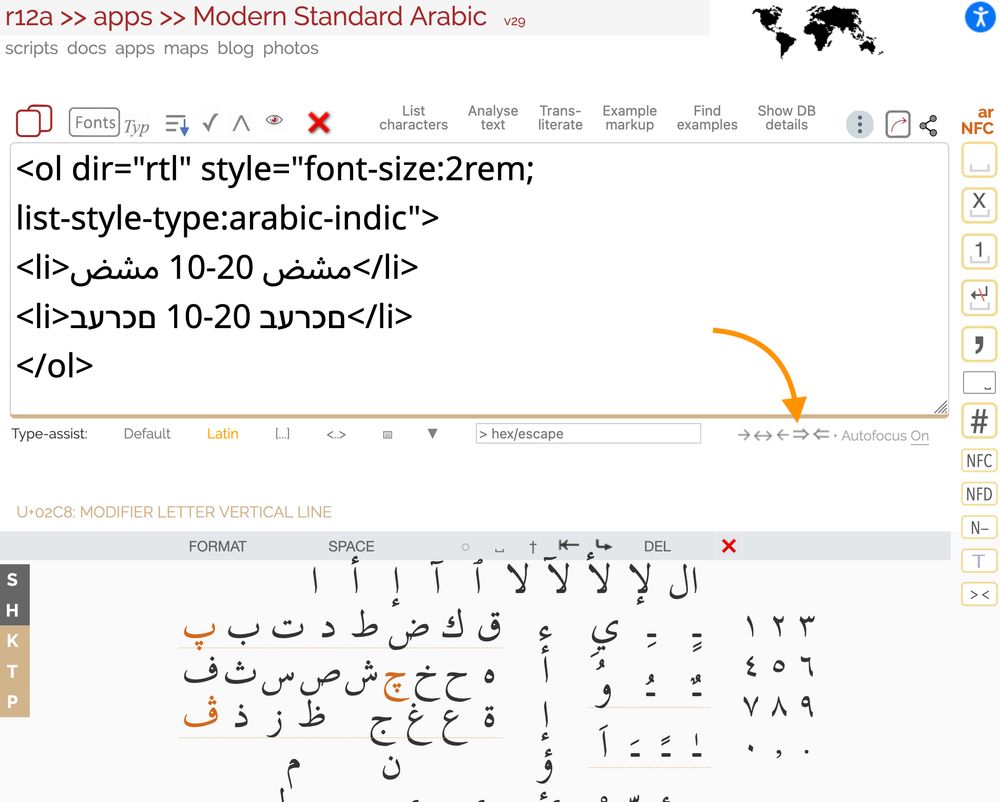
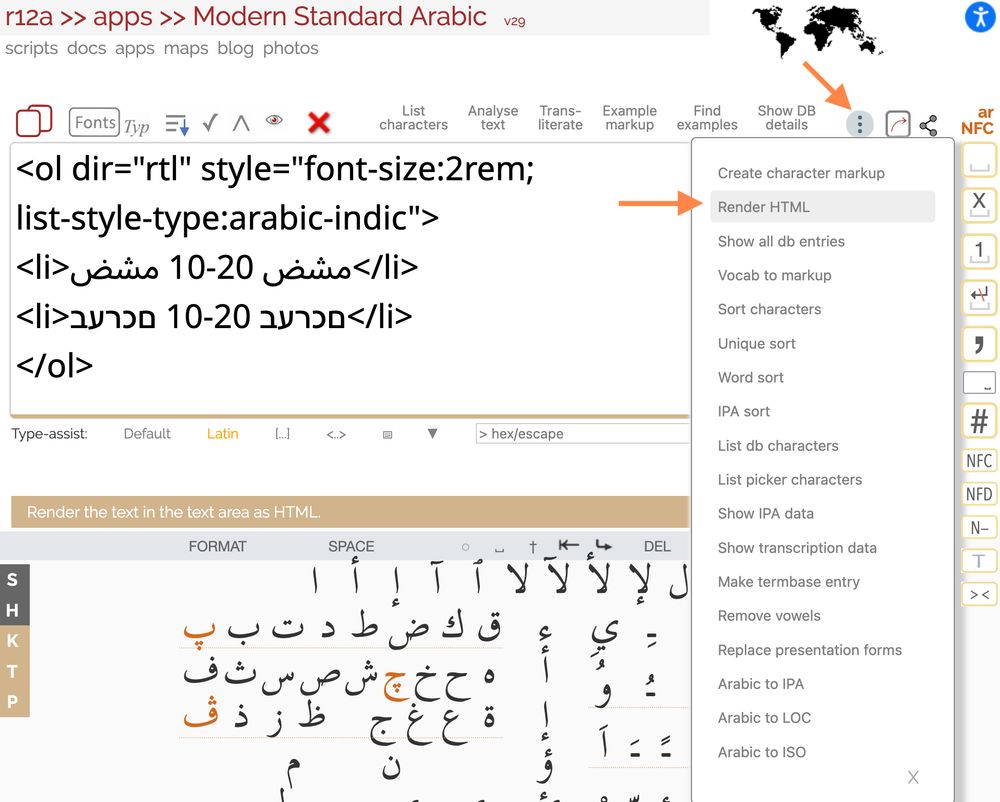
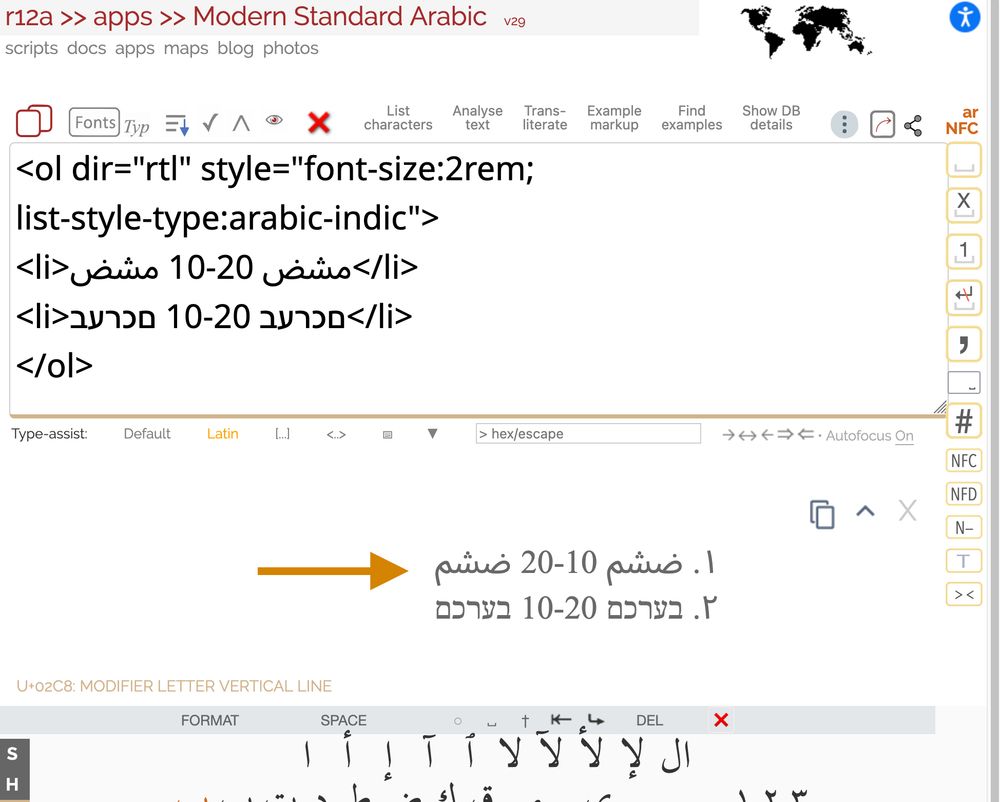
Pickers will now do basic rendering of simple HTML snippets. (Esp. useful for testing RTL behaviours.)
Hint: Set the direction to LTR override to manage bidi with HTML. Type the HTML. Select Render HTML from pulldown menu.
Try it: r12a.github.io/pickers/arab...
Pickers will now do basic rendering of simple HTML snippets. (Esp. useful for testing RTL behaviours.)
Hint: Set the direction to LTR override to manage bidi with HTML. Type the HTML. Select Render HTML from pulldown menu.
Try it: r12a.github.io/pickers/arab...
March 14, 2025 at 4:58 AM
NEW PICKER FEATURE: Render HTML
Pickers will now do basic rendering of simple HTML snippets. (Esp. useful for testing RTL behaviours.)
Hint: Set the direction to LTR override to manage bidi with HTML. Type the HTML. Select Render HTML from pulldown menu.
Try it: r12a.github.io/pickers/arab...
Pickers will now do basic rendering of simple HTML snippets. (Esp. useful for testing RTL behaviours.)
Hint: Set the direction to LTR override to manage bidi with HTML. Type the HTML. Select Render HTML from pulldown menu.
Try it: r12a.github.io/pickers/arab...
Thanks to Vinodh Rajan, the webfont used for these pages now uses a font that supports the Kashmiri vowel signs (and a lot more conjunct forms).
March 10, 2025 at 9:09 AM
Thanks to Vinodh Rajan, the webfont used for these pages now uses a font that supports the Kashmiri vowel signs (and a lot more conjunct forms).
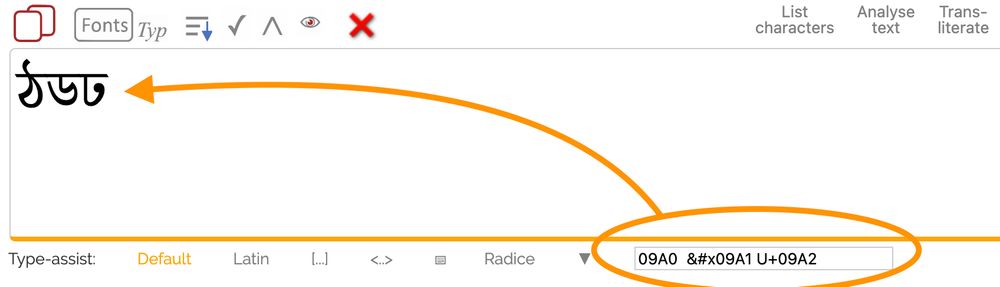
The input field that allows you to add characters to the text area in a picker by typing code points or escapes has been moved just below the text area, for convenience.
Just type one or more code points or escapes and hit return to add the character to the text area.
r12a.github.io/pickers/
Just type one or more code points or escapes and hit return to add the character to the text area.
r12a.github.io/pickers/
March 5, 2025 at 11:10 AM
The input field that allows you to add characters to the text area in a picker by typing code points or escapes has been moved just below the text area, for convenience.
Just type one or more code points or escapes and hit return to add the character to the text area.
r12a.github.io/pickers/
Just type one or more code points or escapes and hit return to add the character to the text area.
r12a.github.io/pickers/