




Reposted by ハチトラ

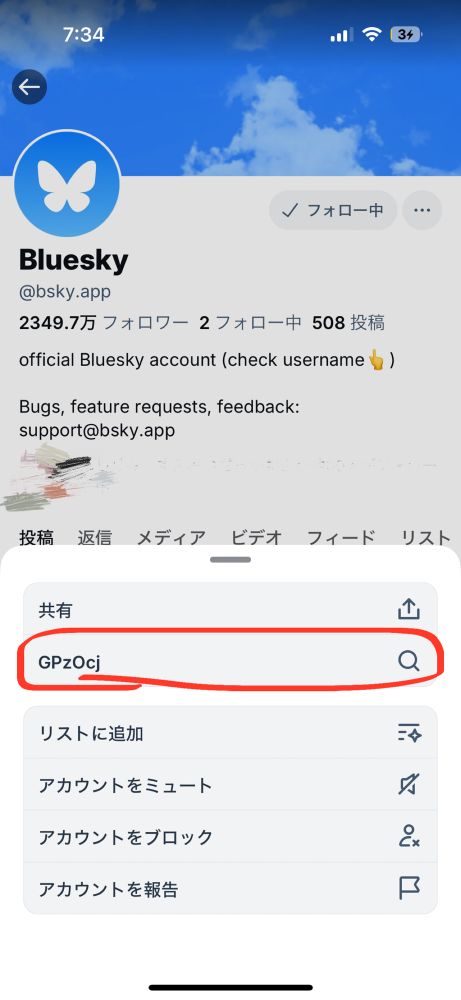
わ〜い今回の青空くんアプデでアカウント内の個別検索機能でた!!!!!!!自分のポストとかよく検索したい時あるからこれめっちゃ助かるよ〜🫶🫶🥹!!!!!ありがとうございます!!!!
1️⃣アカウントのホーム飛んで三点リーダーマークタップ
2️⃣「GPzOcj🔍」をタップ
(これ多分文字化け?修正されそう)
3️⃣個別検索用の画面が出るので一番上の🔍のとこに検索したい言葉入れると結果出てくる
1️⃣アカウントのホーム飛んで三点リーダーマークタップ
2️⃣「GPzOcj🔍」をタップ
(これ多分文字化け?修正されそう)
3️⃣個別検索用の画面が出るので一番上の🔍のとこに検索したい言葉入れると結果出てくる


February 17, 2025 at 10:56 PM
わ〜い今回の青空くんアプデでアカウント内の個別検索機能でた!!!!!!!自分のポストとかよく検索したい時あるからこれめっちゃ助かるよ〜🫶🫶🥹!!!!!ありがとうございます!!!!
1️⃣アカウントのホーム飛んで三点リーダーマークタップ
2️⃣「GPzOcj🔍」をタップ
(これ多分文字化け?修正されそう)
3️⃣個別検索用の画面が出るので一番上の🔍のとこに検索したい言葉入れると結果出てくる
1️⃣アカウントのホーム飛んで三点リーダーマークタップ
2️⃣「GPzOcj🔍」をタップ
(これ多分文字化け?修正されそう)
3️⃣個別検索用の画面が出るので一番上の🔍のとこに検索したい言葉入れると結果出てくる