




Sujal Vanjare
@sujal-vanjare.bsky.social
Frontend Developer | Designer
Building 🔨 https://usenotioncms.vercel.app ( Notion as a CMS, Next.js websites templates )
My portfolio & code blogs👉🏻 https://www.sujalvanjare.com
Building 🔨 https://usenotioncms.vercel.app ( Notion as a CMS, Next.js websites templates )
My portfolio & code blogs👉🏻 https://www.sujalvanjare.com
Day 45 to 50, added Site Navbar, Footer & Page Breadcrumb
- navbar is fully responsive for mobile, with a hamburger menu and side panel view
- footer and navbar social icons & page links are managed via a Notion database
👇🏻check out how the Notion database looks below
#buildinpublic #notion
- navbar is fully responsive for mobile, with a hamburger menu and side panel view
- footer and navbar social icons & page links are managed via a Notion database
👇🏻check out how the Notion database looks below
#buildinpublic #notion


August 7, 2025 at 5:55 PM
Day 45 to 50, added Site Navbar, Footer & Page Breadcrumb
- navbar is fully responsive for mobile, with a hamburger menu and side panel view
- footer and navbar social icons & page links are managed via a Notion database
👇🏻check out how the Notion database looks below
#buildinpublic #notion
- navbar is fully responsive for mobile, with a hamburger menu and side panel view
- footer and navbar social icons & page links are managed via a Notion database
👇🏻check out how the Notion database looks below
#buildinpublic #notion
designed & coded this animated Buy me a Coffee☕ button for my Notion + Next.js site template.
Rate it out of 10👇🏻
#buildinpublic
Rate it out of 10👇🏻
#buildinpublic
August 6, 2025 at 4:50 PM
designed & coded this animated Buy me a Coffee☕ button for my Notion + Next.js site template.
Rate it out of 10👇🏻
#buildinpublic
Rate it out of 10👇🏻
#buildinpublic
collected & organized clean social icons in figma
will be using these in my Notion + Next.js portfolio + blog template.
#buildinpublic #figma
will be using these in my Notion + Next.js portfolio + blog template.
#buildinpublic #figma

August 6, 2025 at 4:48 PM
collected & organized clean social icons in figma
will be using these in my Notion + Next.js portfolio + blog template.
#buildinpublic #figma
will be using these in my Notion + Next.js portfolio + blog template.
#buildinpublic #figma
Day 43–44: Rendered page icon, cover, and thumbnail using Notion page & database properties.
If a page has multiple thumbnails, they’re shown in a carousel.
Also updated link-to-page and mention-a-page previews to show title, description, and thumbnails (with carousel).
#notion #buildinpublic
If a page has multiple thumbnails, they’re shown in a carousel.
Also updated link-to-page and mention-a-page previews to show title, description, and thumbnails (with carousel).
#notion #buildinpublic

August 2, 2025 at 5:26 PM
Day 43–44: Rendered page icon, cover, and thumbnail using Notion page & database properties.
If a page has multiple thumbnails, they’re shown in a carousel.
Also updated link-to-page and mention-a-page previews to show title, description, and thumbnails (with carousel).
#notion #buildinpublic
If a page has multiple thumbnails, they’re shown in a carousel.
Also updated link-to-page and mention-a-page previews to show title, description, and thumbnails (with carousel).
#notion #buildinpublic
Day 38–42: added Facebook Post Embed & Mention Block
- Through the Notion API, I get the embed block and extract the Facebook post URL.
- Facebook has an official way to embed posts using their script, I use that to render the post.
#notion #buildinpublic
- Through the Notion API, I get the embed block and extract the Facebook post URL.
- Facebook has an official way to embed posts using their script, I use that to render the post.
#notion #buildinpublic


July 31, 2025 at 6:36 PM
Day 38–42: added Facebook Post Embed & Mention Block
- Through the Notion API, I get the embed block and extract the Facebook post URL.
- Facebook has an official way to embed posts using their script, I use that to render the post.
#notion #buildinpublic
- Through the Notion API, I get the embed block and extract the Facebook post URL.
- Facebook has an official way to embed posts using their script, I use that to render the post.
#notion #buildinpublic
Day 38–42: added Pinterest Pin Embed & Mention Block
- Through the Notion API, I get the embed block and extract the Pinterest post URL.
- Pinterest has an official way to embed pins using their script, I use that to render the post.
#notion #buildinpublic
- Through the Notion API, I get the embed block and extract the Pinterest post URL.
- Pinterest has an official way to embed pins using their script, I use that to render the post.
#notion #buildinpublic


July 31, 2025 at 6:35 PM
Day 38–42: added Pinterest Pin Embed & Mention Block
- Through the Notion API, I get the embed block and extract the Pinterest post URL.
- Pinterest has an official way to embed pins using their script, I use that to render the post.
#notion #buildinpublic
- Through the Notion API, I get the embed block and extract the Pinterest post URL.
- Pinterest has an official way to embed pins using their script, I use that to render the post.
#notion #buildinpublic
Day 37–42 added Instagram Post Embed
- In a Notion page, we can embed Instagram posts
- Through the Notion API, I get the embed block and extract the Instagram post URL
- Instagram has an official way to do embeds using
- In a Notion page, we can embed Instagram posts
- Through the Notion API, I get the embed block and extract the Instagram post URL
- Instagram has an official way to do embeds using
and a script, I use that to render the post
#notion #buildinpublic


July 31, 2025 at 6:33 PM
Day 37–42 added Instagram Post Embed
- In a Notion page, we can embed Instagram posts
- Through the Notion API, I get the embed block and extract the Instagram post URL
- Instagram has an official way to do embeds using
- In a Notion page, we can embed Instagram posts
- Through the Notion API, I get the embed block and extract the Instagram post URL
- Instagram has an official way to do embeds using
and a script, I use that to render the post
#notion #buildinpublic
Day 35-36: Just wrapped up the final Notion blocks - Breadcrumb and Link to Page
✅ With this, I’ve built a fully accurate Notion block renderer that can render any Notion page perfectly in a Next.js site - block by block, pixel by pixel.
Most accurate Notion renderer yet.
#notion #buildinpublic
✅ With this, I’ve built a fully accurate Notion block renderer that can render any Notion page perfectly in a Next.js site - block by block, pixel by pixel.
Most accurate Notion renderer yet.
#notion #buildinpublic


July 25, 2025 at 6:18 PM
Day 35-36: Just wrapped up the final Notion blocks - Breadcrumb and Link to Page
✅ With this, I’ve built a fully accurate Notion block renderer that can render any Notion page perfectly in a Next.js site - block by block, pixel by pixel.
Most accurate Notion renderer yet.
#notion #buildinpublic
✅ With this, I’ve built a fully accurate Notion block renderer that can render any Notion page perfectly in a Next.js site - block by block, pixel by pixel.
Most accurate Notion renderer yet.
#notion #buildinpublic
Day 32–34: Added inline mention blocks and their previews
- Previews include links, page mentions, files, images, PDFs, videos, and more.
- Mention text and previews now render exactly like @notion.com, but even better, and fully static in @nextjs.org!
Just one block left ✨
#notion #buildinpublic
- Previews include links, page mentions, files, images, PDFs, videos, and more.
- Mention text and previews now render exactly like @notion.com, but even better, and fully static in @nextjs.org!
Just one block left ✨
#notion #buildinpublic
July 23, 2025 at 3:29 PM
Day 32–34: Added inline mention blocks and their previews
- Previews include links, page mentions, files, images, PDFs, videos, and more.
- Mention text and previews now render exactly like @notion.com, but even better, and fully static in @nextjs.org!
Just one block left ✨
#notion #buildinpublic
- Previews include links, page mentions, files, images, PDFs, videos, and more.
- Mention text and previews now render exactly like @notion.com, but even better, and fully static in @nextjs.org!
Just one block left ✨
#notion #buildinpublic
Day 30 – 31: Added Figma, Excalidraw, GitHub Gist, CodeSandbox, Google Forms & generic site embeds to my Notion-as-CMS Next.js portfolio + blog template.
Moving fast now only 2 block types & inline mention left to fully replicate @notion.com page rendering statically in @nextjs.org
#buildinpublic
Moving fast now only 2 block types & inline mention left to fully replicate @notion.com page rendering statically in @nextjs.org
#buildinpublic


July 19, 2025 at 9:07 PM
Day 30 – 31: Added Figma, Excalidraw, GitHub Gist, CodeSandbox, Google Forms & generic site embeds to my Notion-as-CMS Next.js portfolio + blog template.
Moving fast now only 2 block types & inline mention left to fully replicate @notion.com page rendering statically in @nextjs.org
#buildinpublic
Moving fast now only 2 block types & inline mention left to fully replicate @notion.com page rendering statically in @nextjs.org
#buildinpublic

July 18, 2025 at 6:52 PM
Day 29, added Google Map embed in Notion-as-CMS Next.js portfolio + blog template
- you can embed official Google Maps embed urls in sites
- but direct Google Maps urls aren’t embeddable they need an API key, which users may not have
- so coded it to embed with or without a key
#buildinpublic
- you can embed official Google Maps embed urls in sites
- but direct Google Maps urls aren’t embeddable they need an API key, which users may not have
- so coded it to embed with or without a key
#buildinpublic
July 17, 2025 at 7:31 PM
Day 29, added Google Map embed in Notion-as-CMS Next.js portfolio + blog template
- you can embed official Google Maps embed urls in sites
- but direct Google Maps urls aren’t embeddable they need an API key, which users may not have
- so coded it to embed with or without a key
#buildinpublic
- you can embed official Google Maps embed urls in sites
- but direct Google Maps urls aren’t embeddable they need an API key, which users may not have
- so coded it to embed with or without a key
#buildinpublic
Day 28, Created a Notion Database to manage content for my Next.js portfolio + blog template
Page properties includes
title, status, slug, path, category, description, thumbnail_url, published_date, authors, reading_time, & SEO fields, etc.
Everything is Queryable & CMS ready✅
#buildinpublic #cms
Page properties includes
title, status, slug, path, category, description, thumbnail_url, published_date, authors, reading_time, & SEO fields, etc.
Everything is Queryable & CMS ready✅
#buildinpublic #cms

July 16, 2025 at 5:08 PM
Day 28, Created a Notion Database to manage content for my Next.js portfolio + blog template
Page properties includes
title, status, slug, path, category, description, thumbnail_url, published_date, authors, reading_time, & SEO fields, etc.
Everything is Queryable & CMS ready✅
#buildinpublic #cms
Page properties includes
title, status, slug, path, category, description, thumbnail_url, published_date, authors, reading_time, & SEO fields, etc.
Everything is Queryable & CMS ready✅
#buildinpublic #cms
Day 27, added CodePen embed in my Notion-as-CMS Next.js portfolio + blog template
- got the @codepen.io url from the @notion.com api
- converted it to /embed/ format
- rendered via iframe with dynamic theme based on site
- codepen embed in dark/light mode
#buildinpublic #nextjs
- got the @codepen.io url from the @notion.com api
- converted it to /embed/ format
- rendered via iframe with dynamic theme based on site
- codepen embed in dark/light mode
#buildinpublic #nextjs
July 15, 2025 at 3:43 PM
Day 27, added CodePen embed in my Notion-as-CMS Next.js portfolio + blog template
- got the @codepen.io url from the @notion.com api
- converted it to /embed/ format
- rendered via iframe with dynamic theme based on site
- codepen embed in dark/light mode
#buildinpublic #nextjs
- got the @codepen.io url from the @notion.com api
- converted it to /embed/ format
- rendered via iframe with dynamic theme based on site
- codepen embed in dark/light mode
#buildinpublic #nextjs
Day 26, added Spotify🎧embed in my Notion-as-CMS Next.js portfolio + blog template
- got the Spotify url from the notion api
- converted to /embed/ format url
- dynamically rendered via iframe with height based on content type (track, album, artist, playlist)
#buildinpublic #notion #nextjs #spotify
- got the Spotify url from the notion api
- converted to /embed/ format url
- dynamically rendered via iframe with height based on content type (track, album, artist, playlist)
#buildinpublic #notion #nextjs #spotify
July 14, 2025 at 4:34 PM
Day 26, added Spotify🎧embed in my Notion-as-CMS Next.js portfolio + blog template
- got the Spotify url from the notion api
- converted to /embed/ format url
- dynamically rendered via iframe with height based on content type (track, album, artist, playlist)
#buildinpublic #notion #nextjs #spotify
- got the Spotify url from the notion api
- converted to /embed/ format url
- dynamically rendered via iframe with height based on content type (track, album, artist, playlist)
#buildinpublic #notion #nextjs #spotify
Day 25, added PDF embed in my Notion-as-CMS Next.js portfolio+blog template
- got the pdf url from the notion api
- rendered in browser using react-pdf on client side
- for multiple-page pdfs only load first 2 pages, then load more on scroll for better performance like notion
#buildinpublic #notion
- got the pdf url from the notion api
- rendered in browser using react-pdf on client side
- for multiple-page pdfs only load first 2 pages, then load more on scroll for better performance like notion
#buildinpublic #notion
July 13, 2025 at 8:51 PM
Day 25, added PDF embed in my Notion-as-CMS Next.js portfolio+blog template
- got the pdf url from the notion api
- rendered in browser using react-pdf on client side
- for multiple-page pdfs only load first 2 pages, then load more on scroll for better performance like notion
#buildinpublic #notion
- got the pdf url from the notion api
- rendered in browser using react-pdf on client side
- for multiple-page pdfs only load first 2 pages, then load more on scroll for better performance like notion
#buildinpublic #notion
Day 22 to 24, added X Post embed in my Notion-as-CMS Nextjs portfolio+blog template
- I got the embedded tweet URL from the Notion API and extracted the post ID from it
- renders completely static on the server
- supports both dark and light themes
- uses react-tweet package
#buildinpublic #nextjs
- I got the embedded tweet URL from the Notion API and extracted the post ID from it
- renders completely static on the server
- supports both dark and light themes
- uses react-tweet package
#buildinpublic #nextjs
July 12, 2025 at 7:45 PM
Day 22 to 24, added X Post embed in my Notion-as-CMS Nextjs portfolio+blog template
- I got the embedded tweet URL from the Notion API and extracted the post ID from it
- renders completely static on the server
- supports both dark and light themes
- uses react-tweet package
#buildinpublic #nextjs
- I got the embedded tweet URL from the Notion API and extracted the post ID from it
- renders completely static on the server
- supports both dark and light themes
- uses react-tweet package
#buildinpublic #nextjs
Day 21, added Block Equation to my Notion-as-CMS Next.js portfolio + blog template.
- Got the equation expression as a plain string from the Notion API
- Rendered it with KaTeX, styled just like Notion
- Server-side render, no flicker, no layout shift
#buildinpublic #notion #buildinginpublic #cms
- Got the equation expression as a plain string from the Notion API
- Rendered it with KaTeX, styled just like Notion
- Server-side render, no flicker, no layout shift
#buildinpublic #notion #buildinginpublic #cms


July 9, 2025 at 7:26 PM
Day 21, added Block Equation to my Notion-as-CMS Next.js portfolio + blog template.
- Got the equation expression as a plain string from the Notion API
- Rendered it with KaTeX, styled just like Notion
- Server-side render, no flicker, no layout shift
#buildinpublic #notion #buildinginpublic #cms
- Got the equation expression as a plain string from the Notion API
- Rendered it with KaTeX, styled just like Notion
- Server-side render, no flicker, no layout shift
#buildinpublic #notion #buildinginpublic #cms
Day 19-20, added a video block to my Notion-as-CMS Next.js portfolio + blog template.
- Supports both uploaded and embedded videos like ( YouTube, Vimeo, Dailymotion, Facebook, etc ).
see it here notion-as-a-cms-nextjs-portfolio-blog-template.vercel.app#video-block
#buildinpublic #notion #nextjs
- Supports both uploaded and embedded videos like ( YouTube, Vimeo, Dailymotion, Facebook, etc ).
see it here notion-as-a-cms-nextjs-portfolio-blog-template.vercel.app#video-block
#buildinpublic #notion #nextjs


July 8, 2025 at 8:16 PM
Day 19-20, added a video block to my Notion-as-CMS Next.js portfolio + blog template.
- Supports both uploaded and embedded videos like ( YouTube, Vimeo, Dailymotion, Facebook, etc ).
see it here notion-as-a-cms-nextjs-portfolio-blog-template.vercel.app#video-block
#buildinpublic #notion #nextjs
- Supports both uploaded and embedded videos like ( YouTube, Vimeo, Dailymotion, Facebook, etc ).
see it here notion-as-a-cms-nextjs-portfolio-blog-template.vercel.app#video-block
#buildinpublic #notion #nextjs

July 6, 2025 at 7:35 PM
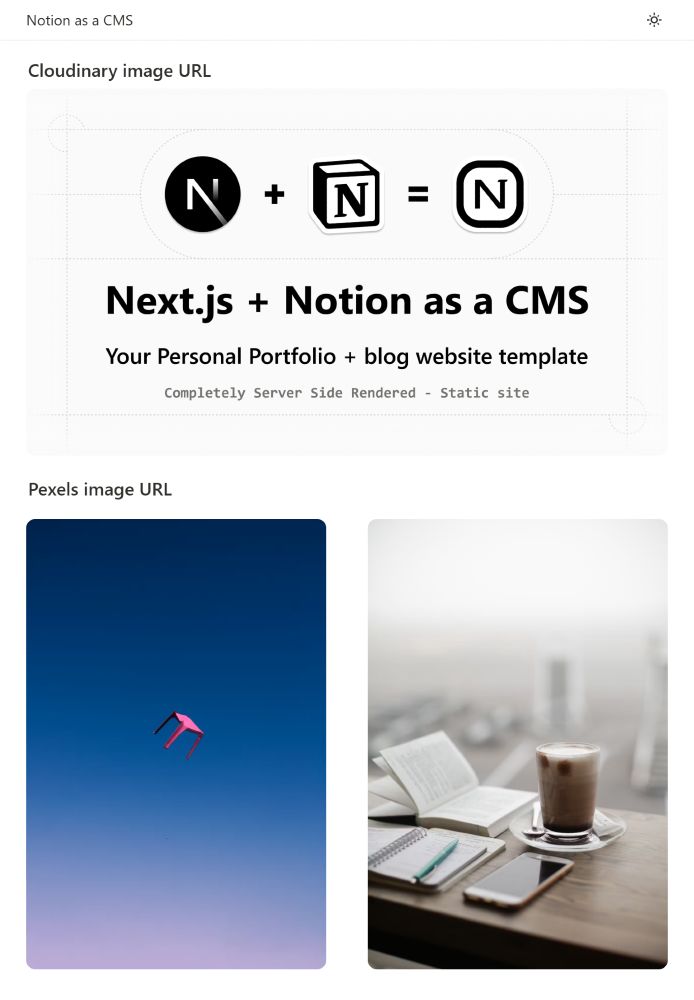
Day 18, Added an image block to my Notion-as-CMS Next.js portfolio + blog template.
- Handled uploaded Notion images by saving them locally and optimizing with Next.js.
- For external URLs (Unsplash, Cloudinary etc), used![]() with responsive sizes and CDN-based srcSet.
with responsive sizes and CDN-based srcSet.
#buildinpublic
- Handled uploaded Notion images by saving them locally and optimizing with Next.js
- For external URLs (Unsplash, Cloudinary etc), used
#buildinpublic


July 6, 2025 at 7:06 PM
Day 18, Added an image block to my Notion-as-CMS Next.js portfolio + blog template.
- Handled uploaded Notion images by saving them locally and optimizing with Next.js.
- For external URLs (Unsplash, Cloudinary etc), used![]() with responsive sizes and CDN-based srcSet.
with responsive sizes and CDN-based srcSet.
#buildinpublic
- Handled uploaded Notion images by saving them locally and optimizing with Next.js
- For external URLs (Unsplash, Cloudinary etc), used
#buildinpublic
Day 16-17, added Table of Contents block in my Notion as a CMS portfolio + blog template
One of the most complex blocks to render is the table of contents.
Here’s how I did it ⬇️
#buildinpublic #buildinginpublic #notion #notioncms #nextjs #tailwindcss
One of the most complex blocks to render is the table of contents.
Here’s how I did it ⬇️
#buildinpublic #buildinginpublic #notion #notioncms #nextjs #tailwindcss

July 5, 2025 at 8:01 PM
Day 16-17, added Table of Contents block in my Notion as a CMS portfolio + blog template
One of the most complex blocks to render is the table of contents.
Here’s how I did it ⬇️
#buildinpublic #buildinginpublic #notion #notioncms #nextjs #tailwindcss
One of the most complex blocks to render is the table of contents.
Here’s how I did it ⬇️
#buildinpublic #buildinginpublic #notion #notioncms #nextjs #tailwindcss
Day 14–15: Added Callout block support in my Notion block renderer ( built with Next.js + Tailwind CSS )
view progress here👉🏻 notion-as-a-cms-nextjs-portfolio-blog-nonex.vercel.app#callout-block
#buildinpublic #buildinginpublic #notion #notioncms #nextjs #tailwindcss
view progress here👉🏻 notion-as-a-cms-nextjs-portfolio-blog-nonex.vercel.app#callout-block
#buildinpublic #buildinginpublic #notion #notioncms #nextjs #tailwindcss


July 3, 2025 at 7:10 PM
Day 14–15: Added Callout block support in my Notion block renderer ( built with Next.js + Tailwind CSS )
view progress here👉🏻 notion-as-a-cms-nextjs-portfolio-blog-nonex.vercel.app#callout-block
#buildinpublic #buildinginpublic #notion #notioncms #nextjs #tailwindcss
view progress here👉🏻 notion-as-a-cms-nextjs-portfolio-blog-nonex.vercel.app#callout-block
#buildinpublic #buildinginpublic #notion #notioncms #nextjs #tailwindcss
Day 13, added Bookmark block in my Notion as a CMS portfolio + blog template
- notion api only gives the url, no metadata
- used Microlink.io to fetch metadata (limit: 50 req/day)
- added a fallback to manually scrape all essential metadata from the bookmark url
#buildinpublic #notion #notionapi
- notion api only gives the url, no metadata
- used Microlink.io to fetch metadata (limit: 50 req/day)
- added a fallback to manually scrape all essential metadata from the bookmark url
#buildinpublic #notion #notionapi


July 1, 2025 at 6:54 PM
Day 13, added Bookmark block in my Notion as a CMS portfolio + blog template
- notion api only gives the url, no metadata
- used Microlink.io to fetch metadata (limit: 50 req/day)
- added a fallback to manually scrape all essential metadata from the bookmark url
#buildinpublic #notion #notionapi
- notion api only gives the url, no metadata
- used Microlink.io to fetch metadata (limit: 50 req/day)
- added a fallback to manually scrape all essential metadata from the bookmark url
#buildinpublic #notion #notionapi
Day 11-12, added Table block in my Notion as a CMS Nextjs portfolio+blog template
- one of the trickier blocks to implement
- semantic html: thead, tbody, tr, th, proper scope roles
- recreated notion-style horizontal overflow gradient
-fixed column width issue
Detail explain⬇️
#buildinpublic #notion
- one of the trickier blocks to implement
- semantic html: thead, tbody, tr, th, proper scope roles
- recreated notion-style horizontal overflow gradient
-fixed column width issue
Detail explain⬇️
#buildinpublic #notion


June 30, 2025 at 9:40 PM
Day 11-12, added Table block in my Notion as a CMS Nextjs portfolio+blog template
- one of the trickier blocks to implement
- semantic html: thead, tbody, tr, th, proper scope roles
- recreated notion-style horizontal overflow gradient
-fixed column width issue
Detail explain⬇️
#buildinpublic #notion
- one of the trickier blocks to implement
- semantic html: thead, tbody, tr, th, proper scope roles
- recreated notion-style horizontal overflow gradient
-fixed column width issue
Detail explain⬇️
#buildinpublic #notion