




IncidentHub
@incidenthub.bsky.social
Monitor All Your Cloud and SaaS Status Pages In One Place.
https://incidenthub.cloud
https://incidenthub.cloud
IncidentHub can now send notifications to Microsoft Teams.
Under the hood it uses Adaptive Cards which support JSON based templating to push rich notifications to Teams channels. The benefit of the templating model is that you can separate data from the layout.
Under the hood it uses Adaptive Cards which support JSON based templating to push rich notifications to Teams channels. The benefit of the templating model is that you can separate data from the layout.


October 13, 2025 at 12:12 PM
IncidentHub can now send notifications to Microsoft Teams.
Under the hood it uses Adaptive Cards which support JSON based templating to push rich notifications to Teams channels. The benefit of the templating model is that you can separate data from the layout.
Under the hood it uses Adaptive Cards which support JSON based templating to push rich notifications to Teams channels. The benefit of the templating model is that you can separate data from the layout.
For services with thousands of components (Google Cloud, Salesforce, etc), just start typing to filter out the ones you want instead of endless scrolling.
The overall experience is also faster now because it's based on TanStack's react-virtual library.
Try it out by creating an IncidentHub acct.
The overall experience is also faster now because it's based on TanStack's react-virtual library.
Try it out by creating an IncidentHub acct.


September 25, 2025 at 3:43 PM
For services with thousands of components (Google Cloud, Salesforce, etc), just start typing to filter out the ones you want instead of endless scrolling.
The overall experience is also faster now because it's based on TanStack's react-virtual library.
Try it out by creating an IncidentHub acct.
The overall experience is also faster now because it's based on TanStack's react-virtual library.
Try it out by creating an IncidentHub acct.
Hey Folks,
This is the second launch of IncidentHub on PH.
www.producthunt.com/products/inc...
Since the first one more than a year ago, I've learnt a lot from my users and customers whose feedback has improved and continues to improve the product.
Looking forward to your feedback!
This is the second launch of IncidentHub on PH.
www.producthunt.com/products/inc...
Since the first one more than a year ago, I've learnt a lot from my users and customers whose feedback has improved and continues to improve the product.
Looking forward to your feedback!

August 13, 2025 at 7:48 AM
Hey Folks,
This is the second launch of IncidentHub on PH.
www.producthunt.com/products/inc...
Since the first one more than a year ago, I've learnt a lot from my users and customers whose feedback has improved and continues to improve the product.
Looking forward to your feedback!
This is the second launch of IncidentHub on PH.
www.producthunt.com/products/inc...
Since the first one more than a year ago, I've learnt a lot from my users and customers whose feedback has improved and continues to improve the product.
Looking forward to your feedback!
A public status page forms the face of your organization's service availability. It is the first point of contact for customers to check the status of your services during a crisis. Ensuring the credibility and uptime of your public status page is crucial.
blog.incidenthub.cloud/mistakes-to-...
blog.incidenthub.cloud/mistakes-to-...

July 24, 2025 at 2:36 PM
A public status page forms the face of your organization's service availability. It is the first point of contact for customers to check the status of your services during a crisis. Ensuring the credibility and uptime of your public status page is crucial.
blog.incidenthub.cloud/mistakes-to-...
blog.incidenthub.cloud/mistakes-to-...
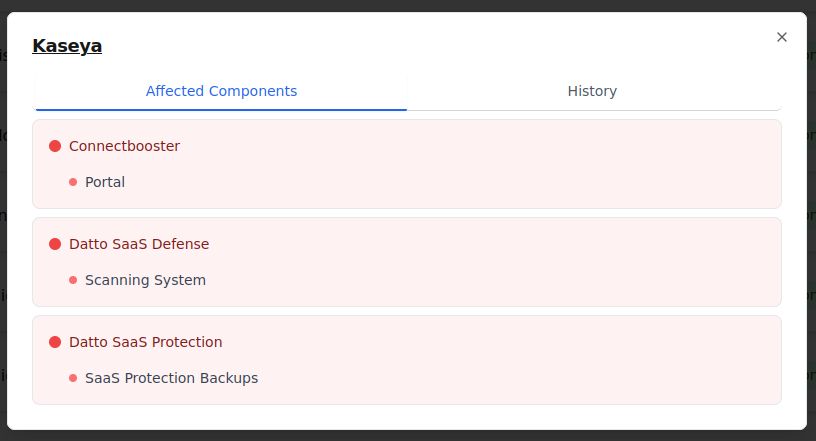
IncidentHub's public status pages now have:
- Affected components
- Historical data for the last 30 days
- Overall status of all your services at a glance
- Affected components
- Historical data for the last 30 days
- Overall status of all your services at a glance


July 21, 2025 at 4:39 AM
IncidentHub's public status pages now have:
- Affected components
- Historical data for the last 30 days
- Overall status of all your services at a glance
- Affected components
- Historical data for the last 30 days
- Overall status of all your services at a glance
Cloud maintenance is unavoidable if you use any cloud vendor's services. Staying on top of upcoming maintenance events and minimizing impact on your own apps and users can pose challenges if not planned well. Read more in our latest article on how to do so. blog.incidenthub.cloud/planning-for...

July 6, 2025 at 11:21 AM
Cloud maintenance is unavoidable if you use any cloud vendor's services. Staying on top of upcoming maintenance events and minimizing impact on your own apps and users can pose challenges if not planned well. Read more in our latest article on how to do so. blog.incidenthub.cloud/planning-for...
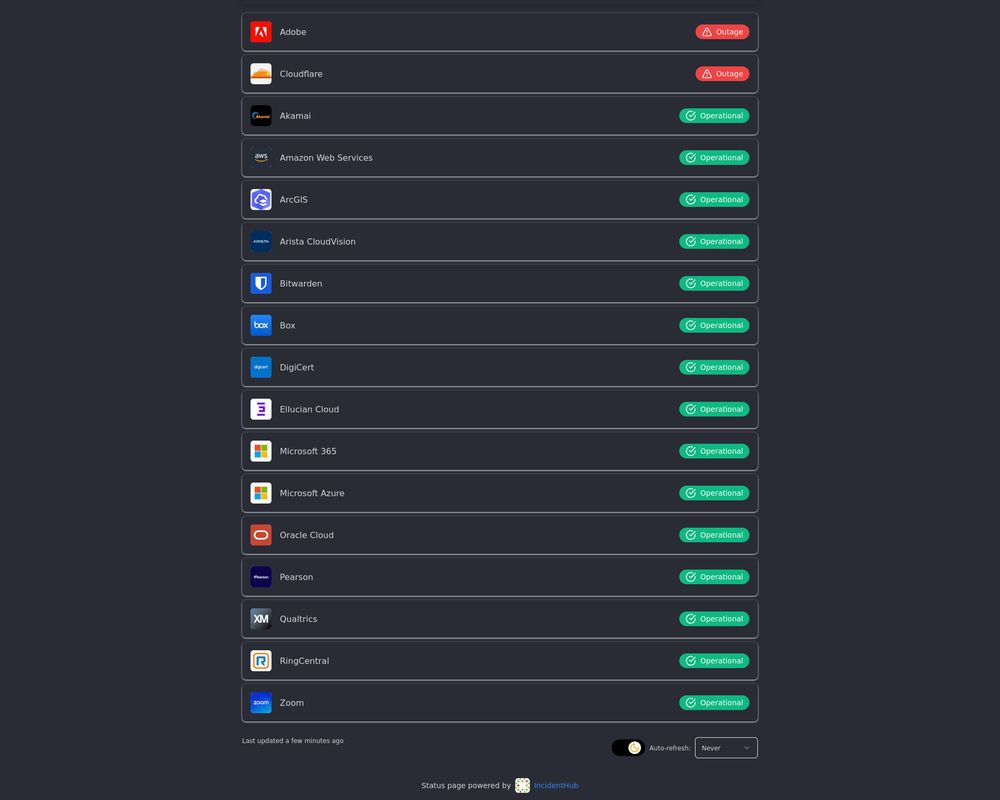
IncidentHub public status pages now support dark mode
June 26, 2025 at 1:54 PM
IncidentHub public status pages now support dark mode
Public status pages with a dedicated subdomain are now available in all IncidentHub accounts. Try it out!
What's next on the road map:
- Theme customization
- Custom domains
- Password protection
- Subscription options
- Affected components view
#IncidentHub #statuspagemonitor #statuspageaggregator
What's next on the road map:
- Theme customization
- Custom domains
- Password protection
- Subscription options
- Affected components view
#IncidentHub #statuspagemonitor #statuspageaggregator

April 30, 2025 at 3:54 PM
Public status pages with a dedicated subdomain are now available in all IncidentHub accounts. Try it out!
What's next on the road map:
- Theme customization
- Custom domains
- Password protection
- Subscription options
- Affected components view
#IncidentHub #statuspagemonitor #statuspageaggregator
What's next on the road map:
- Theme customization
- Custom domains
- Password protection
- Subscription options
- Affected components view
#IncidentHub #statuspagemonitor #statuspageaggregator
A sneak peek into what's coming at #IncidentHub

April 23, 2025 at 11:06 AM
A sneak peek into what's coming at #IncidentHub
If you're in Ops/SRE/IT teams and responsible for monitoring, or have on-call duties, you know how bad alert fatigue can get when you have badly configured, out of date, irrelevant alerts. It's true for third-party alerts as well as for your own services.

April 9, 2025 at 7:43 AM
If you're in Ops/SRE/IT teams and responsible for monitoring, or have on-call duties, you know how bad alert fatigue can get when you have badly configured, out of date, irrelevant alerts. It's true for third-party alerts as well as for your own services.
Hook up your third-party incident alerts to any system of your choice that supports webhooks blog.incidenthub.cloud/how-to-recei...

March 26, 2025 at 8:42 AM
Hook up your third-party incident alerts to any system of your choice that supports webhooks blog.incidenthub.cloud/how-to-recei...
Have you tried the new IncidentHub Slack app yet?
- Login to your account incidenthub.cloud/dashboard
- My Channels -> Add -> Slack
- Choose your target channel for alerts, and you're all set! 🚀
- Login to your account incidenthub.cloud/dashboard
- My Channels -> Add -> Slack
- Choose your target channel for alerts, and you're all set! 🚀

March 18, 2025 at 1:03 PM
Have you tried the new IncidentHub Slack app yet?
- Login to your account incidenthub.cloud/dashboard
- My Channels -> Add -> Slack
- Choose your target channel for alerts, and you're all set! 🚀
- Login to your account incidenthub.cloud/dashboard
- My Channels -> Add -> Slack
- Choose your target channel for alerts, and you're all set! 🚀
January 2025 Product Updates
For the last two months, we have focused on improving the onboarding experience for users, improving reliability of our backend systems, and an easier to use dashboard.
Read more in the IncidentHub blog blog.incidenthub.cloud/product-upda...
For the last two months, we have focused on improving the onboarding experience for users, improving reliability of our backend systems, and an easier to use dashboard.
Read more in the IncidentHub blog blog.incidenthub.cloud/product-upda...

February 5, 2025 at 11:06 AM
January 2025 Product Updates
For the last two months, we have focused on improving the onboarding experience for users, improving reliability of our backend systems, and an easier to use dashboard.
Read more in the IncidentHub blog blog.incidenthub.cloud/product-upda...
For the last two months, we have focused on improving the onboarding experience for users, improving reliability of our backend systems, and an easier to use dashboard.
Read more in the IncidentHub blog blog.incidenthub.cloud/product-upda...
Adding a Grafana Dashboard to Your Prometheus Setup blog.incidenthub.cloud/adding-a-gra...

December 26, 2024 at 5:31 PM
Adding a Grafana Dashboard to Your Prometheus Setup blog.incidenthub.cloud/adding-a-gra...
Evaluating status page providers and unable to decide between self-managed and hosted? These guidelines can help you choose.
blog.incidenthub.cloud/how-to-decid...
blog.incidenthub.cloud/how-to-decid...

December 19, 2024 at 10:30 AM
Evaluating status page providers and unable to decide between self-managed and hosted? These guidelines can help you choose.
blog.incidenthub.cloud/how-to-decid...
blog.incidenthub.cloud/how-to-decid...
Our new dashboard is live with some goodies
- Service and channel usage indicators
- Subscription plan indicator
- Upgrade directly from your dashboard
- Service and channel usage indicators
- Subscription plan indicator
- Upgrade directly from your dashboard

December 11, 2024 at 5:16 PM
Our new dashboard is live with some goodies
- Service and channel usage indicators
- Subscription plan indicator
- Upgrade directly from your dashboard
- Service and channel usage indicators
- Subscription plan indicator
- Upgrade directly from your dashboard
Sending Alerts Using Prometheus and Alertmanager blog.incidenthub.cloud/sending-aler... #DevOps #monitoring #observability #Prometheus #SRE #sitereliabilityengineering

December 3, 2024 at 11:02 AM
Sending Alerts Using Prometheus and Alertmanager blog.incidenthub.cloud/sending-aler... #DevOps #monitoring #observability #Prometheus #SRE #sitereliabilityengineering
Integrate Incident Alerts Into Your Slack Workspace blog.incidenthub.cloud/Integrate-In...

November 12, 2024 at 3:44 AM
Integrate Incident Alerts Into Your Slack Workspace blog.incidenthub.cloud/Integrate-In...
A Step by Step Guide to Checking if a SaaS is Down blog.incidenthub.cloud/A-Step-by-St...

November 11, 2024 at 3:18 PM
A Step by Step Guide to Checking if a SaaS is Down blog.incidenthub.cloud/A-Step-by-St...