




@icons8.bsky.social
Spin the wheel:
ic8.link/ZOPjx
ic8.link/ZOPjx

Black Friday Wheel - Spin to Win Up to 100% OFF!
Try your luck on our Black Friday wheel! Win discounts up to 100% OFF, free premium tools, or exclusive design packs. Spin now!
icons8.com
November 24, 2025 at 5:02 PM
Spin the wheel:
ic8.link/ZOPjx
ic8.link/ZOPjx
That's it for today!
Subscribe for more icon design secrets ✅
Subscribe for more icon design secrets ✅
October 29, 2025 at 10:58 PM
That's it for today!
Subscribe for more icon design secrets ✅
Subscribe for more icon design secrets ✅
5/ If we needed to offer the user multiple different printer models to choose from, we would need to make the icons more elaborate and lifelike

October 29, 2025 at 10:58 PM
5/ If we needed to offer the user multiple different printer models to choose from, we would need to make the icons more elaborate and lifelike
4/ Choose a level of detail and stick to it in all icons

October 29, 2025 at 10:58 PM
4/ Choose a level of detail and stick to it in all icons
3/ The same rule applies when aligning several objects relative to each other

October 29, 2025 at 10:58 PM
3/ The same rule applies when aligning several objects relative to each other
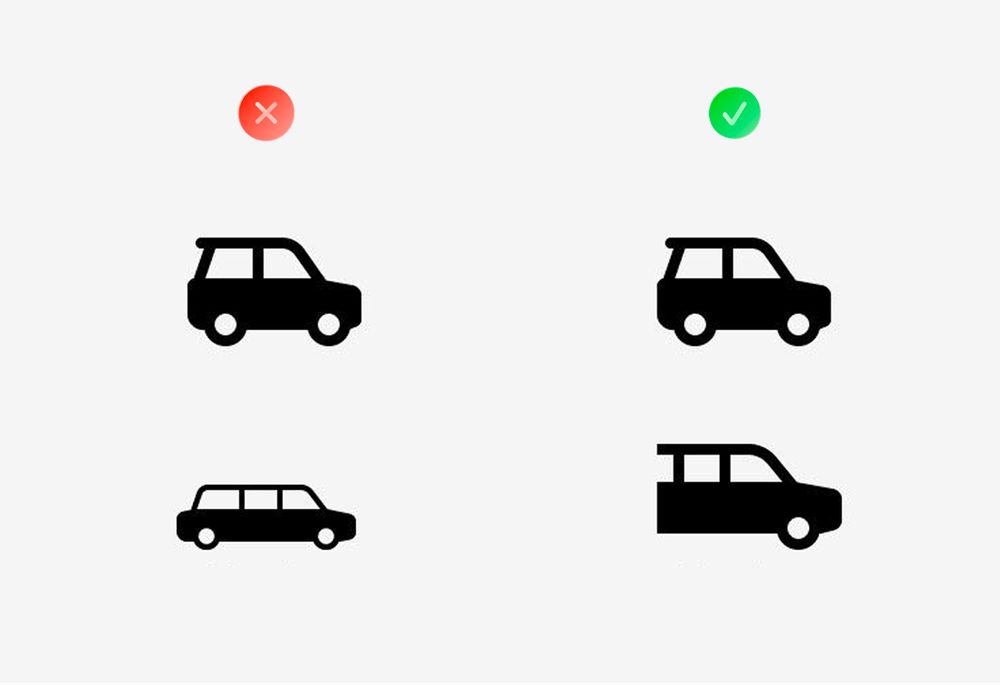
2/ Align complex objects based on visual weight
October 29, 2025 at 10:58 PM
2/ Align complex objects based on visual weight
1/ Merging lines together, you can get a much cleaner results

October 29, 2025 at 10:58 PM
1/ Merging lines together, you can get a much cleaner results
Never scale icons with fractional values.
120.5%? 87.3%? That's how you get blurry edges. Stick to whole numbers.
120.5%? 87.3%? That's how you get blurry edges. Stick to whole numbers.

October 22, 2025 at 11:02 PM
Never scale icons with fractional values.
120.5%? 87.3%? That's how you get blurry edges. Stick to whole numbers.
120.5%? 87.3%? That's how you get blurry edges. Stick to whole numbers.
Curves look fuzzy? Align them to the pixel grid.
Fine-tune your vector paths. Crisp edges aren't magic – they're precision.
Fine-tune your vector paths. Crisp edges aren't magic – they're precision.

October 22, 2025 at 11:02 PM
Curves look fuzzy? Align them to the pixel grid.
Fine-tune your vector paths. Crisp edges aren't magic – they're precision.
Fine-tune your vector paths. Crisp edges aren't magic – they're precision.
Even radius needs even strokes.
Circle with 20px radius? Use 2px stroke thickness. Mixing even and odd values distorts your icon. Math matters.
Circle with 20px radius? Use 2px stroke thickness. Mixing even and odd values distorts your icon. Math matters.

October 22, 2025 at 11:02 PM
Even radius needs even strokes.
Circle with 20px radius? Use 2px stroke thickness. Mixing even and odd values distorts your icon. Math matters.
Circle with 20px radius? Use 2px stroke thickness. Mixing even and odd values distorts your icon. Math matters.
Snap the outer edge to the pixel grid. Then nudge the half-pixels inward. Sharp edges guaranteed.

October 22, 2025 at 11:02 PM
Snap the outer edge to the pixel grid. Then nudge the half-pixels inward. Sharp edges guaranteed.
Your outline icons look blurry? Check the stroke width.
If it's not aligned with the pixel grid – you lose sharpness.
If it's not aligned with the pixel grid – you lose sharpness.

October 22, 2025 at 11:02 PM
Your outline icons look blurry? Check the stroke width.
If it's not aligned with the pixel grid – you lose sharpness.
If it's not aligned with the pixel grid – you lose sharpness.