


Frankie754
@frankie754.bsky.social
Reposted by Frankie754

When we need to compare arrays based on custom criteria in #SwiftLang, we can use the elementsEqual(_:by:) method. It gives us more flexibility than using the == operator with arrays of Equatable elements:
nilcoalescing.com/blog/Compare...
nilcoalescing.com/blog/Compare...

Compare arrays based on custom criteria
When we need to compare arrays based on custom criteria in Swift, we can use elementsEqual(_:by:) method. It allows us to define custom comparison logic with a closure, offering more flexibility than ...
nilcoalescing.com
April 6, 2025 at 9:45 AM
When we need to compare arrays based on custom criteria in #SwiftLang, we can use the elementsEqual(_:by:) method. It gives us more flexibility than using the == operator with arrays of Equatable elements:
nilcoalescing.com/blog/Compare...
nilcoalescing.com/blog/Compare...
Reposted by Frankie754


Reposted by Frankie754

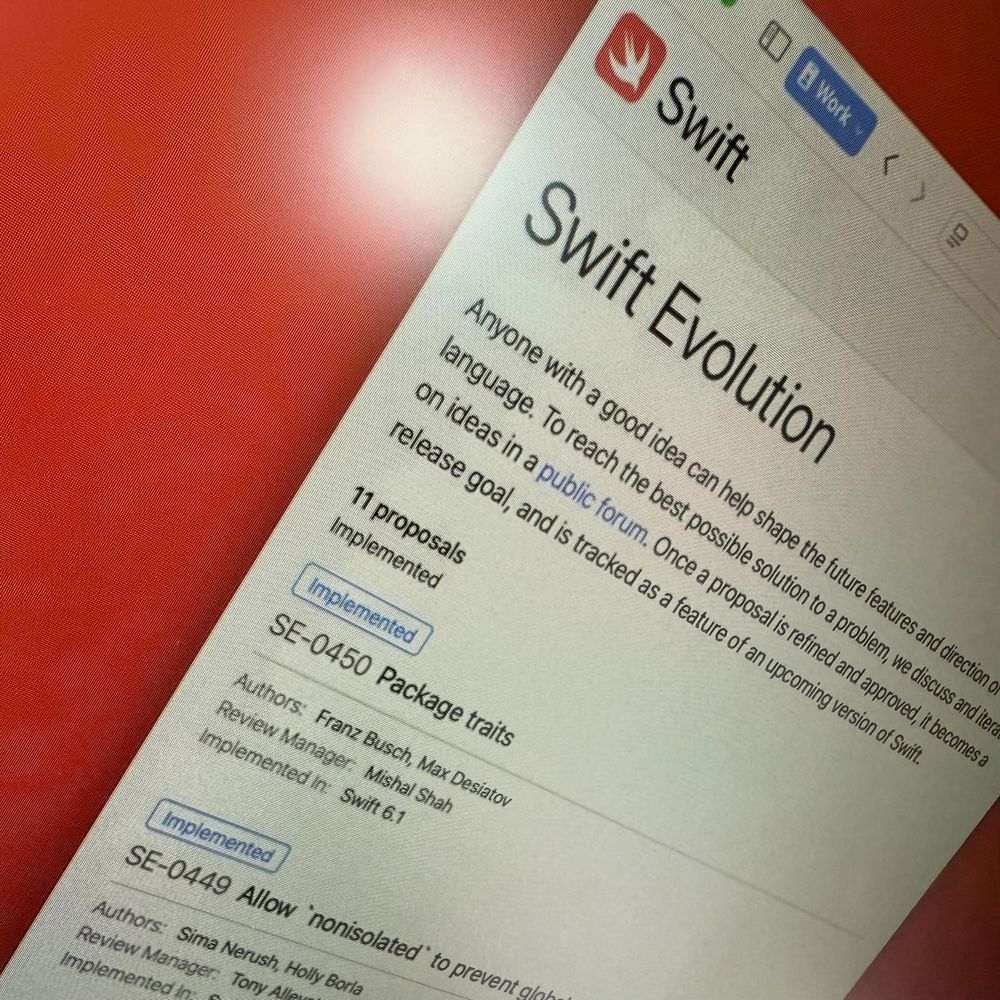
📰 Announcing Swift 6.1 📰 With ergonomic improvements to concurrency, simpler Objective-C interop, productivity and package improvements: swift.org/blog/swift-6... Install with Xcode 16.3 or the new swiftly version manager!
March 31, 2025 at 9:20 PM
📰 Announcing Swift 6.1 📰 With ergonomic improvements to concurrency, simpler Objective-C interop, productivity and package improvements: swift.org/blog/swift-6... Install with Xcode 16.3 or the new swiftly version manager!
Reposted by Frankie754
It can be difficult to find a clear, concise explanation of how method dispatch works in Swift, when calls are resolved statically or dynamically, and what that means for performance.
I wrote a post summarizing my learnings, with key cases and examples: nilcoalescing.com/blog/MethodD...
#SwiftLang
I wrote a post summarizing my learnings, with key cases and examples: nilcoalescing.com/blog/MethodD...
#SwiftLang

Method dispatch mechanisms in Swift: static and dynamic dispatch
Dive into how static and dynamic dispatch work in Swift, how they affect performance, and how to control method resolution to write faster, more efficient code.
nilcoalescing.com
March 28, 2025 at 7:54 AM
It can be difficult to find a clear, concise explanation of how method dispatch works in Swift, when calls are resolved statically or dynamically, and what that means for performance.
I wrote a post summarizing my learnings, with key cases and examples: nilcoalescing.com/blog/MethodD...
#SwiftLang
I wrote a post summarizing my learnings, with key cases and examples: nilcoalescing.com/blog/MethodD...
#SwiftLang
Reposted by Frankie754

Implement a high-performance lazy scrolling list in #SwiftUI by efficiently reusing views for smooth scrolling with large datasets:
nilcoalescing.com/blog/CustomL...
nilcoalescing.com/blog/CustomL...

Designing a custom lazy list in SwiftUI with better performance
Implement a high-performance lazy scrolling list in SwiftUI by efficiently reusing views for smooth scrolling with large datasets.
nilcoalescing.com
March 16, 2025 at 9:41 PM
Implement a high-performance lazy scrolling list in #SwiftUI by efficiently reusing views for smooth scrolling with large datasets:
nilcoalescing.com/blog/CustomL...
nilcoalescing.com/blog/CustomL...
Reposted by Frankie754

Everyone wants to keep that main thread responsive. This usually comes down understanding and managing synchronous work.
That's what this post is all about.
www.massicotte.org/synchronous-...
That's what this post is all about.
www.massicotte.org/synchronous-...
Synchronous Work
Occasionally, you’ll come across something that will really influence your thinking on a topic. This happened to me after reading a post on the Swift forums. That was nearly 6 months ago as I write, b...
www.massicotte.org
March 3, 2025 at 12:24 PM
Everyone wants to keep that main thread responsive. This usually comes down understanding and managing synchronous work.
That's what this post is all about.
www.massicotte.org/synchronous-...
That's what this post is all about.
www.massicotte.org/synchronous-...
Reposted by Frankie754
If we want to present a sheet on top of another sheet in #SwiftUI, we have to attach the second sheet() modifier inside the content of the first sheet view, otherwise it won't work properly and SwiftUI will complain that only presenting a single sheet is supported.
February 11, 2025 at 6:14 AM
If we want to present a sheet on top of another sheet in #SwiftUI, we have to attach the second sheet() modifier inside the content of the first sheet view, otherwise it won't work properly and SwiftUI will complain that only presenting a single sheet is supported.
Reposted by Frankie754

Love this simple solution form Bruno Philipe. A Set gets rid of the duplicates but doesn't preserve the order. A simple sort by length for an Array would take care of that.
![let datesToTry : [String] = Array(Set(datesToTryFull)).sorted { lhs, rhs in
lhs.count > rhs.count
}](https://cdn.bsky.app/img/feed_thumbnail/plain/did:plc:pkehwbxsusk6vk2etua7o7h4/bafkreig2vvg6rqkbnlrgjrfck7fwed4nkaxedjwhvga5wduimyvpjh6euq@jpeg)
January 13, 2025 at 9:32 PM
Love this simple solution form Bruno Philipe. A Set gets rid of the duplicates but doesn't preserve the order. A simple sort by length for an Array would take care of that.
Reposted by Frankie754

Made a small Swift package: a morphing view for UIKit (top) and SwiftUI (bottom). It's not as feature-rich as the one that UIKit uses, but it works pretty well. github.com/harlanhaskin...
January 9, 2025 at 5:44 AM
Made a small Swift package: a morphing view for UIKit (top) and SwiftUI (bottom). It's not as feature-rich as the one that UIKit uses, but it works pretty well. github.com/harlanhaskin...
Reposted by Frankie754
UIKit tip: UIKit has a couple of hidden user defaults that turn on a bunch of very useful gesture logging. gist.github.com/harlanhaskin...

December 20, 2024 at 7:28 PM
UIKit tip: UIKit has a couple of hidden user defaults that turn on a bunch of very useful gesture logging. gist.github.com/harlanhaskin...
Reposted by Frankie754
Let's start looking at managing real state with Swift concurrency!
So far, everything I've done in the past has been read-only. Here's another step-by-step post that examines stateful systems, actors, and reentrancy.
www.massicotte.org/step-by-step...
So far, everything I've done in the past has been read-only. Here's another step-by-step post that examines stateful systems, actors, and reentrancy.
www.massicotte.org/step-by-step...
Concurrency Step-by-Step: Stateful Systems
You know what? Coming up with example material is hard. This might sound silly or like it doesn’t matter that much, but it really does! Of course, a great example helps keep things understandable. It ...
www.massicotte.org
December 30, 2024 at 3:43 PM
Let's start looking at managing real state with Swift concurrency!
So far, everything I've done in the past has been read-only. Here's another step-by-step post that examines stateful systems, actors, and reentrancy.
www.massicotte.org/step-by-step...
So far, everything I've done in the past has been read-only. Here's another step-by-step post that examines stateful systems, actors, and reentrancy.
www.massicotte.org/step-by-step...

Reposted by Frankie754

In many cases, adding a `.animation` or `withAnimation` might be all you need to have beautiful interruptible animations in SwiftUI.
December 16, 2024 at 7:54 AM
In many cases, adding a `.animation` or `withAnimation` might be all you need to have beautiful interruptible animations in SwiftUI.
Reposted by Frankie754
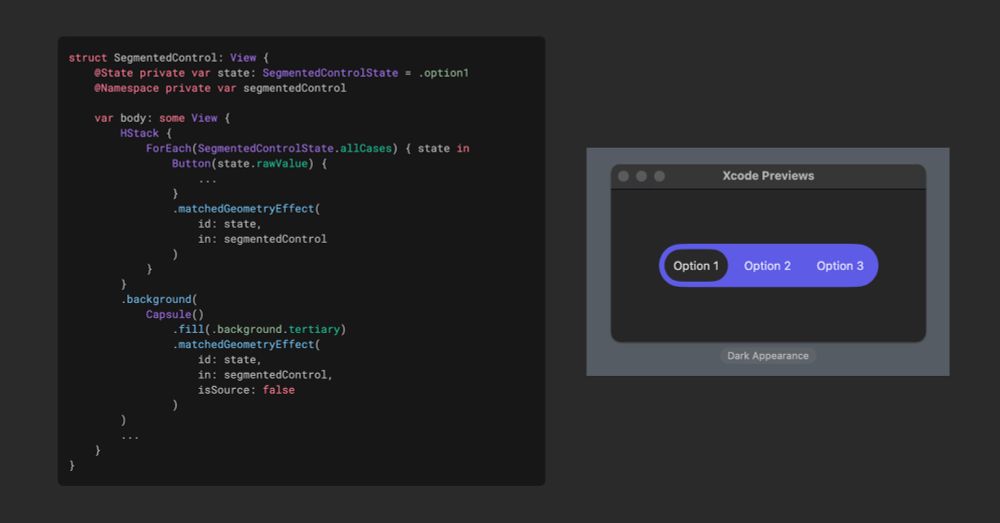
I recently built a custom segmented control in #SwiftUI and found that matchedGeometryEffect() provided an easy way to animate a capsule highlighting the selected option as it transitions between choices.
I summarized the example in a blog post: nilcoalescing.com/blog/CustomS...
I summarized the example in a blog post: nilcoalescing.com/blog/CustomS...
SwiftUI matched geometry effect in a custom segmented control
Learn how to use matchedGeometryEffect() in SwiftUI to animate a capsule background that highlights the selected option in a custom segmented control.
nilcoalescing.com
December 1, 2024 at 6:35 AM
I recently built a custom segmented control in #SwiftUI and found that matchedGeometryEffect() provided an easy way to animate a capsule highlighting the selected option as it transitions between choices.
I summarized the example in a blog post: nilcoalescing.com/blog/CustomS...
I summarized the example in a blog post: nilcoalescing.com/blog/CustomS...
Reposted by Frankie754

Hacked together a lil script that lets me write iOS code in Cursor. When I hit ⌘R it switches to Xcode, kicks off a new build (without xcodebuild's awful build times), and switches back to Cursor. Add this script, update your tasks.json, and pick a good key command.
gist.github.com/mergesort/6e...
gist.github.com/mergesort/6e...

![{
"version": "2.0.0",
"tasks": [
{
"label": "Run in Xcode",
"type": "shell",
"command": "osascript",
"args": [
"'/Users/mergesort/Developer/scripts/run_in_xcode.scpt'"
],
"presentation": {
"reveal": "always"
},
"problemMatcher": []
}
]
}](https://cdn.bsky.app/img/feed_thumbnail/plain/did:plc:b6eke66r3vbmnegg73qgprl6/bafkreibv5fw5dyjbpccn7vmuwofsrevfesrp2itrq55qutdxhknezkalme@jpeg)
November 27, 2024 at 10:36 PM
Hacked together a lil script that lets me write iOS code in Cursor. When I hit ⌘R it switches to Xcode, kicks off a new build (without xcodebuild's awful build times), and switches back to Cursor. Add this script, update your tasks.json, and pick a good key command.
gist.github.com/mergesort/6e...
gist.github.com/mergesort/6e...