



Ehler
@ehler.musician.social.ap.brid.gy
I teach band and I'm a nerd. lowan to the core.
Mononymous, if you'd please.
The internet peaked with 8-Bit Theater
#MusicEd #MusicEducation #Icms #Tuba […]
[bridged from https://musician.social/@ehler on the fediverse by https://fed.brid.gy/ ]
Mononymous, if you'd please.
The internet peaked with 8-Bit Theater
#MusicEd #MusicEducation #Icms #Tuba […]
[bridged from https://musician.social/@ehler on the fediverse by https://fed.brid.gy/ ]
@ambulephabus One of the point releases fixed drag and drop, so thank you!!
October 10, 2025 at 1:58 AM
@ambulephabus One of the point releases fixed drag and drop, so thank you!!
@marcoarment @atpfm I have a vague recollection of you mentioning a countdown widget app you like, but trying to search old show notes was unfruitful
August 24, 2025 at 1:22 AM
@marcoarment @atpfm I have a vague recollection of you mentioning a countdown widget app you like, but trying to search old show notes was unfruitful
Currently unable to use my right hand, and it might honestly be easier to type on an iPhone than on my Mac.
August 11, 2025 at 1:15 AM
Currently unable to use my right hand, and it might honestly be easier to type on an iPhone than on my Mac.
Neat stuff coming for everyone’s favorite score reading app
https://mastodon.social/@ambulephabus/115001142428615631
https://mastodon.social/@ambulephabus/115001142428615631
Justin Bianco (@ambulephabus@mastodon.social)
@ehler@musician.social Sure, I’ll paste it below. I just haven’t mentioned here or on the forScore account yet because I’m still tweaking the design a bit and want to update my screenshots on Monday or Tuesday (I’ll probably release the first beta then too). https://forscore.co/sneak-peek-forscore-15/
mastodon.social
August 10, 2025 at 3:37 AM
Neat stuff coming for everyone’s favorite score reading app
https://mastodon.social/@ambulephabus/115001142428615631
https://mastodon.social/@ambulephabus/115001142428615631
@ambulephabus Is there a direct link to your recent blog post that I can boost on here?
August 8, 2025 at 5:03 PM
@ambulephabus Is there a direct link to your recent blog post that I can boost on here?

Not sure how they manifest on iPhone, but I have a lot of mixed thoughts about the (relatively small) changes to the share sheet on iPadOS 26
August 1, 2025 at 3:19 PM
Not sure how they manifest on iPhone, but I have a lot of mixed thoughts about the (relatively small) changes to the share sheet on iPadOS 26
@hotdogsladies I don’t use Chatty G often, and the one other time I faced it with a music theory question it fell on its face, but it nailed this one

July 23, 2025 at 6:41 AM
@hotdogsladies I don’t use Chatty G often, and the one other time I faced it with a music theory question it fell on its face, but it nailed this one
Save a reminder on this for late September…
https://www.macrumors.com/how-to/ios-set-custom-iphone-ringtone/
https://www.macrumors.com/how-to/ios-set-custom-iphone-ringtone/

iOS 26: Set a Custom iPhone Ringtone in Seconds
Setting custom ringtones on your iPhone is dramatically easier in iOS 26. Apple has eliminated the need for the cumbersome process of exporting a track from the GarageBand app, and now provides a simple four-step process that works directly from the Files app.
The new streamlined approach means you can transform any MP3 or M4A audio file that's less than 30 seconds into a personalized ringtone in a just a few taps. Whether it's a favorite song snippet, a voice memo, or a sound effect you've downloaded, the process is now as straightforward as sharing a photo. Here's how to set up your custom ringtone without opening an additional app in iOS 26 (currently in beta).
1. Open the Files app on your iPhone.
2. Long press an MP3 or M4A audio file that's less than 30 seconds long.
3. Tap **Share** in the pop-up menu.
4. Scroll down to the actions menu and choose **Use as Ringtone**.
The change will be made immediately. You'll be sent to Settings ➝ Sounds & Haptics ➝ Ringtone, where you'll see the custom ringtone selected. From here, you can delete the ringtone (swipe left, then tap Delete) or choose another one in the default ringtones that's more to your liking.
Note that the Use as Ringtone option also appears for audio files in select other apps, including Voice Memos. Unfortunately, it's not possible to set Apple Music songs as custom ringtones for free, even with a subscription. Apple still sells 30-second song ringtones for $1.29 each through the iTunes Store app.
This article, "iOS 26: Set a Custom iPhone Ringtone in Seconds" first appeared on MacRumors.com
Discuss this article in our forums
www.macrumors.com
July 22, 2025 at 11:06 PM
Save a reminder on this for late September…
https://www.macrumors.com/how-to/ios-set-custom-iphone-ringtone/
https://www.macrumors.com/how-to/ios-set-custom-iphone-ringtone/
Reposted by Ehler

TIL that when I prefix any URL with a question mark and a space, #Kagi @kagihq will give me some context about it, e.g. `? https://zottmann.org/2025/04/17/sarcasm-is-poison.html` summarizes my blog post and gives one or two links which *aren't in my post* but relate to the subject. Cool.
July 20, 2025 at 7:19 PM
TIL that when I prefix any URL with a question mark and a space, #Kagi @kagihq will give me some context about it, e.g. `? https://zottmann.org/2025/04/17/sarcasm-is-poison.html` summarizes my blog post and gives one or two links which *aren't in my post* but relate to the subject. Cool.

Kind of an insulting thing to lead your unsolicited message with

July 6, 2025 at 10:02 PM
Kind of an insulting thing to lead your unsolicited message with
The only reason why I’m sure who ‘Caroline’ refers to can be attributed solely to Neil Diamond. https://mastodon.social/@nancycomics/114786936884997909

NANCY COMICS BY BUSHMILLER (@nancycomics@mastodon.social)
Attached: 1 image Nancy By Ernie Bushmiller July 2,1962
mastodon.social
July 3, 2025 at 1:57 PM
The only reason why I’m sure who ‘Caroline’ refers to can be attributed solely to Neil Diamond. https://mastodon.social/@nancycomics/114786936884997909
This does sound like an easy route to further degradation of the web…
https://mjtsai.com/blog/2025/07/02/cloudflare-creates-ai-crawler-tollbooth/
https://mjtsai.com/blog/2025/07/02/cloudflare-creates-ai-crawler-tollbooth/
Michael Tsai - Blog - Cloudflare Creates AI Crawler Tollbooth
mjtsai.com
July 2, 2025 at 9:23 PM
This does sound like an easy route to further degradation of the web…
https://mjtsai.com/blog/2025/07/02/cloudflare-creates-ai-crawler-tollbooth/
https://mjtsai.com/blog/2025/07/02/cloudflare-creates-ai-crawler-tollbooth/
It’s midnight and I’m sitting here wishing I could get a submarine sandwich. Shaggy coded.
July 2, 2025 at 4:58 AM
It’s midnight and I’m sitting here wishing I could get a submarine sandwich. Shaggy coded.
Okay, if you were unaware, Eric Whitacre finally got permission to publish the Frost poem that became Sleep.
June 30, 2025 at 10:22 PM
Okay, if you were unaware, Eric Whitacre finally got permission to publish the Frost poem that became Sleep.
Wasn’t there discussion last year about Letterboxd adding TV support in 2024?
June 30, 2025 at 6:50 PM
Wasn’t there discussion last year about Letterboxd adding TV support in 2024?
Reposted by Ehler

The reason this zine is called "The Secret Rules of the Terminal" is that I learned more useful things while writing this zine than when writing any other zine, even though I've been using the terminal every day for 20 years.
It really left me feeling like the terminal is full of hidden secrets […]
It really left me feeling like the terminal is full of hidden secrets […]
Original post on social.jvns.ca
social.jvns.ca
June 24, 2025 at 5:19 PM
The reason this zine is called "The Secret Rules of the Terminal" is that I learned more useful things while writing this zine than when writing any other zine, even though I've been using the terminal every day for 20 years.
It really left me feeling like the terminal is full of hidden secrets […]
It really left me feeling like the terminal is full of hidden secrets […]
Reposted by Ehler

This is fine… 🫣 #ios26 (source: infosec.exchange/@vinski/1147...)

June 17, 2025 at 10:48 PM
This is fine… 🫣 #ios26 (source: infosec.exchange/@vinski/1147...)
Reposted by Ehler

I hope I live long enough to see this style philosophy come back around. https://mastodon.social/@realmacdan/113792374380828124
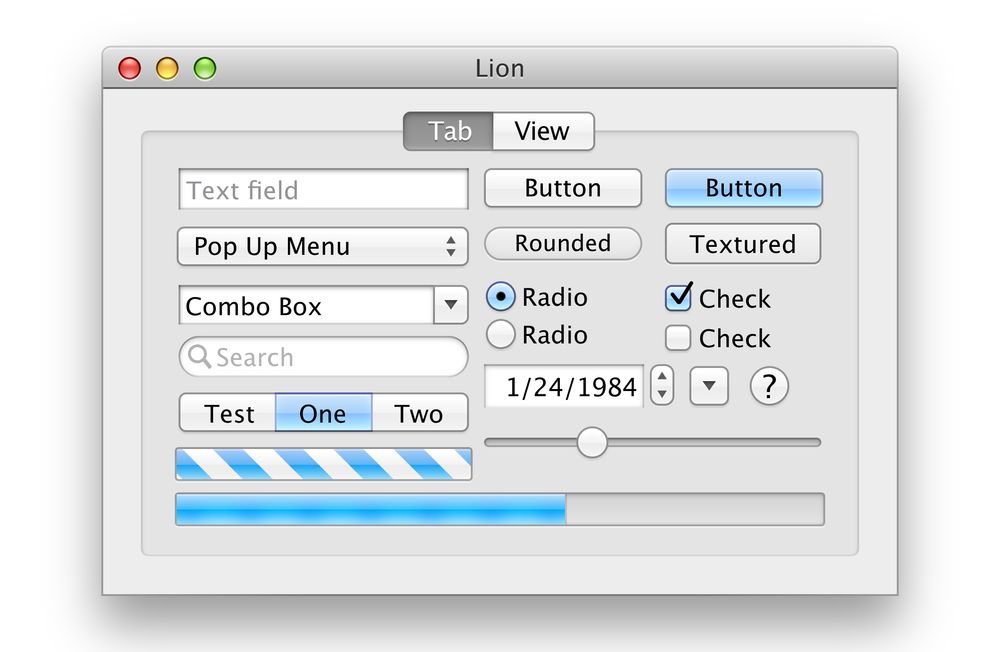
Dan Counsell (@realmacdan@mastodon.social)
Attached: 1 image Can we please have the macOS X Lion UI back? 😍
mastodon.social
June 12, 2025 at 10:29 PM
I hope I live long enough to see this style philosophy come back around. https://mastodon.social/@realmacdan/113792374380828124
Things I’m most excited about from WWDC:
1. iPad multitasking improvements
2. Ability to have third-party control center controls on macOS and watchOS
3. New Phone/Messages screening & hold features
4. tvOS UI redesign
5. On-device LLM APIs for 3rd-party apps
1. iPad multitasking improvements
2. Ability to have third-party control center controls on macOS and watchOS
3. New Phone/Messages screening & hold features
4. tvOS UI redesign
5. On-device LLM APIs for 3rd-party apps
June 11, 2025 at 9:51 PM
Things I’m most excited about from WWDC:
1. iPad multitasking improvements
2. Ability to have third-party control center controls on macOS and watchOS
3. New Phone/Messages screening & hold features
4. tvOS UI redesign
5. On-device LLM APIs for 3rd-party apps
1. iPad multitasking improvements
2. Ability to have third-party control center controls on macOS and watchOS
3. New Phone/Messages screening & hold features
4. tvOS UI redesign
5. On-device LLM APIs for 3rd-party apps