




Patrick Corsetti
@corsettidev.bsky.social
How can I get all of these?! 😱🤩
Which is your favourite? Idk if I could pick one they’re all so awesome haha.
Which is your favourite? Idk if I could pick one they’re all so awesome haha.
December 19, 2024 at 1:58 PM
How can I get all of these?! 😱🤩
Which is your favourite? Idk if I could pick one they’re all so awesome haha.
Which is your favourite? Idk if I could pick one they’re all so awesome haha.

Google might be behind in ai, but search you gotta admit they do right. Reddit's been so slow for me overall lately, I can't imagine not using google to search through reddit resutls
December 12, 2024 at 6:06 AM
Google might be behind in ai, but search you gotta admit they do right. Reddit's been so slow for me overall lately, I can't imagine not using google to search through reddit resutls
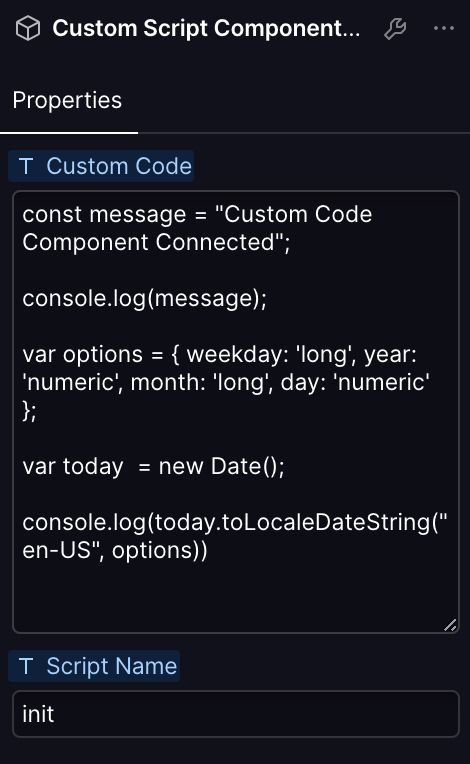
Check out the props on my component for what I'm talking about. Also added the Script name field for optional debug tracking.
December 4, 2024 at 12:50 AM
Check out the props on my component for what I'm talking about. Also added the Script name field for optional debug tracking.
I’ll try to put together a quick demo later this week! 🥳
November 25, 2024 at 11:51 PM
I’ll try to put together a quick demo later this week! 🥳
Let me know if you try this and it works for you or there's something wrong, just came up with it last night. Also, when is Bluesky getting a custom code post style 👀
November 25, 2024 at 7:28 PM
Let me know if you try this and it works for you or there's something wrong, just came up with it last night. Also, when is Bluesky getting a custom code post style 👀
(Bonus Part 2)
Text Element Content:
{
"name" : "Patrick",
"job" : "wizard"
}
<script>
(function() {
const data = JSON.parse(document.currentScript.parentNode.previousElementSibling.textContent);
console.log(`${data.name} is a ${data.job}!`);
})();
</script>
Text Element Content:
{
"name" : "Patrick",
"job" : "wizard"
}
<script>
(function() {
const data = JSON.parse(document.currentScript.parentNode.previousElementSibling.textContent);
console.log(`${data.name} is a ${data.job}!`);
})();
</script>
November 25, 2024 at 7:28 PM
(Bonus Part 2)
Text Element Content:
{
"name" : "Patrick",
"job" : "wizard"
}
<script>
(function() {
const data = JSON.parse(document.currentScript.parentNode.previousElementSibling.textContent);
console.log(`${data.name} is a ${data.job}!`);
})();
</script>
Text Element Content:
{
"name" : "Patrick",
"job" : "wizard"
}
<script>
(function() {
const data = JSON.parse(document.currentScript.parentNode.previousElementSibling.textContent);
console.log(`${data.name} is a ${data.job}!`);
})();
</script>
(Bonus Part 1) This method works for single line text inputs, but if you want to use custom JSON data, you can also add in a text element before your embed, and then tie that fields contents to a multi-line text component property.
Then in your code, you can parse it and use the full schema:
Then in your code, you can parse it and use the full schema:
November 25, 2024 at 7:28 PM
(Bonus Part 1) This method works for single line text inputs, but if you want to use custom JSON data, you can also add in a text element before your embed, and then tie that fields contents to a multi-line text component property.
Then in your code, you can parse it and use the full schema:
Then in your code, you can parse it and use the full schema:
(3/3) Now if you want to have it work multiple times throughout the page, you can wrap the code inside an IIFE, that way any variables you create won't interfere with the global namespace
<script>
(function() {
// above function goes inside here
})();
</script>
<script>
(function() {
// above function goes inside here
})();
</script>
November 25, 2024 at 7:28 PM
(3/3) Now if you want to have it work multiple times throughout the page, you can wrap the code inside an IIFE, that way any variables you create won't interfere with the global namespace
<script>
(function() {
// above function goes inside here
})();
</script>
<script>
(function() {
// above function goes inside here
})();
</script>
(2/3) In your embed's code, you can access those properties using the currentScript property like this:
const embed = document.currentScript.parentElement;
const name = embed.getAttribute('prop-name');
console.log(`Hello ${name}!`)
const embed = document.currentScript.parentElement;
const name = embed.getAttribute('prop-name');
console.log(`Hello ${name}!`)
November 25, 2024 at 7:28 PM
(2/3) In your embed's code, you can access those properties using the currentScript property like this:
const embed = document.currentScript.parentElement;
const name = embed.getAttribute('prop-name');
console.log(`Hello ${name}!`)
const embed = document.currentScript.parentElement;
const name = embed.getAttribute('prop-name');
console.log(`Hello ${name}!`)
I still wish I knew why the honeypot wasn’t working in the code but it was essentially the same logic in Xano!
Other things I’ve seen:
• Mislabelling the email id field so that the validation will fail when a bot autofills
• A time lock — most forms filled within 3s of page load are fake!
Other things I’ve seen:
• Mislabelling the email id field so that the validation will fail when a bot autofills
• A time lock — most forms filled within 3s of page load are fake!
November 21, 2024 at 6:11 PM
I still wish I knew why the honeypot wasn’t working in the code but it was essentially the same logic in Xano!
Other things I’ve seen:
• Mislabelling the email id field so that the validation will fail when a bot autofills
• A time lock — most forms filled within 3s of page load are fake!
Other things I’ve seen:
• Mislabelling the email id field so that the validation will fail when a bot autofills
• A time lock — most forms filled within 3s of page load are fake!